v2026.5.5
v2026.5.5
Meta-Arguments, Terraform Outputs, and Functional Agents
The May 2026 weekly v2026.5.5 release adds count and for_each meta-argument support, renders Terraform outputs in the UI after apply, and expands Aiden (the platform's AI assistant) with specialized agents and deeper observability integration.
For developers and DevOps engineers, you can scale resources with standard Terraform expressions, manage provider bindings, identifiers, and meta-arguments from a dedicated Advanced tab, and read output values (such as bucket ARNs or names) in the platform after deployment without opening state files manually.
For Aiden users, this release focuses on enhanced customization through Functional Agents and tighter integration with infrastructure observability and alert investigation workflows.
Explore the sections below to see what's new, enhanced, and fixed in this update.
| Feature | Link | |
|---|---|---|
| What's New | Topology | Meta-Arguments: count and for_each |
| Advanced Settings Pane | ||
| Plan & Deploy | Terraform Outputs Rendering | |
| Confirmed Apply and Destroy Actions | ||
| Aiden | Functional Agents | |
| Observability and Alert Integration | ||
| What's Enhanced | Plan & Deploy | Modified Resource Visibility |
| Security | Detailed Secret Setup Instructions | |
| AWS IAM Role Prefix Removal | ||
| UX | appStack Listing Refresh | |
| What's Fixed | Platform | Snapshot Restore Resource Destruction |
| Plan & Deploy | Meta-Argument Plan Validation | |
| Plan Button Without Runner | ||
| Environment Name Prefix Plan Failure | ||
| UX | appStack Casing Standardization |
What's New
Meta-Arguments: count and for_each
Click to view
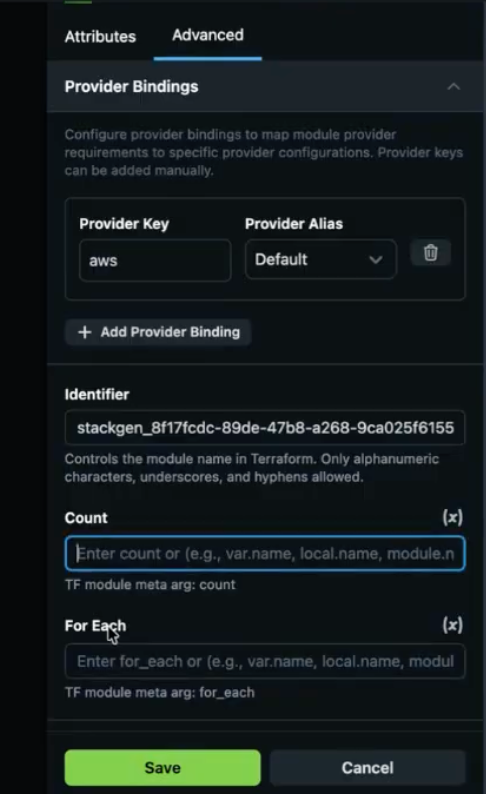
We've added support for the count and for_each meta-arguments so you can create multiple resource instances from the Topology canvas using standard Terraform expressions.
Key Features
- Dynamic scaling with count - Specify how many identical resource instances to create with a numeric value. For example, a count of three on an S3 bucket module creates three separate buckets.
- Complex iteration with for_each - Iterate over maps or sets of strings like a loop to create resources from defined variables. Use environment variables to set attributes such as bucket names dynamically.
- Terraform expression support - Both meta-arguments accept standard Terraform expressions, including boolean logic, so you can create resources only when a specific variable is enabled.
- Validation and error handling - The platform enforces Terraform standards by blocking count and for_each on the same resource. Plan fails with a specific error when you try an invalid combination.
User Interface and Access
-
Advanced pane - Count and for_each live in the new Advanced tab on the resource configuration panel.
-
Centralized configuration - The Advanced tab also groups Identifier, Provider Bindings, and other technical settings so the primary attribute form stays uncluttered.
Why It Matters
This update brings the platform closer to native Terraform parity, so infrastructure teams can manage sophisticated scaling requirements and conditional logic without manual resource duplication or complex workarounds.
Advanced Settings Pane
Click to view
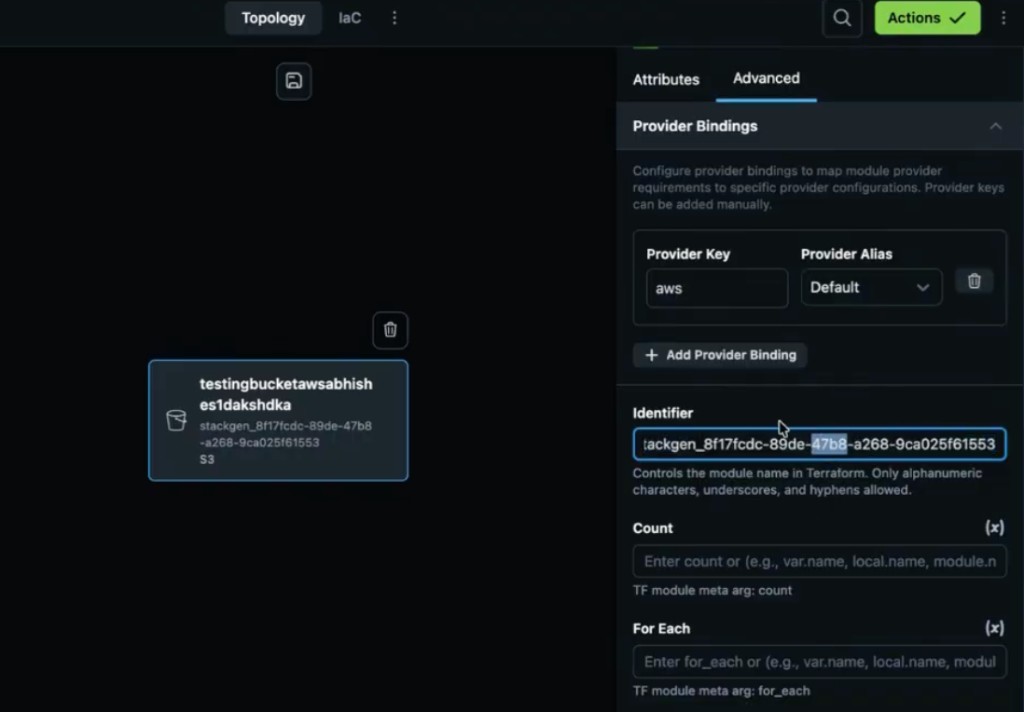
The Advanced settings pane is a new tab within the module and resource attribute panel. It consolidates technical and advanced configuration options so the primary form stays focused on standard settings.
Overview
The goal is to optimize space on the attribute panel. Previously, technical fields such as Identifier sat alongside primary variables, which made the form feel cluttered. Moving those controls to a dedicated tab keeps routine configuration on Attributes while advanced options stay one click away for DevOps users.
Key Features and Controls
The Advanced pane now houses the following configurations:
-
Identifier field - Identifies specific modules or resources. Moved from the top of the resource form into this tab.
-
Provider bindings - Standard provider configuration settings, centralized in one place.
-
Meta-arguments - Home for count and for_each, supporting dynamic resource scaling.
Why It Matters
The attribute panel is easier to scan for day-to-day edits, while experts still have fast access to identifiers, provider wiring, and scaling arguments without crowding the main variable form.
Terraform Outputs Rendering
Click to view
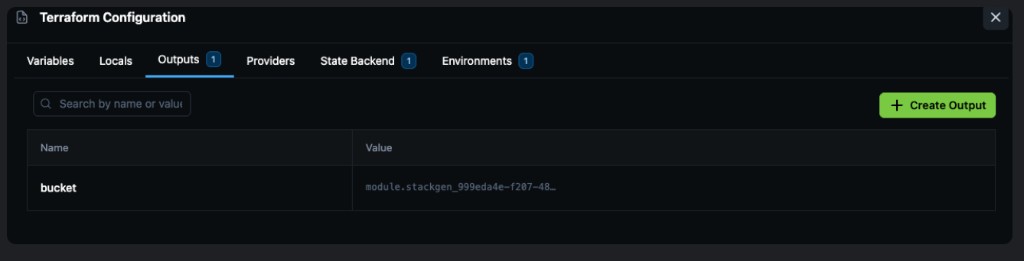
The platform now automatically fetches and renders Terraform output values in a dedicated table within the UI following a successful deployment.
Key Features
-
Automated data population - After apply completes, the platform retrieves output values from the state backend and populates them into the Outputs table.
-
Support for multiple sources - Outputs can refer to attributes from a deployed module (for example a bucket ARN) or variables populated at runtime (for example tags or versioning).
-
CLI and UI parity - Output rendering is supported whether deployment is triggered through the web interface or via the
stackgen provisioncommand. -
Management controls - Add supported output types and delete existing ones as needed from the Terraform Configuration panel.
-
Renaming limitation - The UI does not currently support renaming existing outputs.
To define stack-level outputs before deploy, see appStack Outputs.
Why It Matters
This feature provides immediate visibility into critical runtime data, such as resource names and ARNs, without requiring you to manually inspect complex state files or logs.
Functional Agents
Click to view
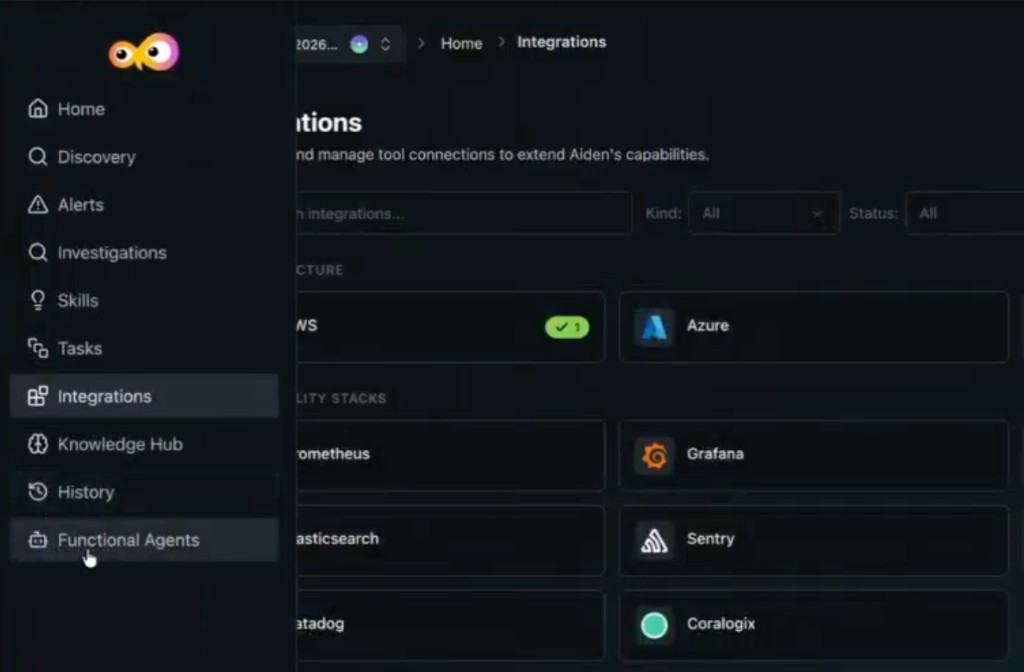
Functional Agents (also referred to as personal agents) are customizable AI entities in Aiden that you can configure with specific expertise and operational guidelines.
Key Features
-
Persona customization - Define specific roles for an agent, such as a Cloud Infra Architect, to handle specialized tasks.
-
Expert integration - When you define an agent, select which expert it is allowed to work with so the agent uses the correct domain knowledge.
-
Custom instructions - Provide unique instructions to each agent to govern how it responds and the standards it should follow.
-
Thought process visibility - When an agent generates output (for example Terraform code), its internal reasoning and thought process are visible, including which agent produced the response.
-
Agent filtering - Filter your list of agents by text to quickly find the right persona for a conversation.
Why It Matters
Specialized personas and transparent reasoning give you more accurate, context-aware assistance, so teams can generate infrastructure code and troubleshoot complex environments according to their own organizational standards.
Observability and Alert Integration
Click to view
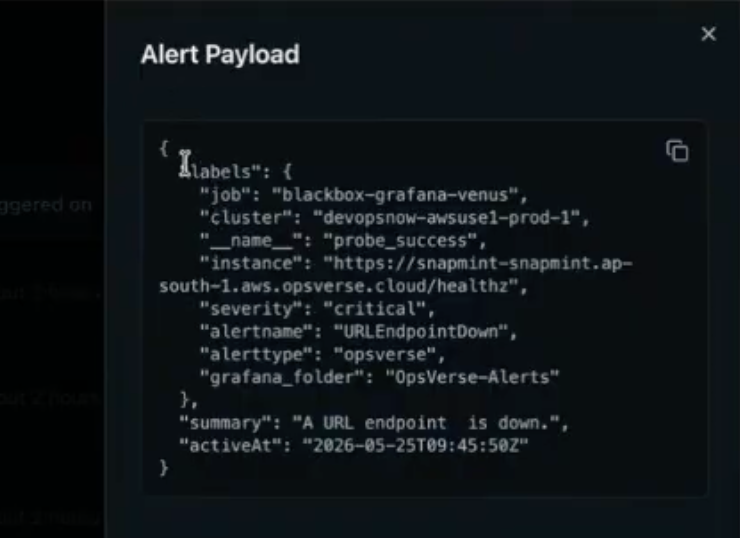
Aiden now provides enhanced visibility and automated context-gathering for infrastructure alerts and investigations.
Key Features
-
Full alert payloads - For environments with Grafana or Observe configured, Aiden can display the complete information payload for any captured alert.
-
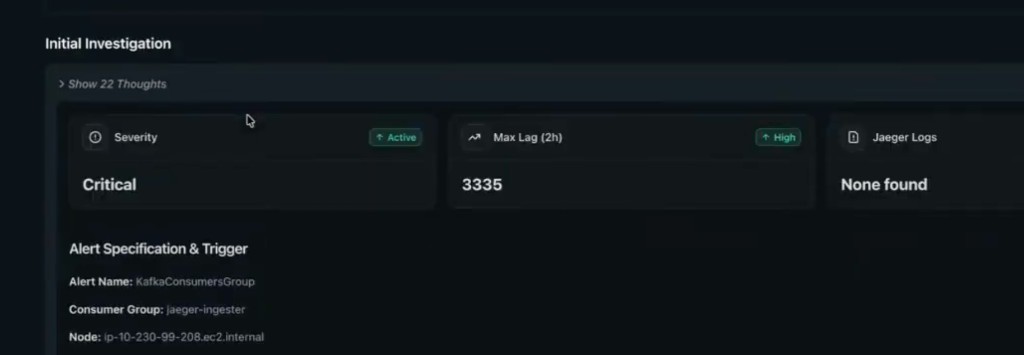
Investigation detail visibility - The Investigation tab now renders all detailed data related to a specific infrastructure investigation in one view.
-
Contextual conversations - Start a new Aiden conversation that automatically includes the full payload of an investigation for more accurate, data-driven assistance.
-
Chain of thought rendering - The internal reasoning and chain of thought for an investigation are visible in both the dedicated investigation view and the main chat window.
Why It Matters
By surfacing full alert payloads and maintaining the chain of thought throughout the investigation, Aiden gives DevOps teams immediate, deep context. This reduces the time spent manually gathering data from external observability tools during critical incidents.
Confirmed Apply and Destroy Actions
Click to view
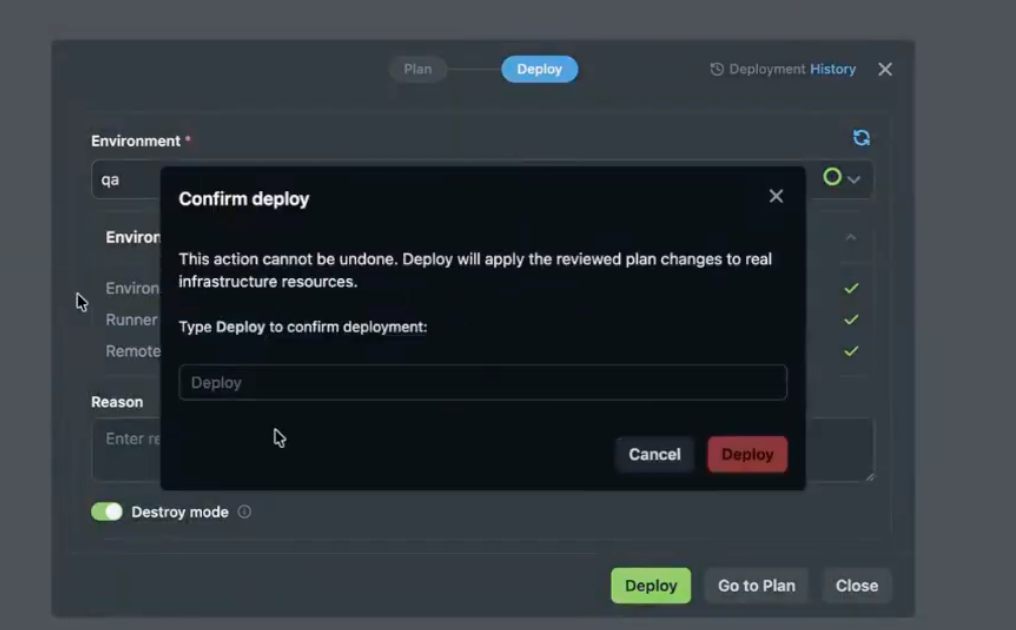
To prevent accidental deployments or infrastructure deletions, we have introduced a mandatory confirmation step for apply and destroy actions.
Key Features
-
Manual keyword confirmation - When you initiate apply or destroy, a confirmation popup appears. You must type
deployinto the text field to proceed. -
Safety interlock - The final action button (for example Deploy) stays disabled until the correct keyword is entered.
-
Intentional execution - This step ensures critical environment changes are deliberate and governed.
Why It Matters
This update serves as a critical guardrail against human error. Explicit textual confirmation reduces the risk of accidental resource destruction or unintended production deployments.
What's Enhanced
Modified Resource Visibility
Click to view
We have enhanced the platform's plan and deploy interface to clearly distinguish between resources being updated and those being replaced. Previously, the system sometimes showed incorrect metadata, indicating a resource would be destroyed and newly created when it was actually only being updated.
Key Features
- Modified status - A new field explicitly identifies when an existing resource is being modified rather than destroyed and recreated.
- New metadata column - A dedicated column titled to be replaced provides better clarity on the impact of a plan.
- Consistent UI experience - This visibility is standardized across the CLI details page, general CLI output, and the platform's plan and apply interface.
Why It Matters
Clearer status indicators prevent confusion during infrastructure updates. By explicitly labeling modifications, the platform gives you more confidence that existing resources and data will be preserved during a deployment cycle rather than unnecessarily destroyed.
Detailed Secret Setup Instructions
Click to view
We've improved secret setup for the AWS EKS secret type and related AWS cloud provider flows. The platform previously lacked adequate guidance on how to configure this secret correctly.
Key Features
-
Detailed guidance - Secret Manager now explains how to create and wire the AWS EKS secret so it works as intended, instead of leaving teams to guess at required steps.
-
Updated UI - A UI update adds clear, step-by-step instructions in the secret configuration flow so setup matches the expected trust and provider configuration.
-
Related IAM naming - For AWS cloud provider secrets, you no longer need a
stackgenprefix on IAM role names. Any valid role name works when the trust policy is configured correctly. See AWS IAM Role Prefix Removal.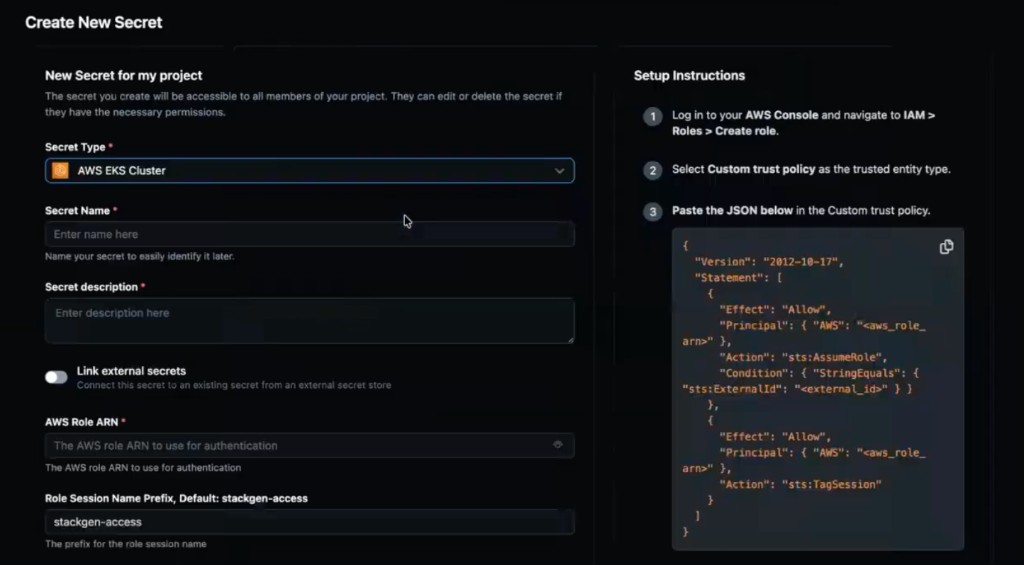
Why It Matters
Clearer secret onboarding reduces failed integrations and speeds up secure AWS and EKS setup without trial-and-error configuration.
AWS IAM Role Prefix Removal
Click to view
We've removed the stackgen prefix requirement for IAM role names on AWS cloud provider secrets.
What you need to do now:
- Use any valid IAM role name when the trust policy is configured correctly for StackGen access.
- Teams with existing AWS role naming conventions no longer rename roles to satisfy a platform-specific prefix.
Why It Matters
Removing the mandatory prefix allows teams to follow their own internal organizational naming conventions for AWS IAM roles. This reduces friction during the initial setup of cloud provider secrets and ensures the platform can integrate more seamlessly with existing security governance policies.
appStack Listing Refresh
Click to view
We've added a Refresh control to the appStack listing page so you can reload the catalog without leaving the view.
Key Features
-
On-demand reload - Use Refresh next to the Cloud Provider filter to update the appStack list after creates, imports, or changes elsewhere in the platform.
-
Faster iteration - Pick up newly created or updated appStacks without navigating away from the listing or doing a full page reload.

Why It Matters
You spend less time wondering whether the listing is stale. One click brings the appStack table up to date when you return from another workflow.
What's Fixed
Snapshot Restore Resource Destruction
Click to view
We have fixed an issue where restoring an older snapshot could trigger a full destroy-and-recreate cycle for every resource on the appStack. Previously, plan and deploy after restore treated existing resources as new and scheduled unnecessary replacements.
Restore now recognizes existing resources correctly, so you can roll back without unnecessary downtime or replacement churn.
Meta-Argument Plan Validation
Click to view
We have fixed plan failures that could occur when using the new count and for_each support with invalid configurations. Previously, invalid combinations could produce unclear errors, and valid meta-argument expressions could fail spuriously.
The platform now enforces standard Terraform rules for meta-arguments. If you set both count and for_each on the same resource, plan fails with a specific error explaining that the combination is invalid. Valid configurations, such as a boolean expression on count, plan and run as expected.
Plan Button Without Runner
Click to view
We have fixed an issue where the plan button stayed enabled even when no runner was configured for the appStack. Previously, you could start a plan that could not execute, which led to confusing failures downstream.
The plan button is now disabled when no runner is configured, so you resolve runner setup before attempting plan.
Environment Name Prefix Plan Failure
Click to view
We have fixed an issue where plan failed when multiple environment names shared a common prefix. Previously, overlapping name prefixes caused matching errors that blocked plan even when the environments were otherwise valid.
Plan now handles environments with shared name prefixes correctly, so naming conventions with common roots no longer break plan.
appStack Casing Standardization
Click to view
We have fixed the inconsistent casing of the term appStack across the entire platform interface. Previously, the term appeared with inconsistent capitalization (for example AppStack, Appstack, or appstack) in various menus.