January 2026
January 2026
Streamlined Infrastructure Management with Inferred Connections and Enhanced Control
StackGen's January 2026 Release introduces a major architectural improvement with inferred connections, giving you more control over provider management and cleaner generated Infrastructure as Code. With enhanced governance capabilities for policy management and improved module import workflows, this release delivers a more intuitive and flexible infrastructure management experience.
Explore what's new and see how StackGen continues to simplify infrastructure operations while providing greater flexibility and control.
Discover What's New, What's Enhanced, What's Changed, and What's Fixed; and how these updates make building and managing your infrastructure more intuitive.
| Feature | Link | |
|---|---|---|
| What's New | StackGen CLI | StackGen CLI: Optional Default Provider File Creation |
| Aiden MCP | Aiden: Support for Multiple MCP Configurations | |
| What's Enhanced | Resource Connections | Inferred Connections: Unified Connection Model |
| Governance | • Editable Module Resource Restriction Policies | |
| Module Catalog | Input Fields for Imported Module Changed From JSON to Text | |
| IaC Exports | No More Empty Files in Your IaC Exports | |
| What's Changed | Policy Violtions | Custom Resources Require Manual Error Remediation |
| Governance | Bitbucket Secrets Now Require Email ID | |
| What's Fixed | Aiden Skills | Aiden: Skills Fail When You Configure Multiple MCPs |
| Cloud Discovery | Not Used Filter Incorrect for Discovered Resources Across Topologies |
What's New
StackGen CLI: Optional Default Provider File Creation
Click to view
We've made provider file creation more flexible by making default provider.tf file creation optional when your topology uses only custom resources. This gives you greater control over provider versioning and aligns with advanced Terraform workflows.
Here's the complete command:
stackgen preference set --preference-key topology.iac.export.terraform.exportRootProviderFilesIfOnlyCustomResourcesUsed --owner-type Organization --value false --project <projectid>
Key Features
- Project-Level Control: Provider file creation is now controlled by a project-level preference.
- No Forced Defaults: StackGen no longer forces creation of a default
provider.tffile when a topology uses only custom resources, giving you the freedom to manage provider versions as needed. - Flexible Provider Management: This change allows you to use newer Terraform and provider versions without being blocked by enforced default provider files.
Why It Matters
This enhancement gives you more control over your provider versioning strategy. If you want to use newer Terraform or provider versions, you are no longer blocked by enforced defaults, and you can avoid the manual work of downloading and editing your IaC file just to change the provider versions. This results in cleaner exported IaC files and better alignment with advanced Terraform workflows where provider versions are managed explicitly.
When Should You Disable Default Provider Files?
Consider disabling default provider file creation when:
- You're using only custom resources and want to manage provider versions explicitly.
- You need to use newer Terraform or provider versions that differ from StackGen's defaults.
- You want cleaner, more minimal IaC exports.
- You're following advanced Terraform workflows with explicit provider version management.
To learn more about managing preferences, refer to the Preference Key documentation.
Aiden: Support for Multiple MCP Configurations
Click to view
You can now configure multiple MCP (Managed Control Protocol) connections within StackGen. This lets you work with more than one MCP setup in parallel, without overwriting or reconfiguring existing connections.
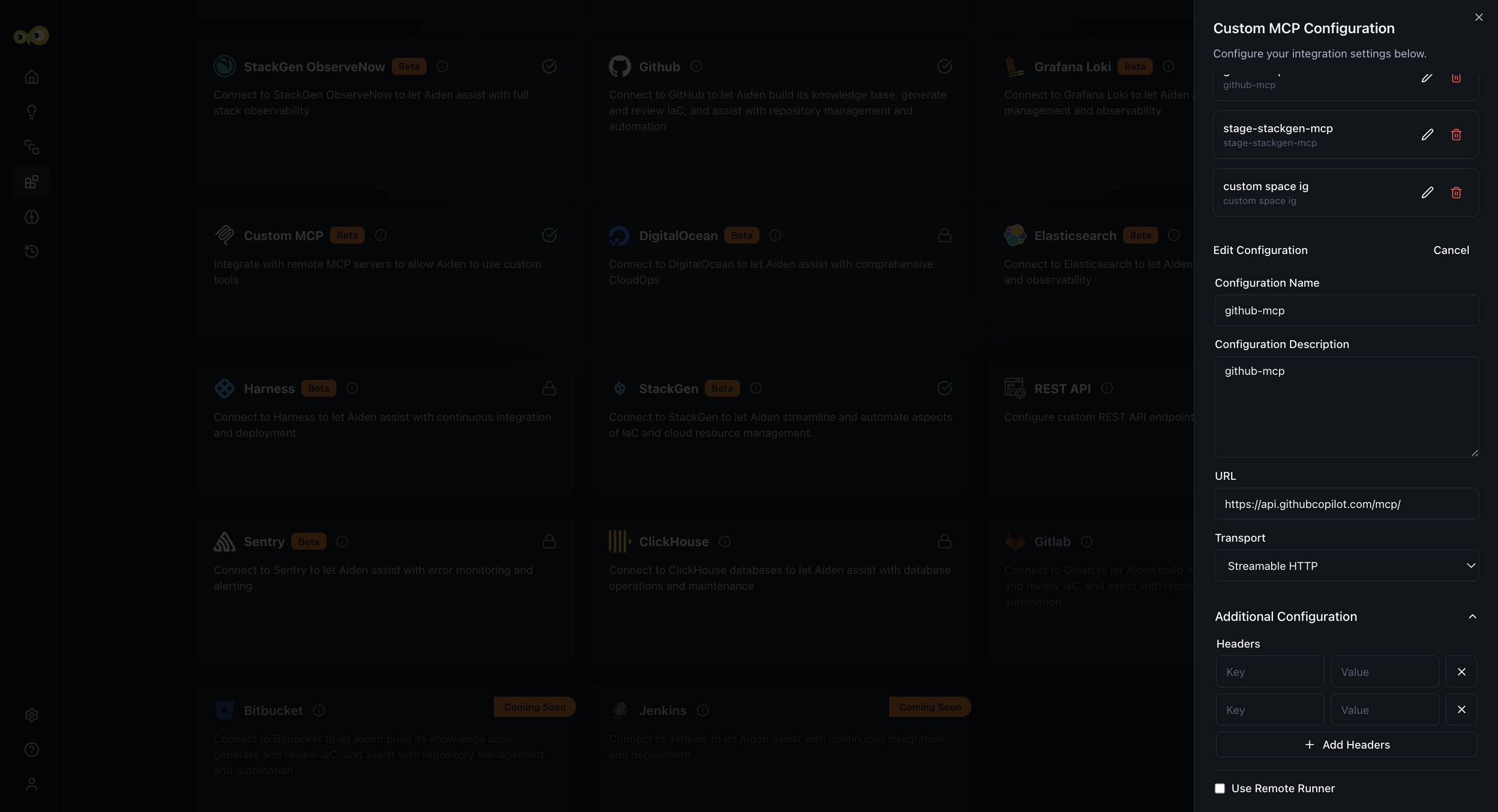
With this feature, you can:
- Configure and manage multiple MCPs in the same environment.
- Seamlessly use Aiden while it switches between MCP configurations as needed.
This change will have no impact on your existing MCP setups.
Why it matters
This update makes it easy to support complex environments, multi-team setups, and evolving infrastructure needs, without repeated reconfiguration or downtime.
Check out the documentation on Model Context Protocol to learn more.
What's Enhanced
Inferred Connections: Unified Connection Model
Click to view
We're excited to introduce a major architectural improvement that unifies how connections work across all resource types in StackGen. All connections, both new and existing ones, are now treated as inferred connections, providing a consistent and more intuitive way to reference resources in your generated Infrastructure as Code.
This change represents a significant improvement in how StackGen handles resource relationships, making connections more predictable and easier to understand while supporting advanced Terraform workflows.
Key Features
- Uniform Connection Logic: All connections now use the same inferred connection model, whether they're between native resources, modules, or custom resources. This creates a consistent experience across all resource types in your appStacks.
- Attribute-Level References: Connections are now represented in Infrastructure as Code using attribute-level references, giving you precise control over how resources reference each other. For example, in the following connections:
- S3 bucket > Athena: Athena references
module.<s3_id>.bucket_name - IAM Role > S3 Bucket Policy: Bucket policy references
module.<iam_role_id>.arn
- S3 bucket > Athena: Athena references
- Automatic Backward Compatibility: Existing appStacks, including older ones, are automatically converted to use inferred connections. Your existing infrastructure configurations continue to work without any manual intervention.
- Support for Multiple Reference Types: Inferred connections support various reference types including:
- Resource names (e.g., bucket names)
- ARNs (e.g., IAM role ARNs)
- Other resource attributes as required
Why It Matters
Inferred connections provide a more intuitive and consistent way to manage resource relationships in your infrastructure. This unified model eliminates confusion about how different resource types connect, making it easier to understand and maintain your Infrastructure as Code. The attribute-level references give you more precise control over resource dependencies, which is especially valuable for complex infrastructure configurations and advanced Terraform workflows.
Check out Resource Connections to learn more.
Editable Module Resource Restriction Policies
Click to view
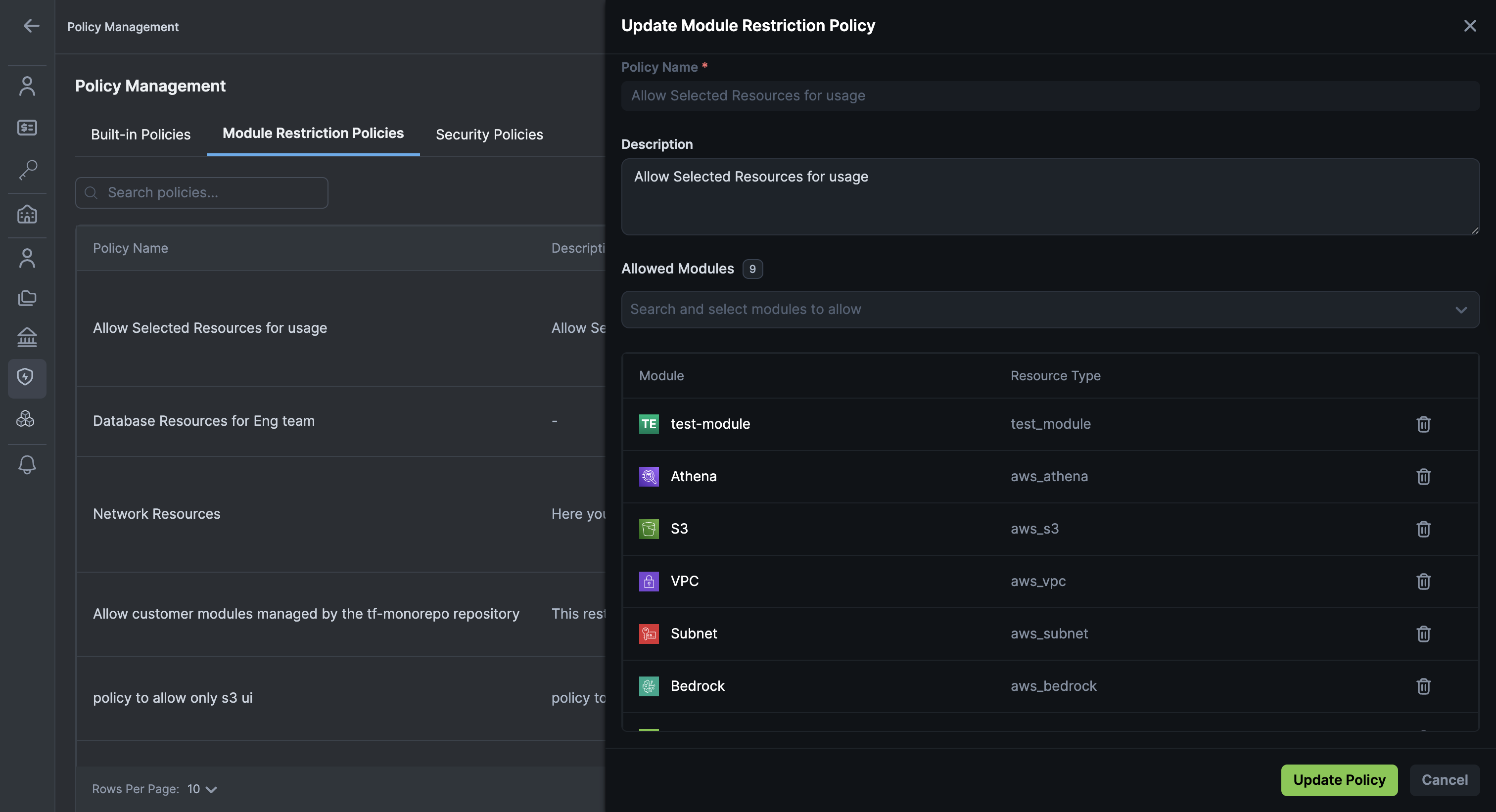
We've enhanced module restriction policies to be fully editable, giving your administrators more flexibility in managing governance rules as your organisational needs evolve.
Previously, module restriction policies couldn't be updated once they were created, which would make it difficult to update policies with changing infrastructure requirements. Now you can update policies to reflect new organizational standards and requirements.
Key Features
-
Edit Existing Policies: Update module restriction policies to add or remove allowed resource types as your organizational needs change. For example, a policy that originally allowed only AWS VPC resources can now be updated to also allow Security Groups and Network Interfaces.
-
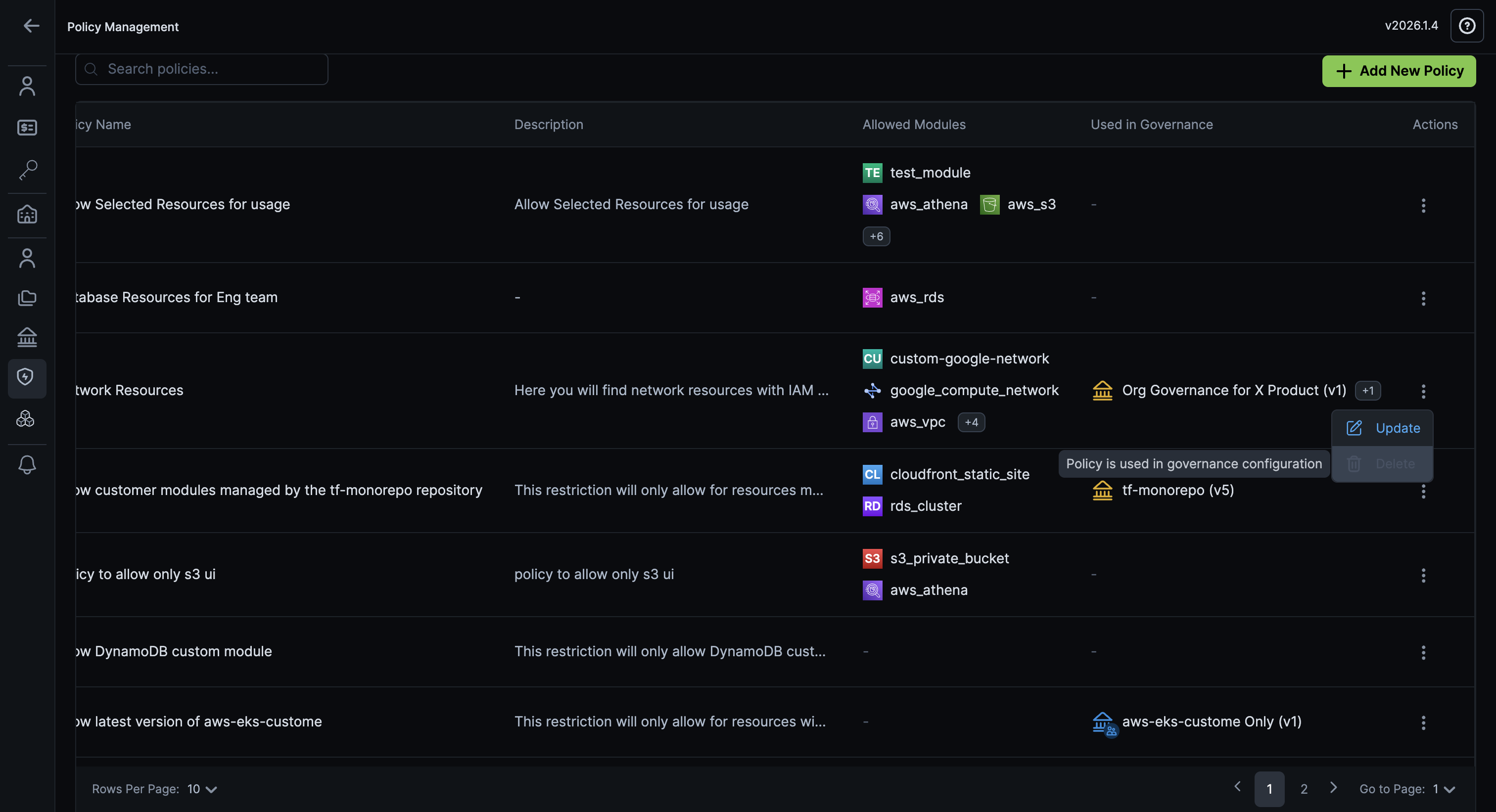
Delete Policies: Delete policies that are no longer needed, keeping your governance configuration clean and manageable.
-
Safety Safeguards: Policies that are currently in use cannot be deleted, and you'll receive a clear warning if you attempt to delete a policy that's attached to a project or governance rule. This prevents accidental removal of active policies.
Why It Matters
This enhancement gives your administrators the flexibility to update governance policies as organizational requirements change. Instead of being locked into immutable policies, you can now adapt your resource restrictions to match your evolving infrastructure standards, making governance more responsive and easier to maintain over time.
Check out Custom Policies to learn more about managing resource restriction policies.
Input Fields for Imported Module Changed From JSON to Text
Click to view
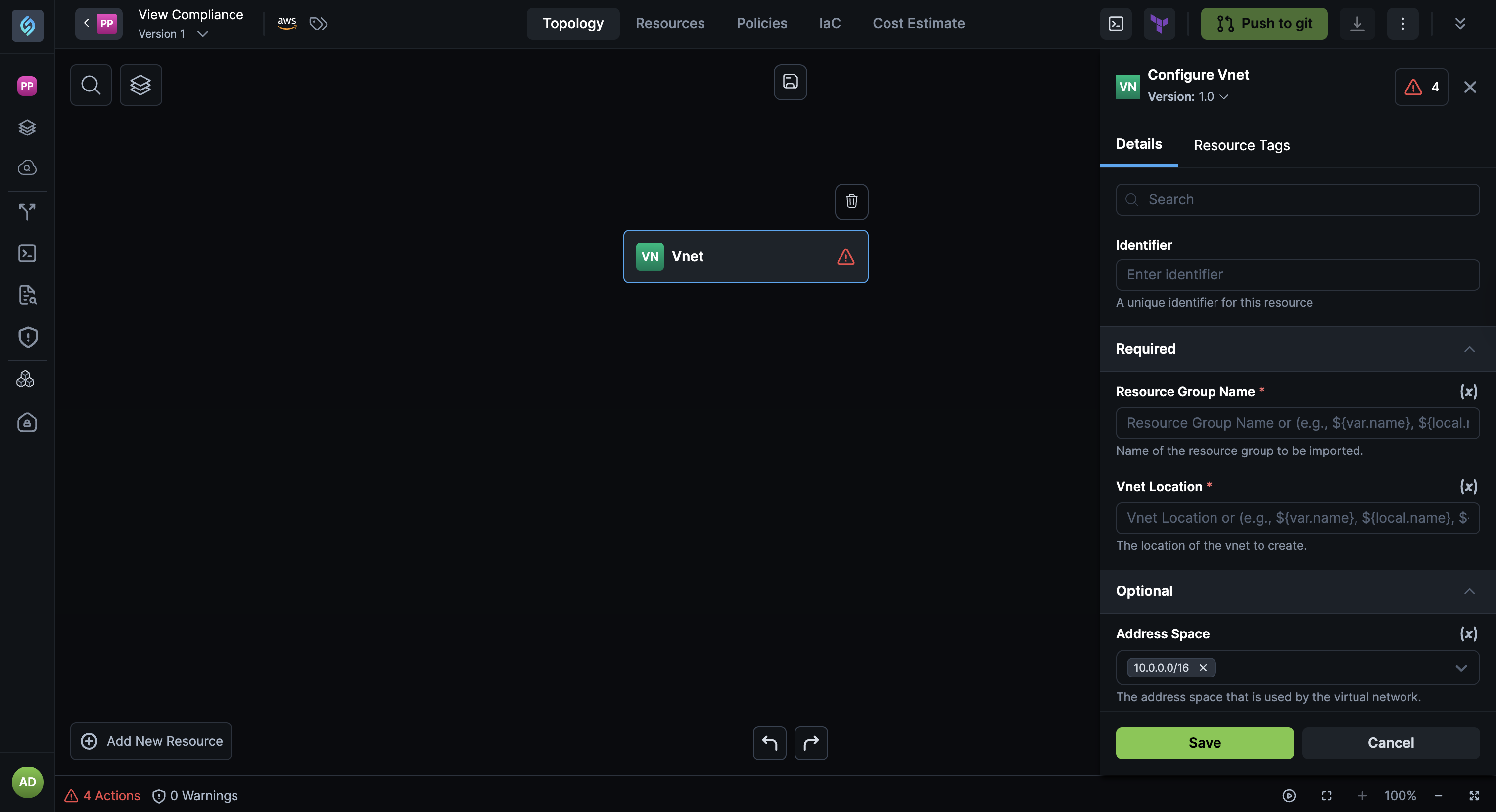
We've improved the module import experience by rendering required inputs for imported modules as text fields instead of raw JSON fields, making module configuration faster and more intuitive.
Why It Matters
This enhancement improves the user experience when importing and configuring Terraform modules. The simpler text input fields reduce input errors and make module configuration faster, especially for common scenarios where required inputs are straightforward values rather than complex JSON structures.
No More Empty Files in Your IaC Exports
Click to view
StackGen now exports only meaningful Infrastructure as Code files, so your generated Terraform is cleaner and easier to work with. Empty Terraform files don’t usually break deployments, but they add unnecessary clutter, make reviews harder, and create confusion about what is actually being configured.
By exporting only relevant files, StackGen lets you review IaC faster, maintain cleaner repositories; letting you focus on what really matters in your infrastructure.
What’s Changed:
- No empty files in your IaC exports: Files like
provider.tforvariables.tfare no longer exported if they don’t contain any configuration. - Cleaner project structure: Your IaC output now includes only files that actually contribute to your infrastructure.
This improvement also lays the foundation for more advanced validation during plan and apply stages.
Support for Deleting Security Policies
Click to view
You can now delete previously created Security policies. This gives your administrators more control over the policy lifecycle management. While we work on making security policies editable, you now have the flexibility to remove policies that are no longer needed.
Key Features
-
Delete Security Policies: Delete security policies that are no longer needed to keep your policy configuration clean and manageable.
-
Safety Safeguards: Security policies that are currently in use cannot be deleted, and you'll receive a clear warning if you attempt to delete a policy that's attached to a project or governance rule. This prevents accidental removal of active policies.
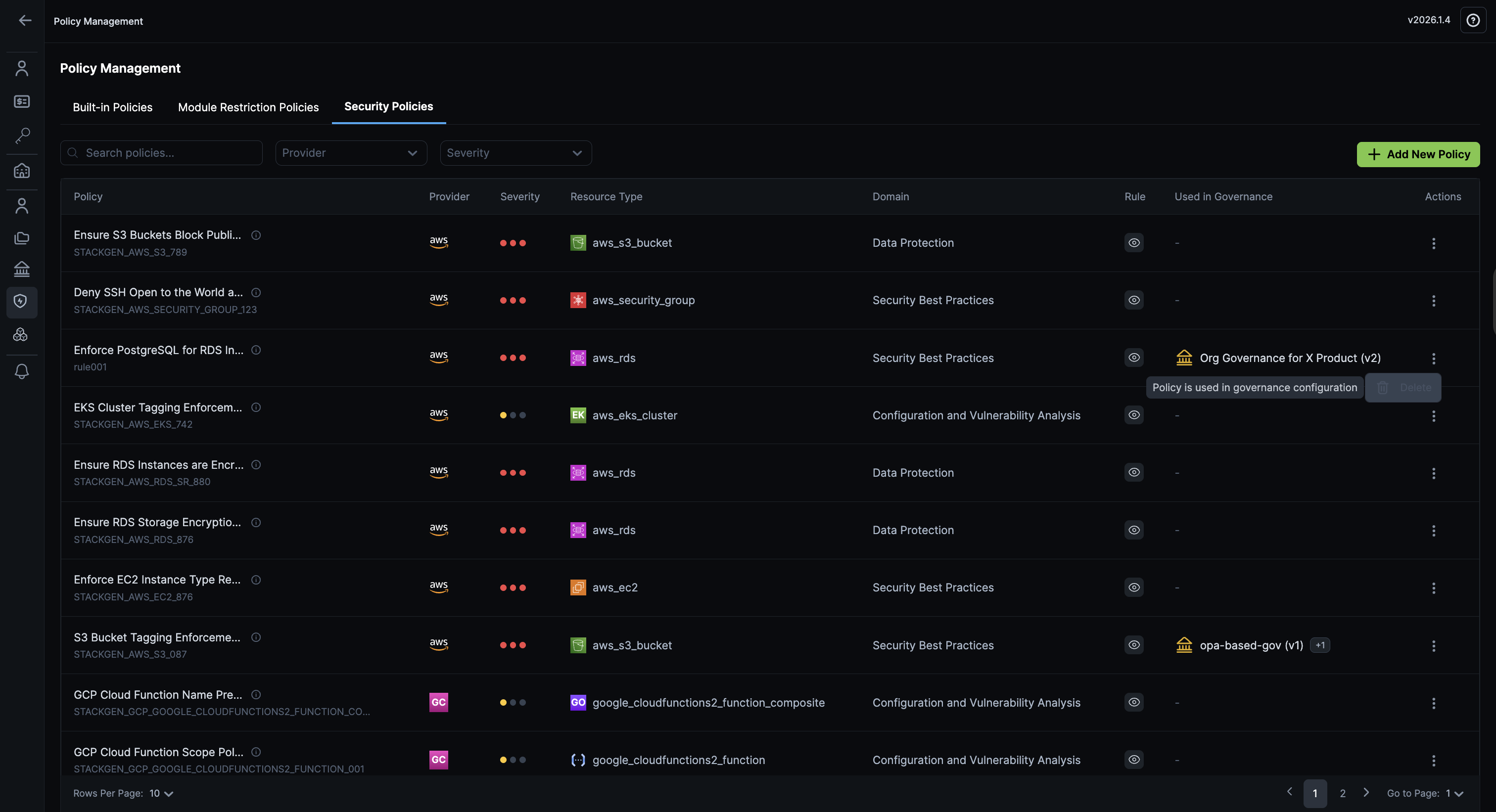
Why This Matters
This change gives your administrators more flexibility in managing security policies over time. While editing is still not supported, the ability to delete unused policies helps maintain a clean and organized policy configuration.
Share Secrets Across Your Enterprise
Click to view
If you are a DevOps or an Admin user, you can now share a secret with all projects in your enterprise. Secrets that you share at an Enterprise level are automatically accessible to both your existing and newly created projects. You no longer need to share your secrets manually by adding all projects.
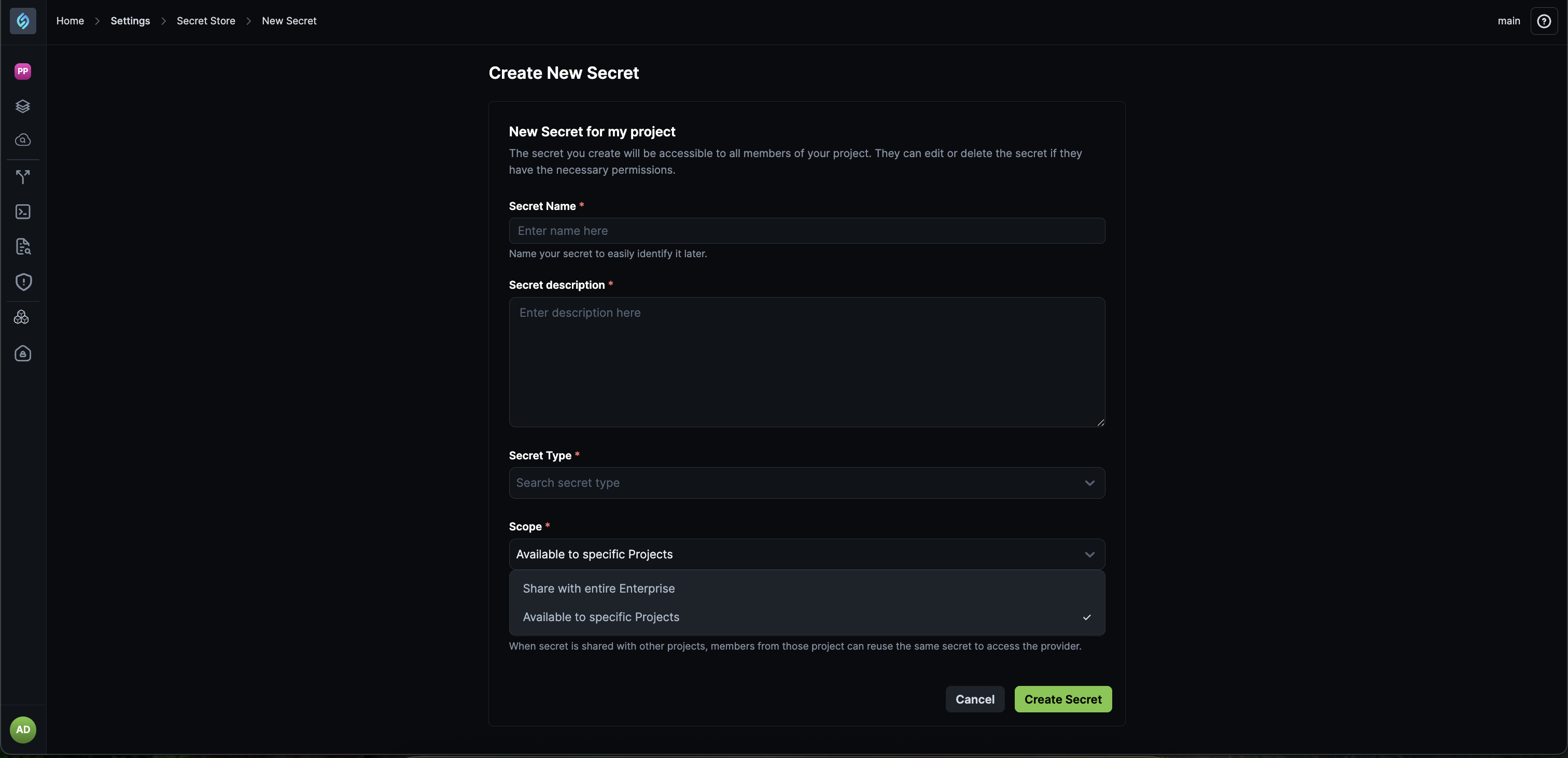
Why this matters
This eliminates repetitive secret store setup, reduces configuration errors, and ensures consistent secret usage across all projects as your organization scales.
- External secrets remain accessible based on user permissions.
- Enterprise sharing does not override existing access controls.
Check out the documentation on Secret Store to learn more.
What's Changed
Custom Resources Require Manual Error Remediation
Click to view
Custom resources now require manual error remediation. Unlike the StackGen provided resources, for which policy violations and missing attributes can be remediated automatically, you will not be able to do the same for custom resources.
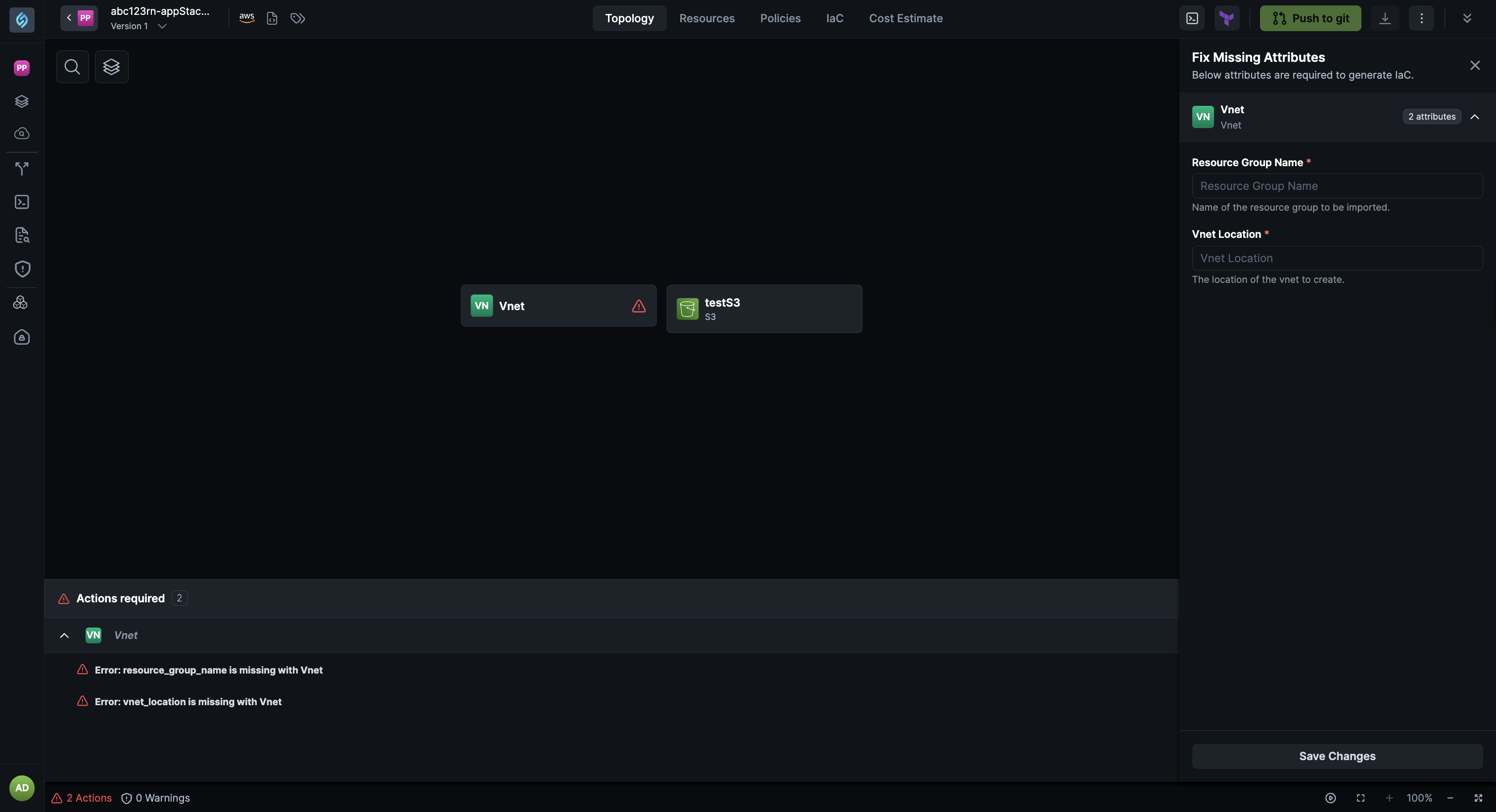
Why This Matters
We cannot guarantee that remediation of your custom resources will work as intended, as they do for the StackGen templates. To ensure reliability and prevent unintended changes, custom resource errors require manual intervention. This approach gives you full control over how custom resources are configured and ensures that any fixes made, align with your specific requirements.
Bitbucket Secrets Now Require Email ID
Click to view
While configuring Bitbucket secrets in StackGen, you must now provide the Bitbucket user’s email ID along with the access token. This ensures correct authentication with Bitbucket APIs and aligns with Bitbucket’s authentication requirements.
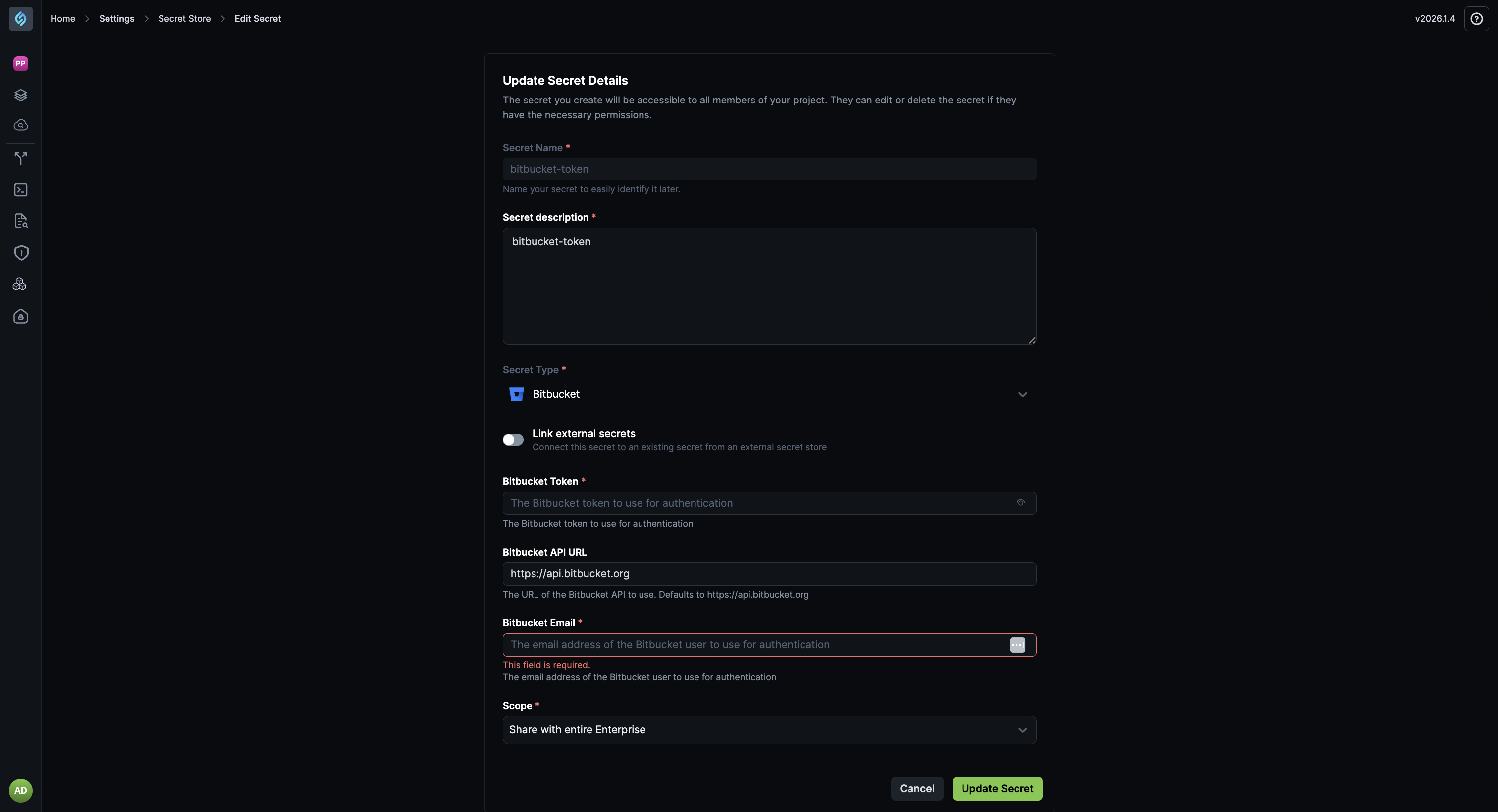
- Email ID is now a required field for Bitbucket secrets.
- This change applies to both project-level and enterprise-shared secrets.
What's Fixed
Aiden: Skills Fail When You Configure Multiple MCPs
Click to view
We fixed an issue where configuring multiple MCPs for the same skill would cause conflicts or incorrect behavior.
Skills now correctly support multiple MCP configurations. MCP settings for one skill no longer override or interfere with that of another MCP resulting in improved reliability when Aiden switches between MCPs and uses the same skill.
This fix ensures that skills behave predictably in complex setups and prevents configuration conflicts when using multiple MCPs with the same skill.
Not Used Filter Incorrect for Discovered Resources Across Topologies
Click to view
We have fixed an issue where the Not Used filter for discovered resources could return incorrect results when the same resource exists in a different topology outside the discovery flow.
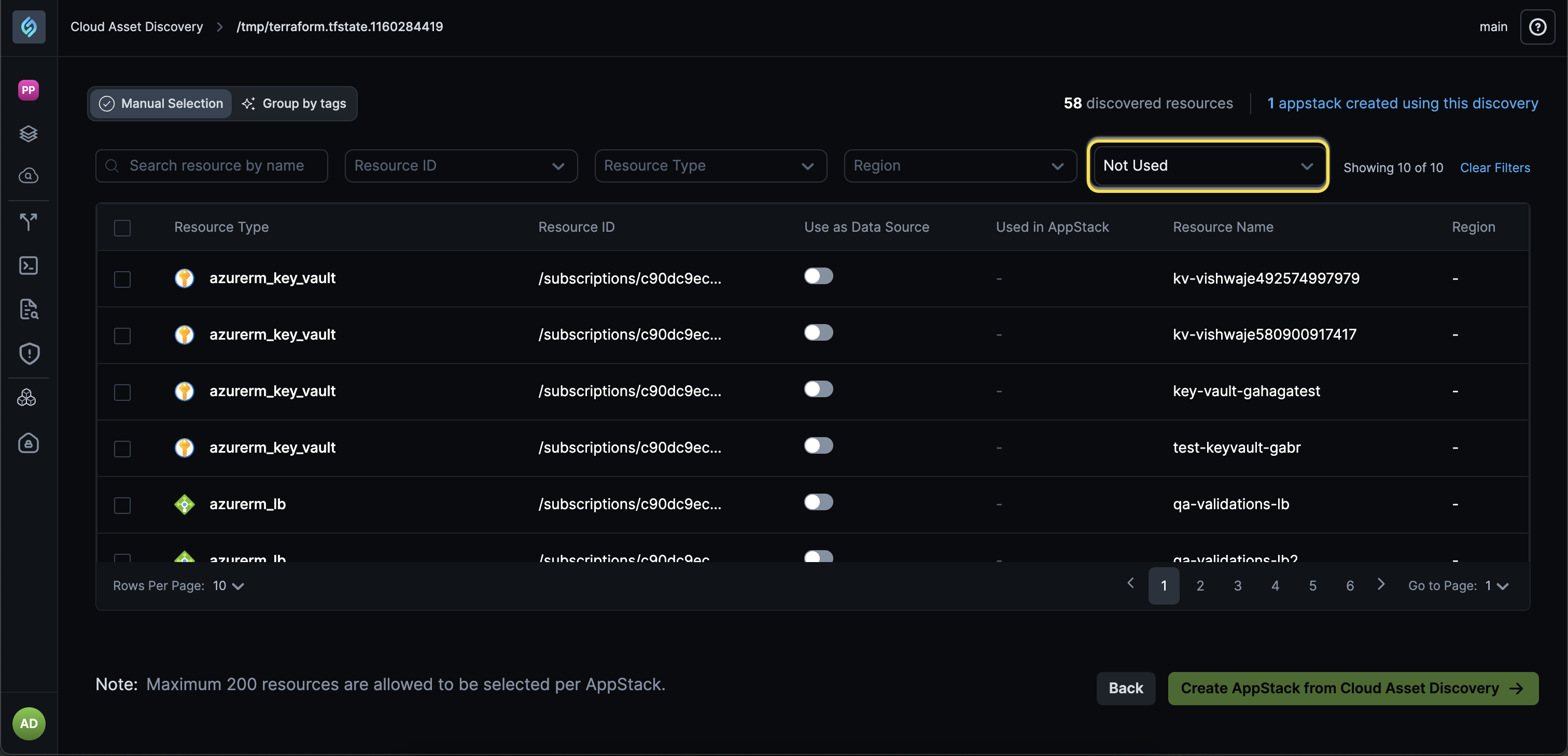
Discovered resources are now evaluated across all related topologies, not just the current one. Resources used in another topology are no longer incorrectly shown as Not Used.
Filtering is now applied after all related resource data is considered, ensuring accurate results. This improves the accuracy of discovery results in environments with multiple topologies, preventing false image.pngUsed classifications and reducing cleanup or remediation mistakes.
Supported Resources
Click to view
With this release, we've added additional support resources across our clouds. Refer to the Supported Resources document to view the complete list.