November 2025
November 2025
Accelerating Secure, Intelligent Infrastructure Automation
StackGen’s November 2025 Release elevates how teams build, secure, and automate their cloud environments. With deep integrations like Wiz for IaC security, smarter Git workflows, Aiden’s new Knowledge Graph, and enterprise-grade Remote Runners, this release delivers more intelligence, more control, and more confidence in every workflow.
Explore what’s new and see how StackGen continues to unify AI and infrastructure into a seamless, secure experience.
Discover What’s New, What’s Enhanced, and What's Fixed; and how these updates make building and managing your infrastructure even more intuitive.
-
What's New
-
What's Enhanced
-
What's Fixed
What's New
StackGen–Wiz Integration for IaC Security Scanning
Click to view
We’re excited to announce StackGen’s new integration with Wiz, that lets you perform security checks on your Terraform modules without leaving the StackGen platform.
This integration brings cloud-grade security scanning directly into your IaC development workflow, helping your teams detect misconfigurations earlier to improve compliance across environments.
-
Wiz Scanning Built Into the Module Catalog: Your platform engineers can now run Wiz scans directly via the Module Catalog page to identify misconfigurations. All scan results appear inline with severity, violation details, and remediation guidance.
-
Variable-Based Policy Evaluation StackGen’s Simulator UI works seamlessly with Wiz to test different variable inputs. Your teams can see how settings like
block_public_aclsimpact security outcomes, helping them catch violations earlier in the design phase. -
Advanced Scanning: You can trigger Advanced Scans to evaluate dynamic configurations and predict how different variable values would behave against Wiz policies.
Setup Overview
Enable the integration by adding your Wiz Client ID and Secret in the StackGen Secret Store.
Once configured, any module in the associated project can be scanned instantly.
Why It Matters
This integration brings security into the flow of work—so IaC policy and misconfiguration issues are caught early on, remediated faster, and never reach your production environment.
Check out StackGen-Wiz Integration guide to learn more.
New Push-to-Git Workflow
Click to view
With this release, we have revamped GitHub Secret management workflow. You can now:
- Use a GitHub configurations across projects.
- Manage GitHub secrets via a centralized Git Configurations page.
- Use the simplified Git Configuration while pushing your appStack changes to GitHub via the Topology page.
The push-to-Git experience is now more intuitive and:
- Auto-selects your project’s default Git configuration.
- Allows you to choose existing and approved configurations.
- Reduces manual input and configuration steps.
To use this, you can:
-
Configure your Git Secret for your Project via the Secret Store, and use it while pushing your changes to Git. You will still have to configure the Repository URL, Target branch, and the Target path manually.
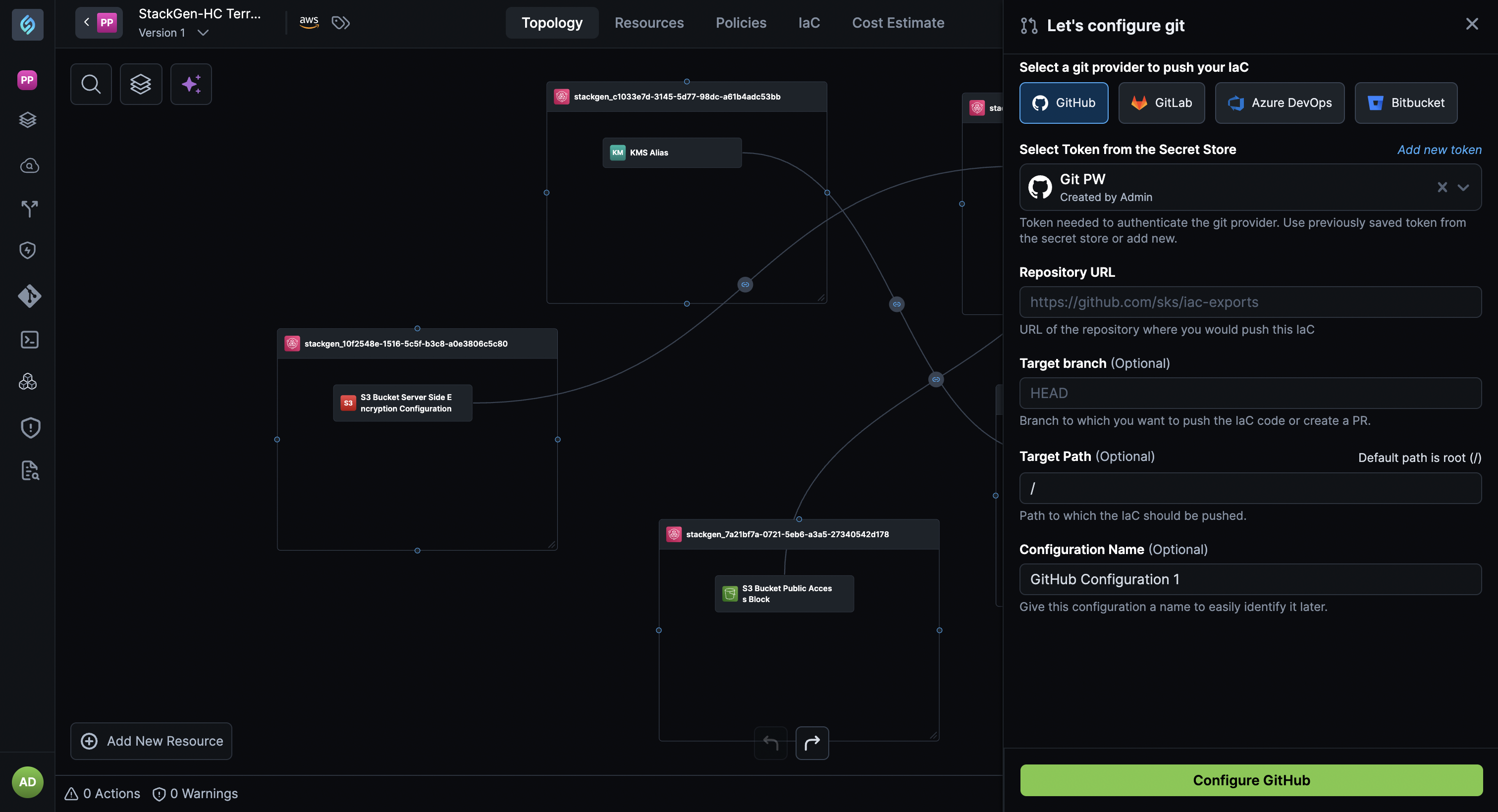
-
Configure project-specific Git configurations via the Git Configurations page.
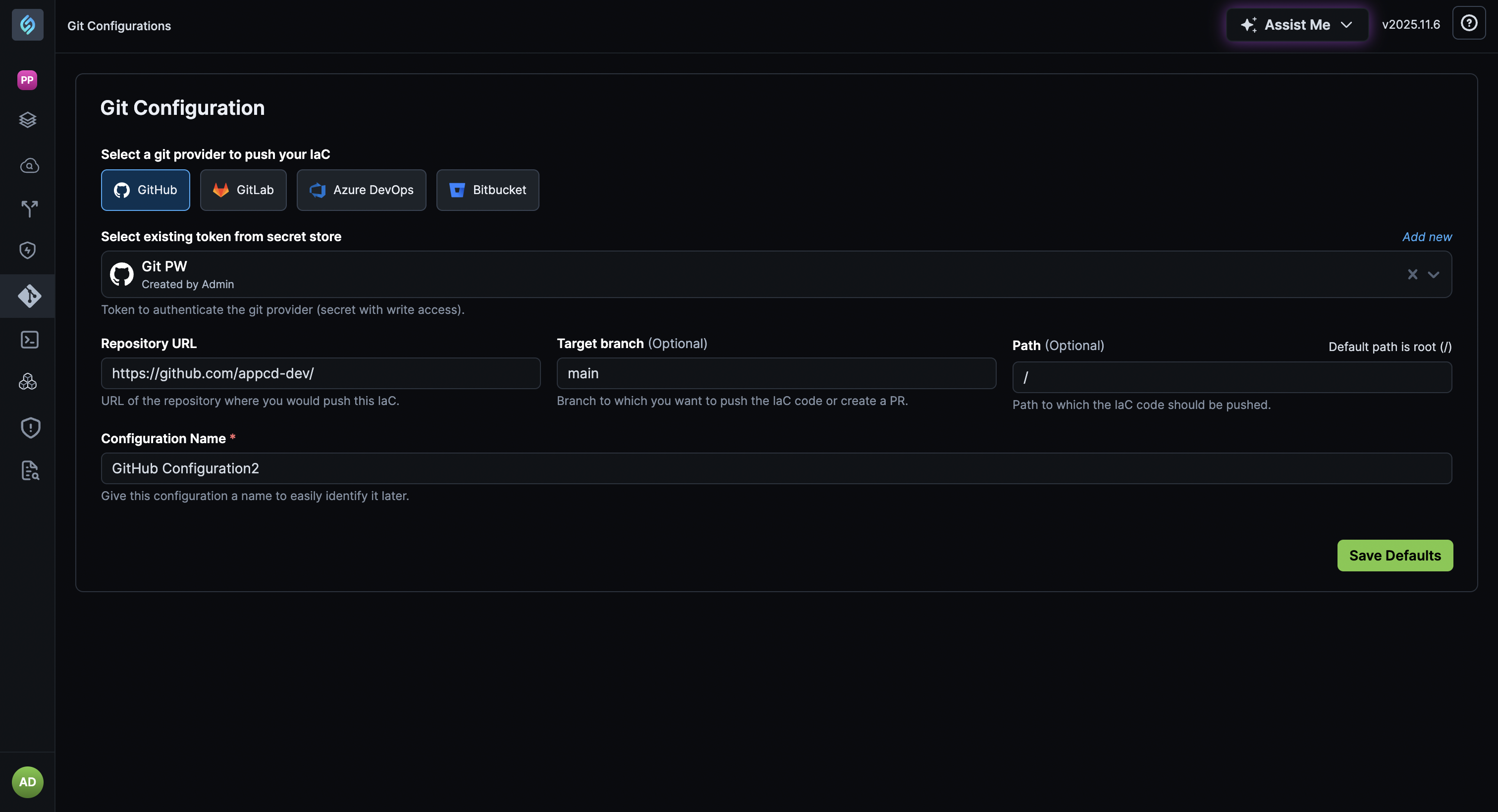
You will still need to create a Secret Store using your credentials. Simply use this configuration while pushing your changes to GitHub.
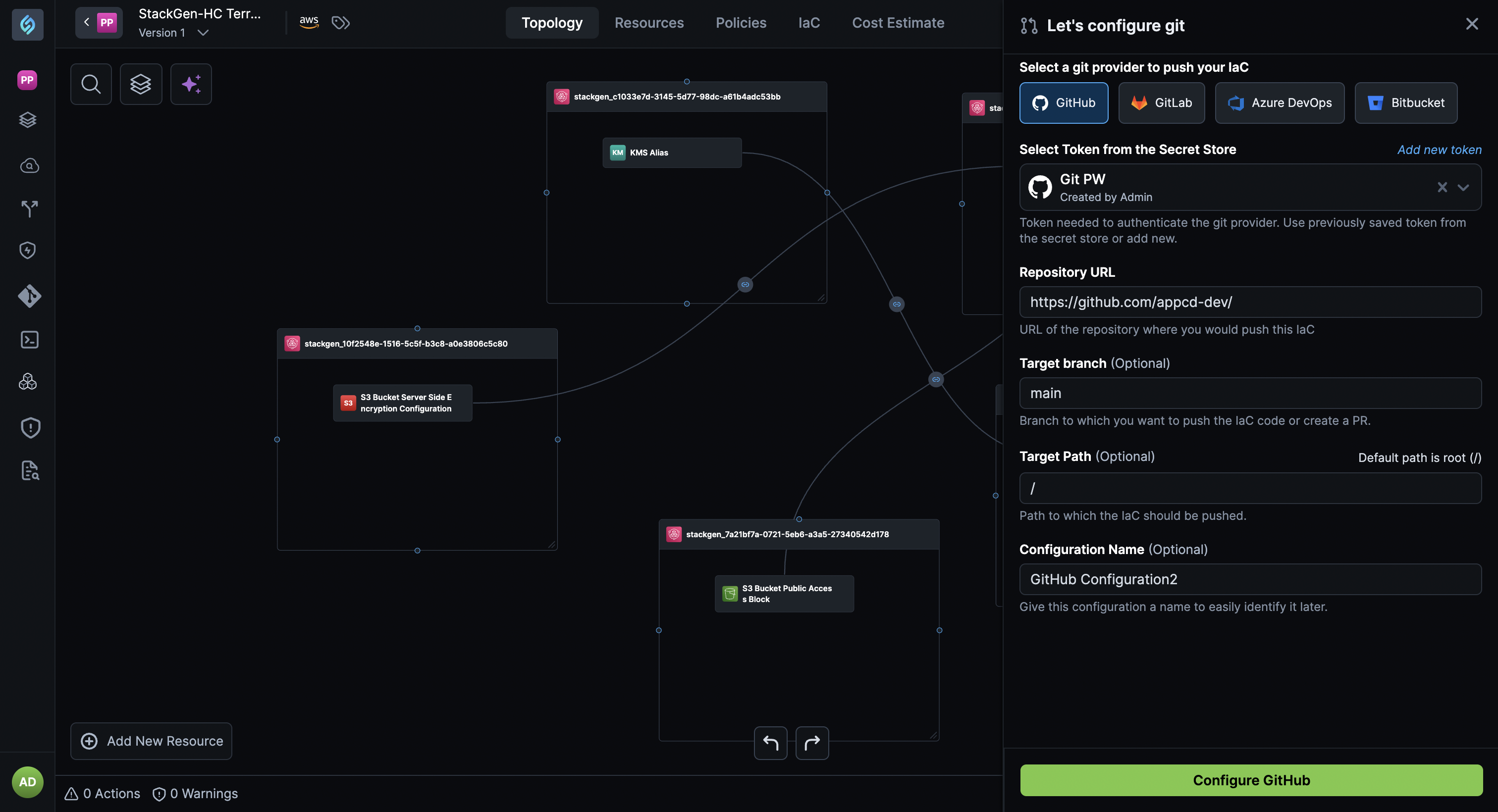
Check out Git Configurations to learn more.
Automated Token Rotation (90-Day Compliance Ready)
Click to view
StackGen now supports automated rotation of authentication tokens using API-based paired token management. This enables the 90-day mandatory rotation compliance policies without manual intervention or service disruption.
Key Benefits
- Compliance-ready: Supports mandatory 90-day (or shorter) token rotation policies.
- Zero downtime: Rotate tokens without interrupting running workflows.
- Automation-friendly: Integrate token renewal into CI/CD pipelines and secret managers.
- Secure by design: Long-lived PATs remain protected while short-lived paired tokens are rotated automatically.
- Enterprise scale: Eliminates operational risk caused by manual token handling.
Common Commands
You can use the following API endpoints for token creation, regenaration, and deletion:
- Create or regenerate a paired API token:
POST /appcd/api/v1/auth/pairedApiKey - Delete the currently associated paired token:
DELETE /appcd/api/v1/auth/pairedApiKey
These endpoints allow automated systems to securely rotate paired tokens while keeping the Personal Access Token (PAT) unchanged.
To learn more, including TTL rules, automation flows, and CI/CD integration examples, check out Paired API Tokens in StackGen
Aiden
The New Aiden Knowledge Graph
Click to view
Aiden now has a persistent, workspace scoped Knowledge Graph, giving it real memory of your environment so it can deliver more accurate, context-aware DevOps assistance.
What’s New
- Central Knowledge Hub: Add and manage knowledge sources directly in your workspace.
- Three input types supported:
-
Text: add quick notes, definitions, or tribal knowledge.
-
File uploads: upload docs like pipeline templates, architecture guides, or troubleshooting runbooks.
noteUploaded documents cannot be previewed or edited inside Aiden. To update them, edit the source and re-upload.
-
URL: ingest publicly accessible documents via URL.
noteURL-based content must be updated at the source; Aiden does not resync automatically.
-
- Automatic Ingestion: StackGen Project context (appStacks and policies) is automatically pulled in when a workspace is linked to a project.
- GitHub repository context can now be connected, giving Aiden access to commit history, repository structure, and activity data.
Smarter Answers, With Citations
Aiden can now:
-
Answer questions using your documents, repos, and project context.
-
Generate YAML or IaC using your templates.
-
Troubleshoot based on your runbooks.
-
Reference the exact source it used in each answer.
Why This Matters
Aiden no longer relies solely on what you say in the moment, it learns from your workspace and uses that knowledge to deliver:
- More accurate automation.
- Faster troubleshooting.
- Better DevOps and platform engineering support.
Check out the Knowledge Hub
Aiden Remote Runners: Secure Access Without Exposure
Click to view
Remote Runners let Aiden securely access tools and data inside your private environment without exposing your data or tools to the public internet. This allows Aiden to work with your internal databases, APIs, MCP servers, and other resources while staying fully secure and compliant with your organization's policies.
How it works
A lightweight agent runs inside your Kubernetes environment (more environments coming soon). When Aiden needs access to an internal tool, it sends a task to the agent, the task runs locally, and the results return securely to Aiden.
Key Benefits
- Stronger security: your data stays inside your VPC.
- Flexible integrations: connect internal tools, APIs, and services.
- Full control: choose which runner each integration uses.
- Enterprise-ready: supports strict privacy and compliance requirements.
For setup instructions, check out the Remote Runner documentation.
What's Enhanced
Revamped + New appStack Creation Flows
Click to view
We've revamped the + New appStack Creation flows for a better user experience. This has been done to keep the appStack creation process aligned with the relevant workflows. We've removed the following appStack creation flows:
- From Code
- Cloud Migration
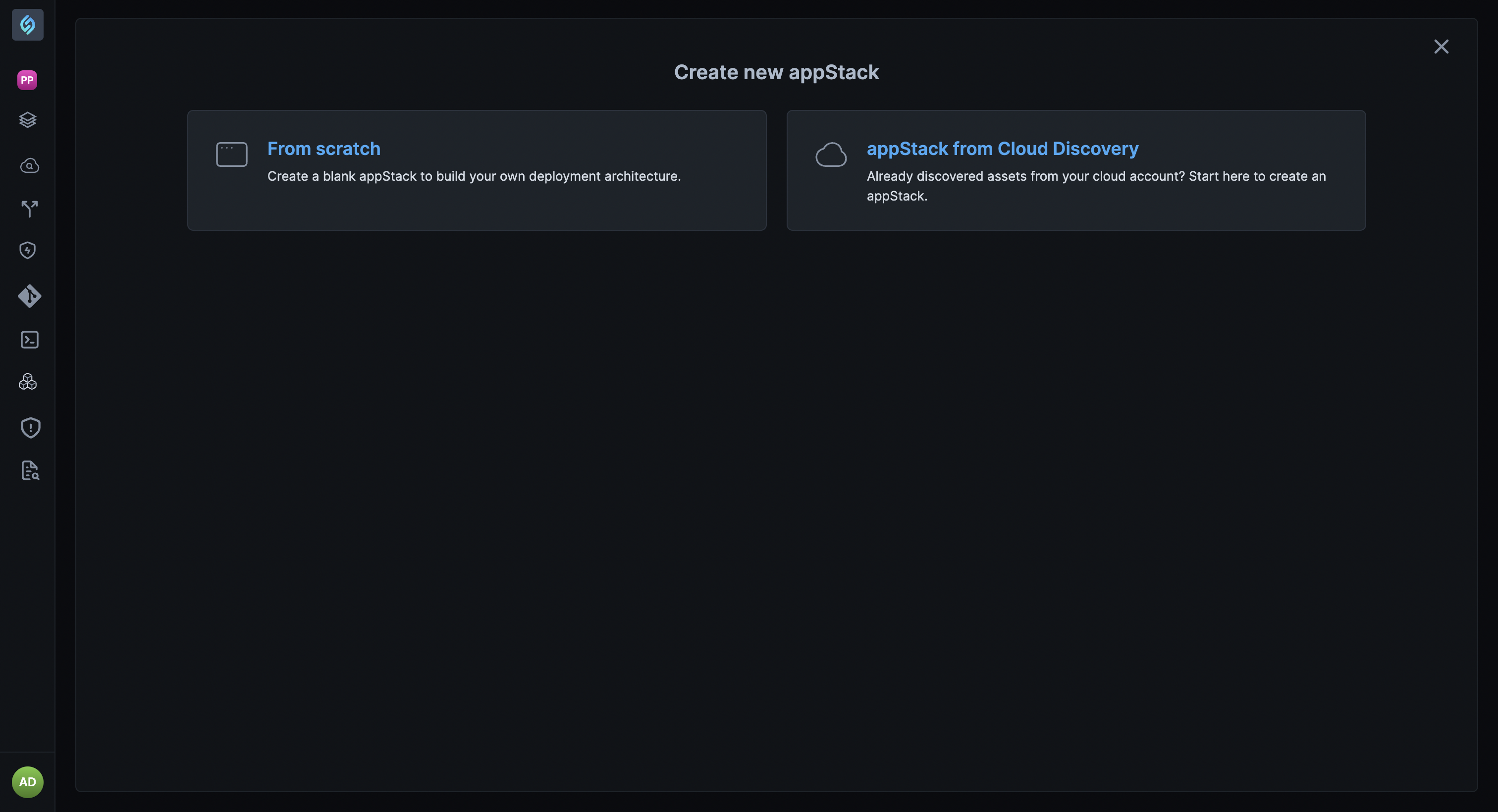
Workspace to StackGen Project Connections
Click to view
You can now link an Aiden workspace with one or more StackGen projects. Once connected, Aiden can automatically pull in the right project details so it can work with better accuracy and context.
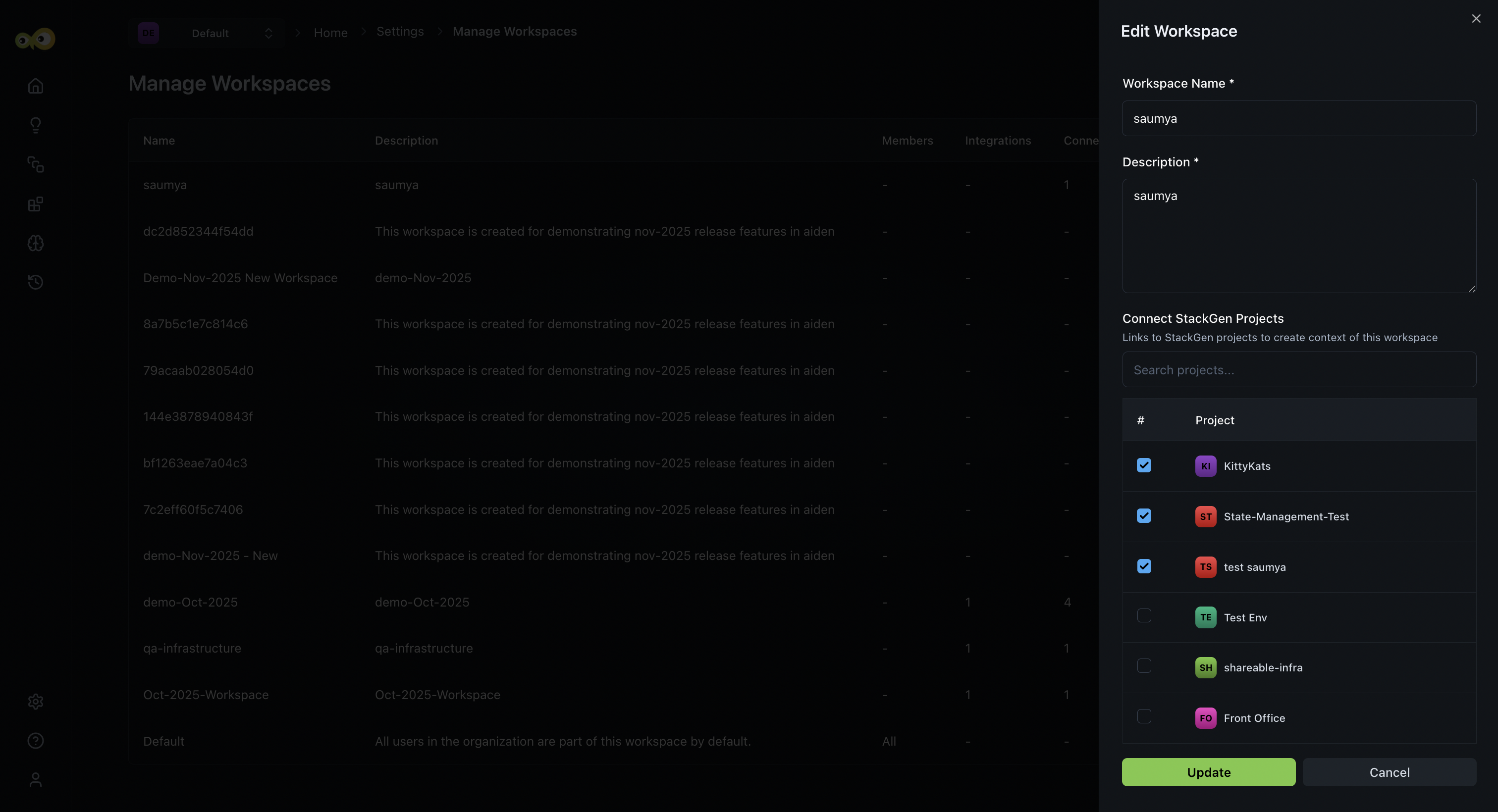
Here's what Aiden can do with the new Stackgen Projects integration:
- Understand your project’s setup and context.
- Retrieve appStacks across linked projects.
- See who’s part of the project.
- Run operations that are scoped to a specific project.
Why this matters: Aiden becomes smarter, more precise, and more aware of your project environment, leading to faster, more reliable automation.
Check out the documentation on Workspaces to learn more.
Aiden
Smarter Knowledge Base Chunking and Retrieval
Click to view
We’re upgrading how Aiden breaks down and retrieves information from your Knowledge Base, leading to more accurate, context-aware output.
What’s Changed
- Semantic chunking: Aiden now creates flexible, context-based chunks instead of rigid section-based ones.
- Micro-chunks: Chunks are created as fine grained units of 50–100 words for better precision.
- Dynamic boundaries: Chunks are shaped by meaning, not formatting.
Key Benefits
- Semantic similarity search instead of keyword matching.
- Cross-document context awareness.
- Smarter ranking that adapts over time.
Why it matters
Aiden delivers more relevant answers, understands nuanced concepts better, and retrieves information with far higher accuracy.
For full details, check out the documentation on Knowledge Hub.
Entra ID (Azure AD) SSO Support for Aiden
Click to view
Aiden now supports logging in with Microsoft Entra ID (Azure AD) using Single Sign-On (SSO). This makes it easier for teams using Entra ID to seamlessly and securely access Aiden with their existing organizational credentials. Check the support article to Configure Microsoft Entra ID (Azure AD) OAuth 2.0 Configuration
What's Fixed
Clicking the Settings Breadcrumb Link Returns a 404 Error
Click to view
While accessing Settings sub-pages like PAT or Secret Store, the Settings breadcrumb was enabled and routed you to a non-existent page, resulting in a 404 error. This happened because the breadcrumb was being rendered as an active link despite the absence of a Settings root route.
We've resolved this issue and the Settings breadcrumb is now conditionally disabled, ensuring valid navigation paths and eliminating erroneous redirects.
Supported Resources
Click to view
With this release, we've added the additional support resources across our clouds. Refer to the Supported Resources document to view the complete list.