December 2025
December 2025
Empowering Teams with Enhanced Governance, Automation, and Control
StackGen's December 2025 Release strengthens how teams manage, secure, and version their cloud infrastructure. With new capabilities like Terraform Registry module imports, AI-assisted policy creation, automatic appStack snapshots, external secrets integration, and enhanced cloud discovery, this release delivers more flexibility, better governance, and greater confidence in infrastructure management.
Explore what's new and see how StackGen continues to simplify infrastructure operations while maintaining enterprise-grade security and compliance.
Discover What's New, What's Enhanced, What's Changed, and What's Fixed; and how these updates make building and managing your infrastructure intuitive.
What's New
Import Modules From Terraform Registry
Click to view
We're excited to announce that you can now import modules directly from the Terraform Registry into the Module Catalog, streamlining how you discover, evaluate, and onboard open-source Terraform modules.
This feature brings the vast ecosystem of Terraform Registry modules directly into your StackGen workflow, making it easier to evaluate and adopt community modules while maintaining security and compliance standards.
Key Features
- Search and Select Modules: Browse and search the Terraform Registry directly from StackGen's Module Catalog's Import Module dialog. Find the modules you need without leaving the platform.
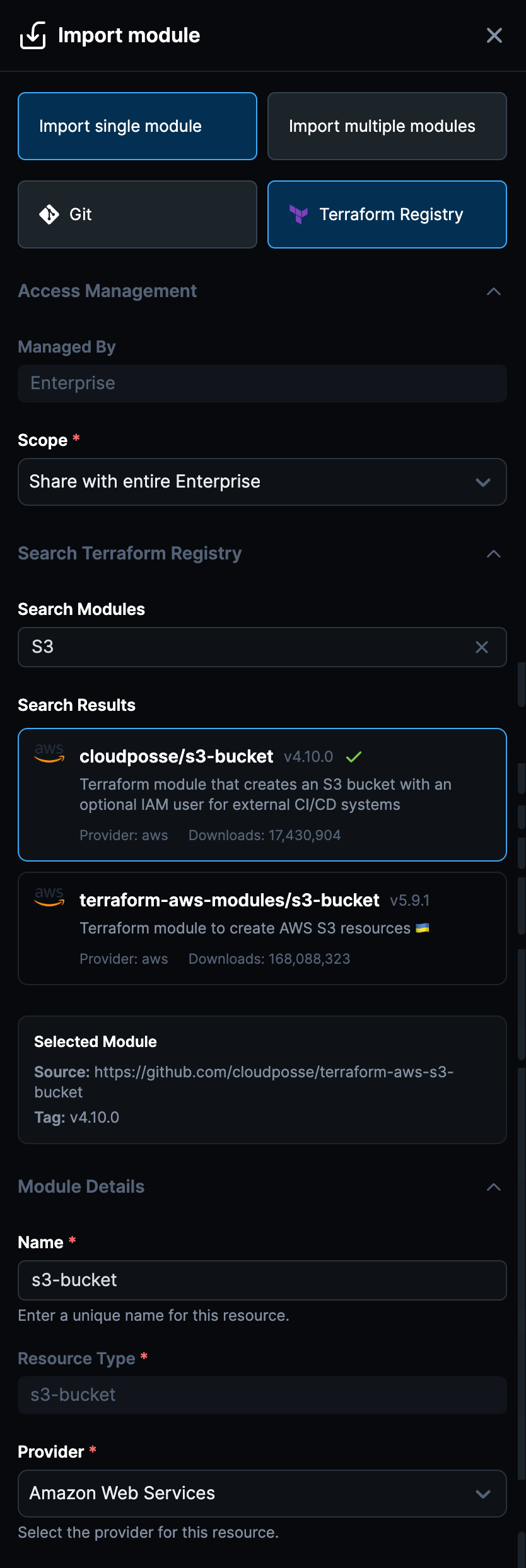
- Auto-Scan on Import: Every module imported from the registry is automatically scanned using StackGen's built-in scanning capabilities. Get immediate visibility into module structure, dependencies, and potential issues before committing to use them.
- Policy Review Before Import: Review passed and failed policies before finalizing the import. This ensures you understand the compliance and security posture of modules before adding them to your catalog.
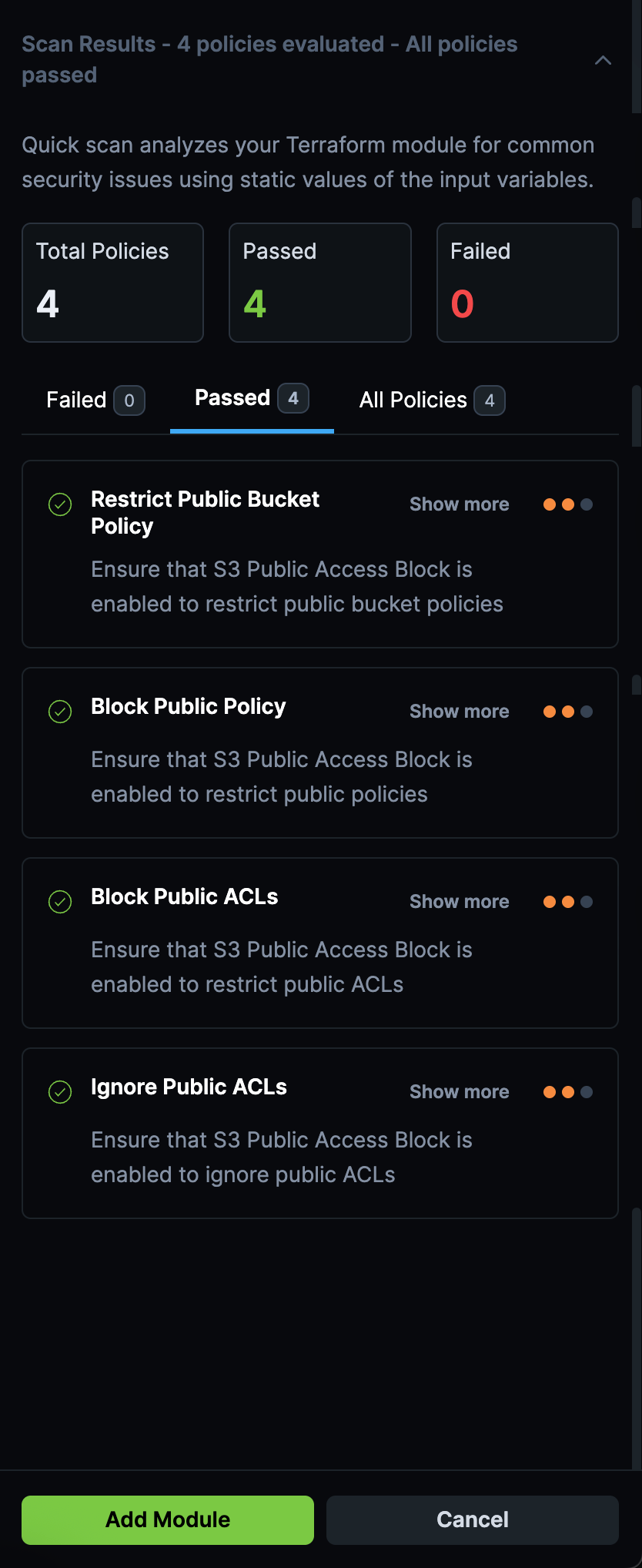
- Evaluate Before Onboarding: Perfect for evaluating open-source modules—see how they align with your organization's policies and standards before making them available to your teams.
Why It Matters
This integration makes it faster and safer to leverage the Terraform community's work. Instead of manually downloading, reviewing, and testing modules, you can now discover, scan, and import them in a single workflow, all while maintaining your security and compliance standards.
Check out Module Catalog to learn more.
appStack Snapshots: Automatic Versioning and Rollback
Click to view
We're excited to introduce a powerful new versioning system for appStacks that automatically captures snapshots of every change, giving you complete control over your infrastructure evolution with the safety of easy rollbacks.
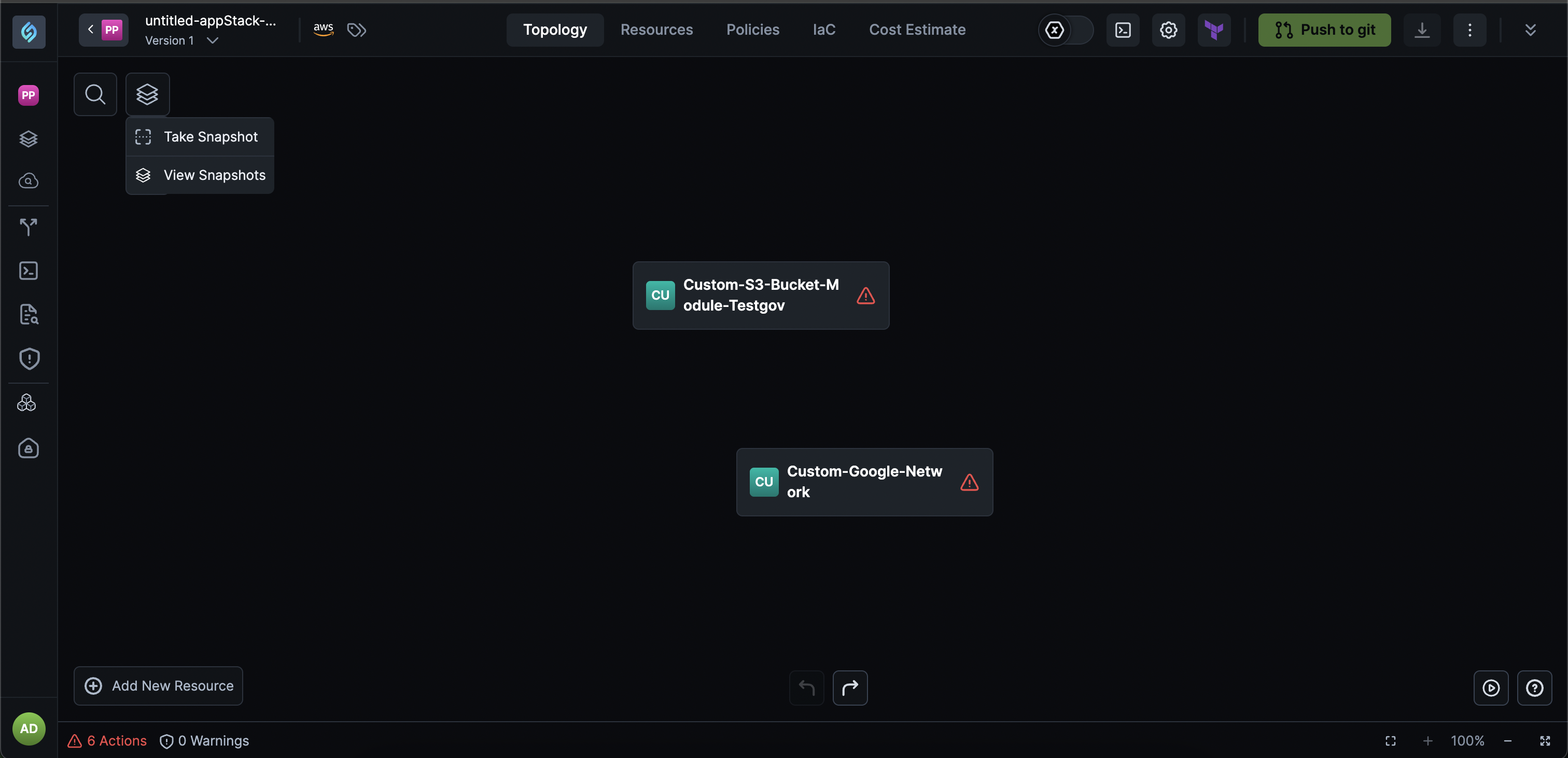
This feature transforms how you experiment with and manage your appStack configurations, providing a comprehensive change history and the ability to restore to any previous state with confidence.
Key Features
-
Automatic Snapshot Capture: Every change to an appStack now automatically captures a snapshot, ensuring you never lose your work and can track the complete evolution of your infrastructure.
-
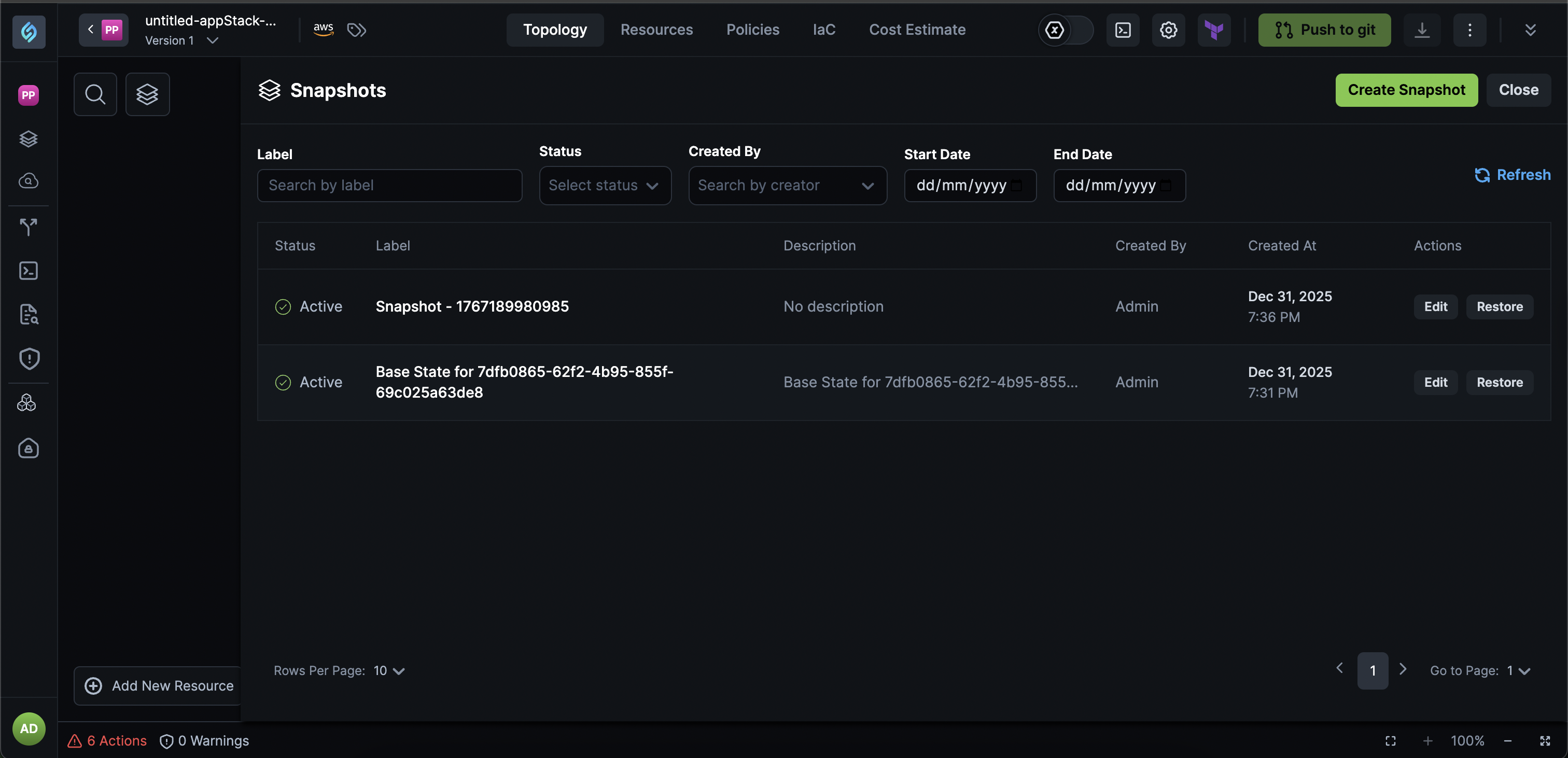
View Change History: Access a complete timeline of all changes made to your appStack, making it easy to understand what changed, when, and by whom.
-
Label Snapshots: Organize and identify important snapshots by adding custom labels, making it easier to find and restore to specific milestones or configurations.
-
Restore to Any Previous State: Restore your appStack to any previous state with a single click, perfect for experimentation and rollback safety when testing new configurations.
Why It Matters
The Snapshot feature eliminates the fear of experimentation by providing a safety net for every change. You can now try out new configurations, with the confidence that you can instantly roll back to a previous working state. This is especially valuable for complex infrastructure changes where the ability to quickly revert can save hours of troubleshooting and prevent costly mistakes.
Check out the documentation on Snapshots to learn more.
Policy Management: UI-Based Resource Restrictions and AI-Assisted Security Policies
Click to view
We're excited to introduce powerful new governance capabilities that make it easier than ever to enforce organizational guardrails and security best practices across your infrastructure, without requiring code expertise.
This release brings two major policy types:
- UI-based Resource Restriction Policies that let your admins create allowlists without writing code.
- AI-assisted Resource Security Policies that help you enforce security best practices through natural language or Rego policies.
Key Features
Resource Restriction Policies (UI-Based)
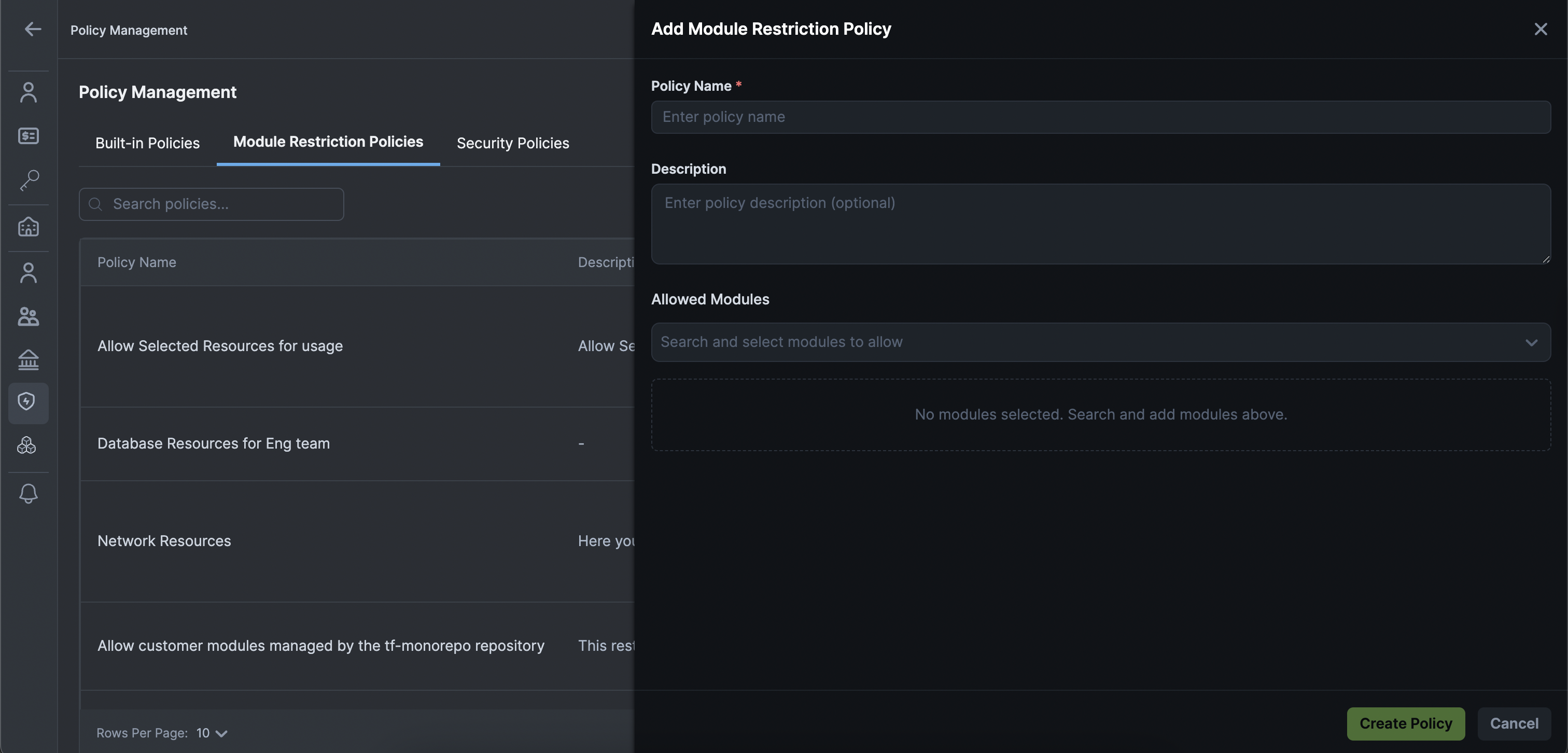
Your Admins can now create resource allowlists directly through the UI, eliminating the need to write code for basic governance rules.
- Restrict Cloud Resources: Define which cloud resources are permitted in your organization, ensuring your teams only use approved infrastructure components.
- Support Multiple Resource Types: Works with standalone, grouped, and custom resources, giving you the flexibility to control any resource type in your environment.
- Enforce at Scale: Apply organizational guardrails consistently across all projects and appStacks, making it ideal for Landing Zone and platform governance teams.
- No Code Required: Create and manage resource restrictions through an intuitive UI, making governance accessible to non-technical team members.
Resource Security Policies (AI-Assisted)
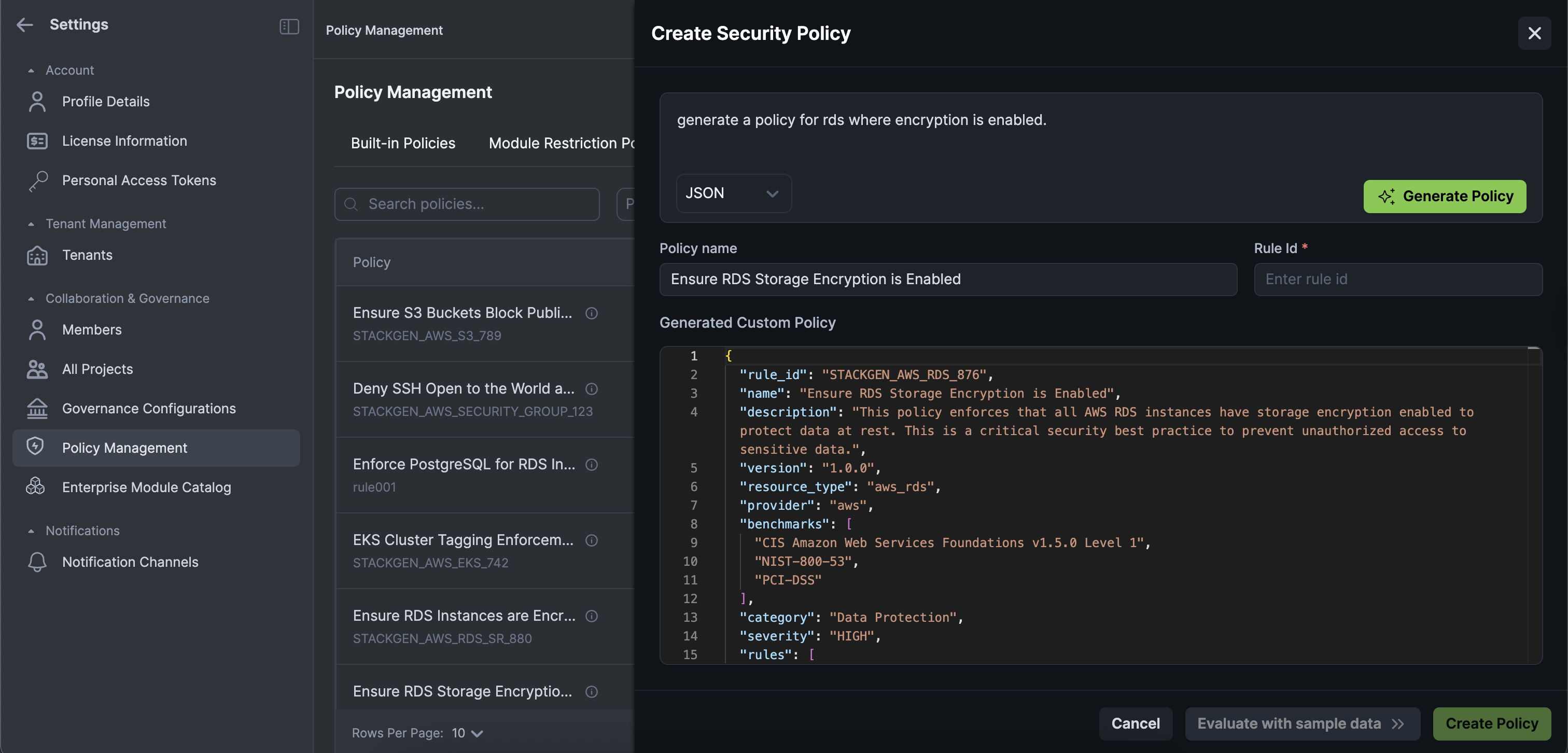
Create rules that enforce security best practices on resources using AI assistance, making policy creation faster and more accessible.
-
Natural Language to JSON: Define policies using natural language, and StackGen automatically generates the JSON policy for you. Simply describe what you want to enforce, and the AI handles the technical translation.
-
Paste Rego Support: If you prefer working with Rego policies, paste your existing Rego code and StackGen automatically generates a StackGen-compatible policy.
-
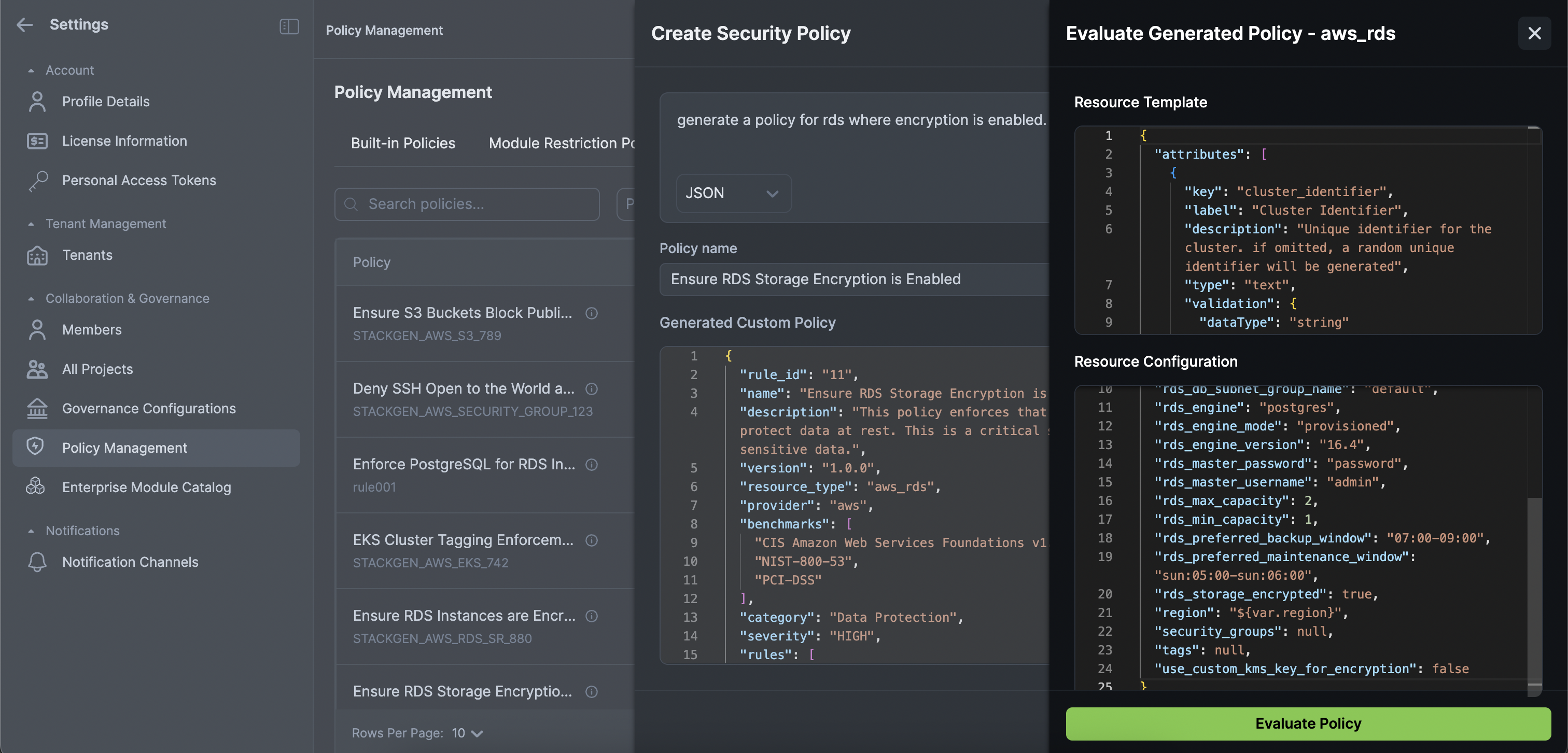
Inline Validation: Test your policies with sample configurations before activation, ensuring they work as expected.
-
Real-Time Feedback: Get immediate policy pass or fail feedback as you build your policies, helping you refine rules before they go live.
Why This Matters
These governance features democratize policy creation, allowing your platform teams and admins to enforce organizational standards without deep coding expertise. Resource Restriction Policies give Landing Zone teams the control they need to maintain infrastructure standards, while AI-assisted Security Policies accelerate the creation of security rules that protect your cloud resources. Together, they enable faster, more consistent governance at scale, reducing the risk of misconfigurations and security violations across your entire infrastructure.
Check out Custom Policies to get started.
External Secrets Support
Click to view
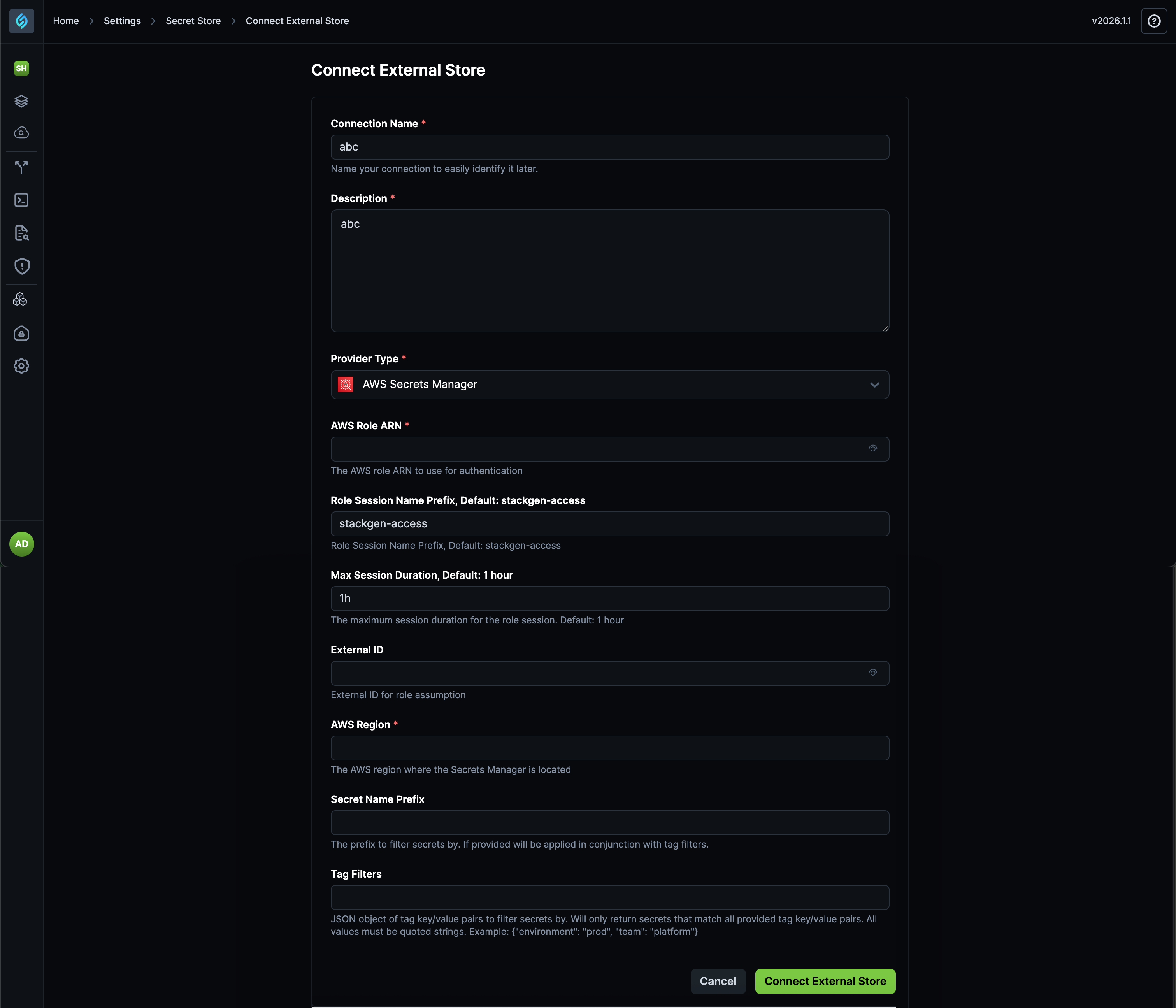
We're excited to introduce support for referencing secrets stored in AWS Secrets Manager, enabling you to securely connect to your AWS secret management system without sharing credentials.
This feature allows you to integrate StackGen with AWS Secrets Manager, providing a secure way to access secrets stored in AWS while maintaining your organization's security standards.
Key Features
- Connect via IAM Role: Connect to AWS Secrets Manager using IAM roles, eliminating the need to share credentials. This provides a more secure authentication method that aligns with AWS security best practices.
- Fetch Secrets Based on Tag Filters: Retrieve secrets from AWS Secrets Manager based on tag filters, giving you fine-grained control over which secrets are accessible.
- Secret Name Prefix Filtering: Optionally filter secrets by name prefix in conjunction with tag filters for more precise secret selection.
- Map to StackGen Internal Secret Handles: Map AWS secrets to StackGen's internal secret handles, making them available throughout your StackGen workflows.
- Project-Level Secret Availability: Make secrets available at the project level securely, ensuring teams have access to the secrets they need while maintaining proper access controls.
Why It Matters
External Secrets Support eliminates the need to duplicate or manually manage secrets across systems. By connecting directly to AWS Secrets Manager, you can maintain a single source of truth for secrets while making them available in StackGen workflows. This reduces security risks associated with credential sharing and simplifies secret management across your infrastructure.
Check out the Settings guide to learn more about Secrets Store.
What's Enhanced
Cloud Discovery: Automatic Labeling and Group-by-Tags for Resources
Click to view
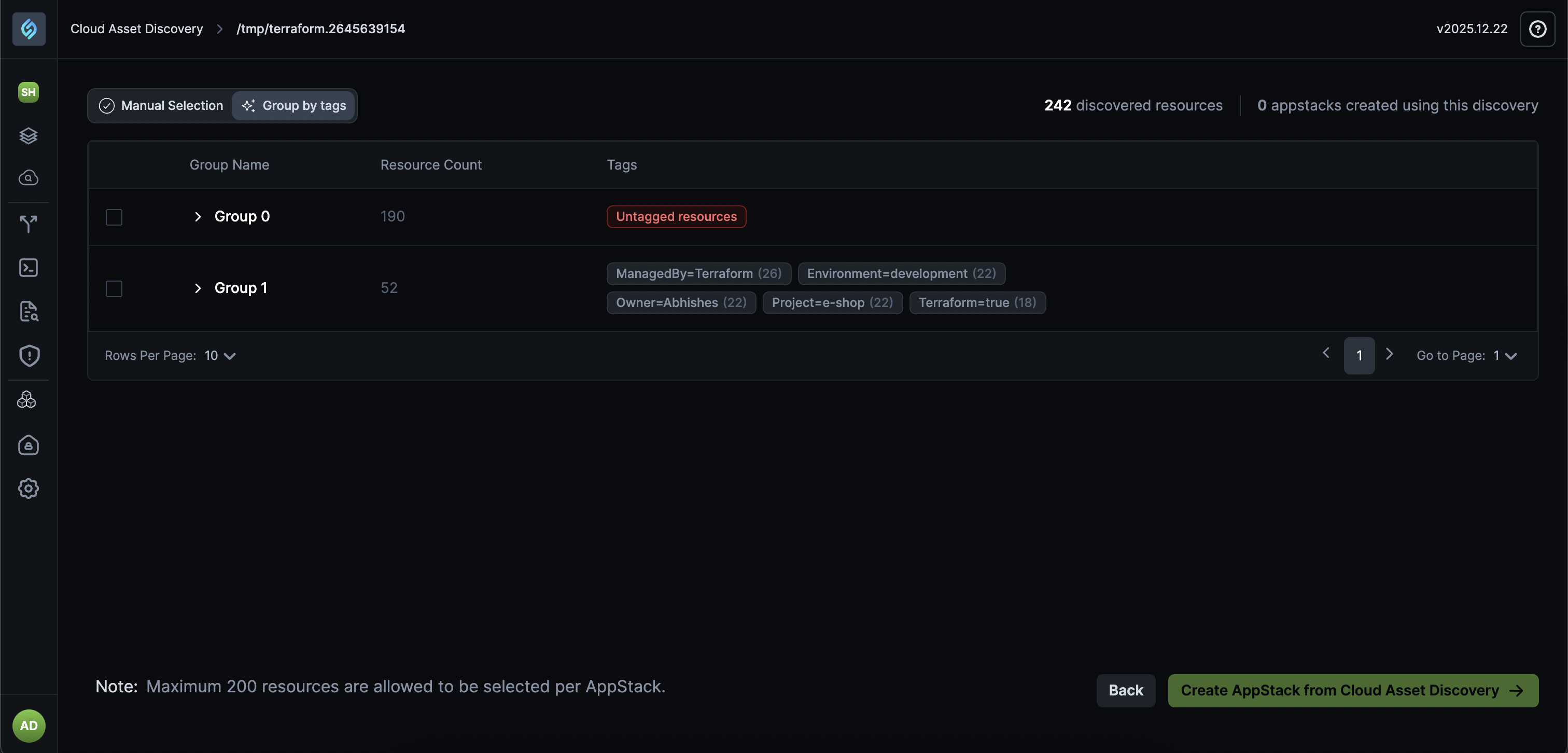
We've enhanced Cloud Asset Discovery to automatically label and organize cloud resources discovered through the discovery process, making it easier to track provenance and convert them into structured appStacks.
Key Features
-
Named Discoveries: Each Cloud Asset Discovery must now be named, making it easy to trace appStacks back to their discovery source.
-
Automatic Resource Labeling: Resources discovered through Cloud Asset Discovery automatically include contextual labels indicating their creation source (e.g., "Grouped by Tags"), helping teams quickly identify provenance and ownership.
-
Group-by-Tags appStack Creation: Automatically convert discovered cloud resources into appStacks based on their cloud tags.
- Use Cases:
- Group infrastructure by environment (production, staging, development).
- Organize by business unit or team ownership.
- Convert brownfield resources into structured appStacks.
- Use Cases:
Why It Matters
These enhancements reduce manual effort in organizing discovered cloud infrastructure. Automatic labeling provides clear provenance tracking, while group-by-tags functionality makes it effortless to convert brownfield resources into structured, manageable appStacks, especially valuable for organizations managing large-scale cloud infrastructure.
appStack Enhancements: Undo/Redo and Compliance Visibility
Click to view
We've enhanced the appStack editing experience with undo/redo capabilities and introduced appStack-level compliance visibility, making it easier to manage changes and track security posture directly from your appStacks.
These enhancements improve both the editing workflow and compliance monitoring, giving you better control over your infrastructure changes and clearer visibility into security issues.
Key Features
-
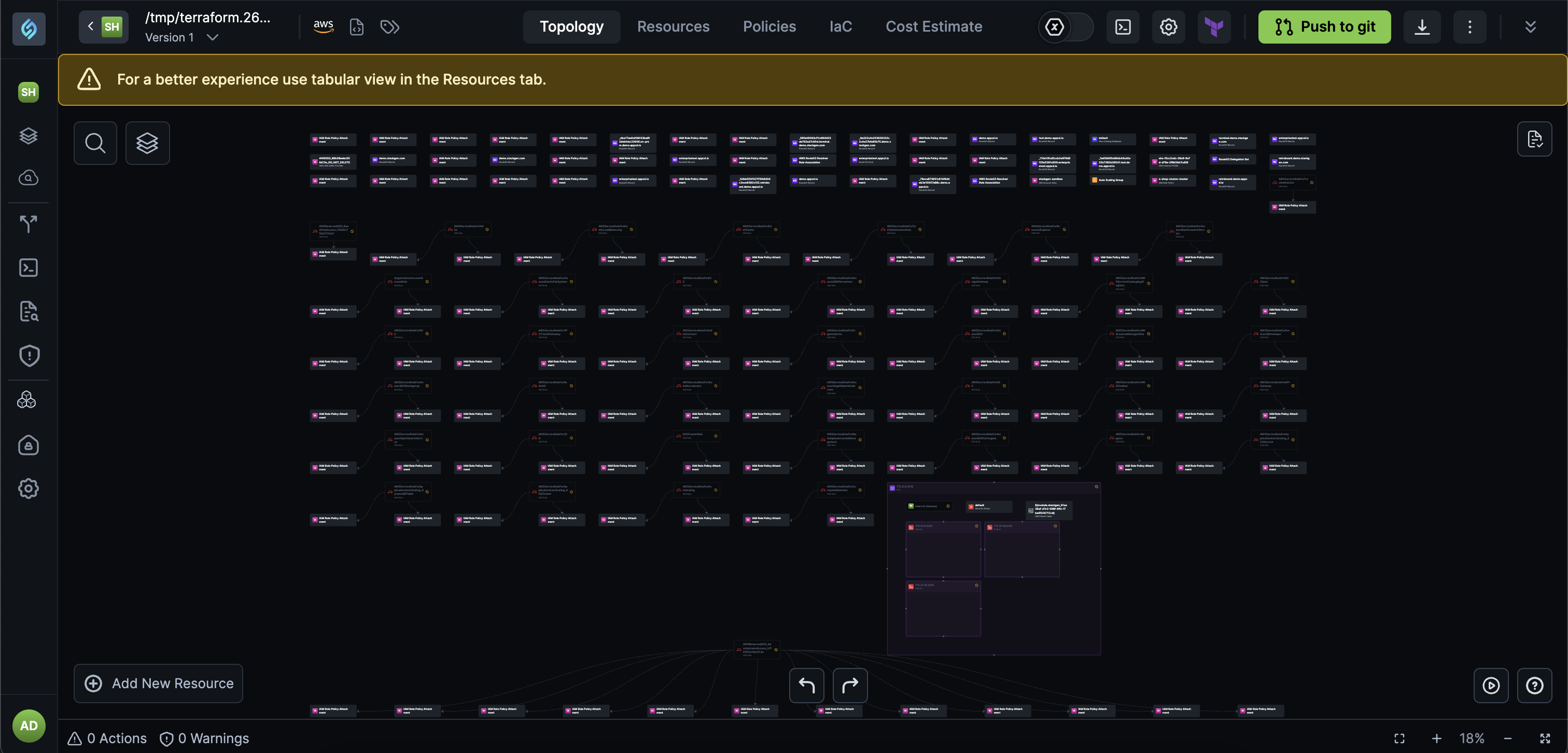
Undo/Redo (UI): Quickly reverse or reapply changes while editing appStacks, giving you the confidence to experiment and make corrections without fear of losing work.
- What you can undo/redo:
- Resource Operations: Undo or redo resource additions and removals.
- Connections: Reverse or reapply connection changes between resources.
- IaC Updates: Undo or redo Infrastructure as Code modifications.
- What you can undo/redo:
-
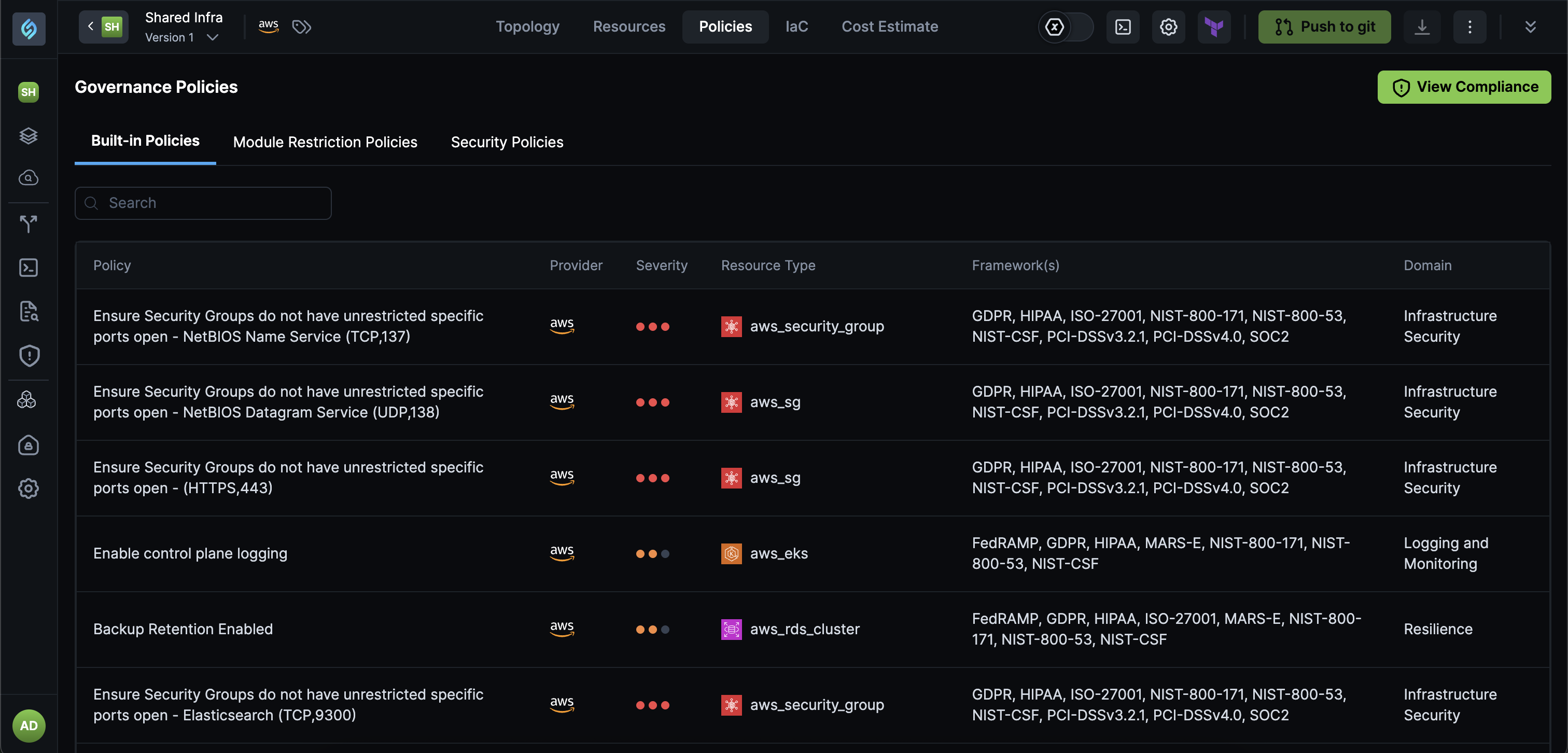
Compliance Visibility: Access compliance results directly from your appStack without navigating to separate compliance dashboards.
Why It Matters
- Undo/redo functionality eliminates the fear of making mistakes during appStack editing, encouraging experimentation and faster iteration.
- The appStack-level compliance view brings security posture directly into your workflow, making it easier to identify and fix issues without context switching.
Together, these enhancements make appStack management more intuitive and compliance monitoring more actionable.
What's Changed
Assist Me Button Removed from Topology View
Click to view
We've removed the Assist Me button from the topology view to streamline the user interface and reduce confusion. This change simplifies the topology editing experience by removing functionality that is no longer actively used.
What's Fixed
Error While Adding Users to Aiden Account
Click to view
While attempting to add new users to an Aiden account, you encountered an error that prevented the user addition. This happened because of an issue in the user management workflow that blocked new user additions.
We've resolved this issue and you can now successfully add team members to their Aiden workspace without encountering errors, ensuring seamless collaboration and user management.
RBAC Access Automatically Resetting to Developer
Click to view
While assigning RBAC access levels to users, the access role was automatically being reset to Developer even when it was explicitly set to Admin or other roles. This happened because of an issue in the role assignment workflow that incorrectly reset user permissions to the default Developer role, causing roadblocks in testing and implementation workflows.
We've resolved this issue and RBAC access levels now remain as defined, ensuring that Admin and other role assignments persist correctly without being automatically downgraded to Developer.
Terraform Registry Modules Only Visible in Personal Projects
Click to view
While importing modules from the Terraform Registry, modules were only appearing in the personal projects section regardless of whether Enterprise or Project-level scope was selected during import. This happened because of an issue in the module import workflow that incorrectly assigned all imported modules to personal projects, making them unavailable at the Enterprise or Project level where they were intended to be shared.
We've resolved this issue and modules imported from the Terraform Registry now appear in the correct location based on the selected scope, ensuring that Enterprise and Project-level modules are available in the custom modules section as expected.
Engine Selection and Version Setting for Terraform and OpenTofu
Click to view
While using StackGen CLI for provision, drift, and destroy operations, the engine choice and version were not configurable, defaulting to OpenTofu with an internal version. This happened because StackGen didn't provide a way to choose between Terraform and OpenTofu or set specific engine versions, causing potential state migration issues and provider-version differences when your CI/CD pipelines used Terraform instead of OpenTofu.
We've resolved this issue and StackGen now supports provision, drift, and destroy commands across both Terraform and OpenTofu. Version setting can be done using enforcement for both OpenTofu and Terraform, allowing you to align StackGen's runtime with your CI/CD pipeline and avoid state compatibility issues.
Terraform Registry Import Not Visible in Accounts
Click to view
While accessing the Module Catalog, the Import from Terraform Registry option was not visible or available in your accounts, preventing your users from importing modules from the Terraform Registry to populate their module catalog. This happened because of an issue in the feature rollout that prevented the Terraform Registry import functionality from being accessible in certain customer accounts.
We've resolved this issue and the Import from Terraform Registry option is now visible and available in all customer accounts, allowing you to import modules from the Terraform Registry and populate your module catalog as expected.
GCP Integration Error with Unclear Error Messages
Click to view
While attempting to add a GCP integration to your Aiden workspace, you encountered a 500 error with a generic error message that didn't explain what went wrong or why the validation failed. This happened because the integration validation process didn't properly check for required permissions and failed to provide clear feedback when permissions were missing, leaving you unable to understand or resolve the issue.
We've resolved this issue and GCP integration now provides clear, actionable error messages that explain what went wrong and why validation failed, making it easier to identify and fix permission issues or other configuration problems when adding integrations.
Incorrect Aiden Query Credit Limits Displayed in UI
Click to view
While viewing query credit limits in Aiden, the UI displayed credits incorrectly. This happened because of an issue in the credit limit calculation and display logic that didn't properly reflect the contractually available credits for all users.
We've resolved this issue and the Aiden UI now correctly displays your actual query credit limits, ensuring that the credit information shown matches your contractually available credits per month.
Policy Evaluation Failure Causing appStack Drag-and-Drop to Fail
Click to view
While using drag-and-drop to rearrange, assign, or manage custom modules in your appStacks, the operations were failing intermittently, blocking you from managing your modules via drag-and-drop. This happened because policy evaluation was intermittently failing during appStack interactions, causing drag-and-drop operations to fail when they should have succeeded.
We've resolved this issue and policy evaluation now works reliably during appStack actions, ensuring that drag-and-drop operations for custom modules work consistently without being blocked by evaluation failures.
URL Redirection Failing Due to Unencoded Colon in Project ID
Click to view
While accessing direct links to specific appStacks via URLs containing project IDs with colons (e.g., stackgen-abc:abc), you were being redirected to the general All appStacks dashboard instead of landing on the specific appStack page. This happened because the URL parsing logic didn't properly handle unencoded colons in project IDs, causing the system to fail to parse the URL and default to the top-level directory.
We've resolved this issue and URL redirection now works correctly with both encoded and unencoded colons in project IDs, ensuring that direct links to specific appStacks resolve properly and display the intended appStack page.
Supported Resources
Click to view
With this release, we've added the additional support resources across our clouds. Refer to the Supported Resources document to view the complete list.