v2026.4.15
v2026.4.15
Starting with this release, we’ve updated our naming convention to reflect the version number in which a release is shipped, rather than the month in which it was developed. This change makes it easier to track and reference releases based on when they become available to you. You may notice a shift in the naming of our release notes. No action is required on your part.
Automated Project Provisioning, Module Promotion, and Sidebar Revamp
The May 2026 v2026.4.15 release introduces automated project onboarding, stronger module catalog controls, and clearer navigation for admins and developers.
For admins, this release brings auto-provisioning projects, so new users can land in a default project on first login, and module access promotion, so you can change project or enterprise module visibility from the Enterprise Module Catalog without republishing.
For module owners and developers, StackGen Registry is available as a module source preference for custom modules, and custom module labels let you tag versions (for example stable or latest) so appStacks stay aligned when labels move in the catalog.
IaC defaults preferences add optional default provider blocks and variables on new appStacks, including cloud-specific defaults for AWS, Azure, and GCP. The sidebar is reorganized into User and Enterprise Configuration menus, environment configuration changes appear in activity logs, and legacy version suffixes are removed from activity logs and CLI drift commands.
Explore the sections below to see what's new, enhanced, changed, and fixed, and how these updates make building and managing your infrastructure more intuitive.
| Feature | Link | |
|---|---|---|
| What's New | Platform | Auto-provisioning Projects |
| Modules | Module Access Promotion | |
| StackGen Registry | ||
| Custom Module Labels | ||
| What's Enhanced | Platform | IaC Defaults Preferences |
| Sidebar Menu Consolidation | ||
| Environments | Environment Configuration in the Audit Log | |
| What's Changed | UX | Removal of Version Suffixes |
| What's Fixed | Platform | IaC Export Compliance Preference |
| GCP Module Action Count Mismatch | ||
| Terraform Expression Empty Values | ||
| Plan & Deploy | CLI Run Project Switch URL | |
| Activity Logs | appStack Filter Search on Activity Logs |
What's New
Auto-provisioning Projects
Click to view
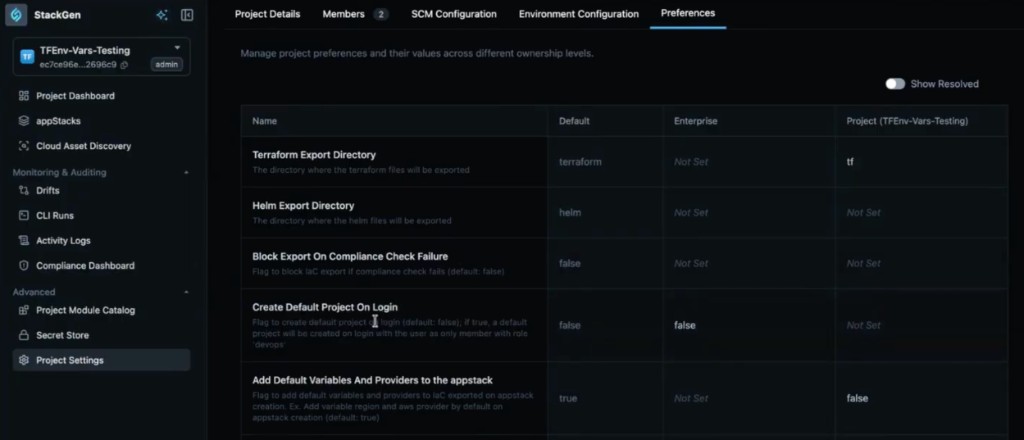
We've added an enterprise-level preference that allows the platform to automatically create a Default Project for new users the first time they log in. This feature supports the requirements for individual developers and partnerships using the platform.
Key Features
-
Automatic Setup - New users land in a pre-created project instead of an empty state.
-
Project Naming - Projects are automatically named following the pattern
default-project-followed by the user's username. -
Enterprise Control - This behavior is managed via an Enterprise level preference. The feature only functions when this specific preference is set to true.
-
Collaboration Support - Unlike the former personal workspaces, these default projects allow other users to be added, though they function similarly to personal projects in providing individual developer workspace access.
Why It Matters
By automatically provisioning a project, the platform removes the manual overhead for admins to create workspaces for every new user. It ensures that even individual developers have an immediate, governed landing project to begin their work.
Module Access Promotion
Click to view
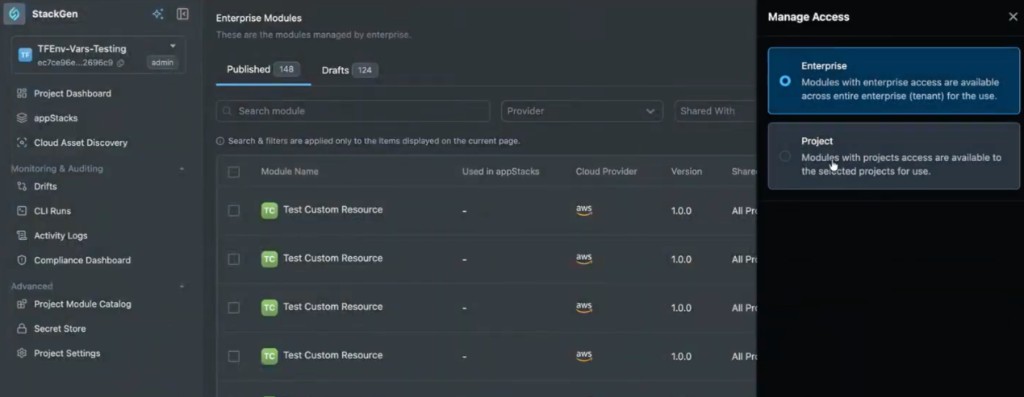
The StackGen Catalog has been enhanced to allow users to promote their modules directly within the Enterprise Module Catalog. Previously, if a module was shared only with specific projects, it could not be easily shared with the entire enterprise without deleting and republishing it.
Key Features
-
Manage Access - Users can now open a module in the catalog and select Manage Access to switch between Project and Enterprise visibility.
-
Multi-Project Sharing - When the access is set to Project, you can add and manage multiple specific projects that should have access to that module.
-
Enterprise-Wide Availability - Modules can now be switched to be shared with the entire enterprise directly, ensuring all projects within the organization can utilize them.
Why It Matters
This update allows project-level modules to be promoted to enterprise-wide visibility without republishing. It eliminates the need for repetitive manual work and ensures that modules can be governed and distributed efficiently as they mature from project-specific tools to enterprise standards.
StackGen Registry
Click to view
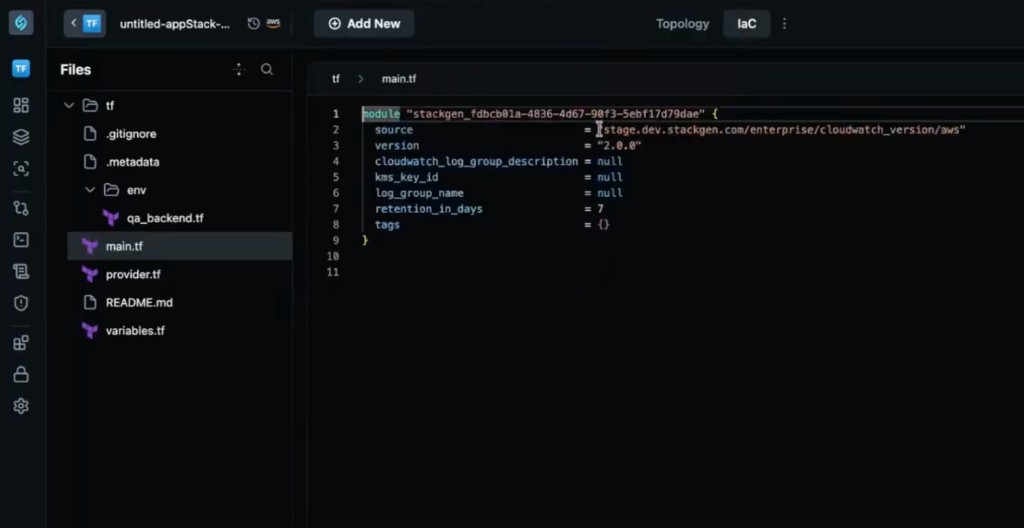
We've introduced a Module Source preference that defaults to the StackGen Registry for custom modules. This update helps the platform achieve parity with standard Terraform registries while providing better internal visibility.
Key Features
-
New Module Source Preference - Users can now choose how they want to source their modules through a dedicated preference.
-
Registry Hierarchy - The platform supports three primary module sources:
- StackGen Registry - Set as the default source for custom modules to improve tracking.
- Remote - Utilizes a remote Git URL for sourcing.
- Local - Supports local vendoring or inline module definitions.
-
Enhanced Data Insights - By routing custom modules through the StackGen registry, the platform can more effectively collect data on which modules are being utilized by customers.
-
Custom Module Support - This feature currently applies specifically to custom modules and does not include inbuilt StackGen modules or appStack-specific modules.
Why It Matters
Centralizing module sourcing improves governance, discoverability, and module usage tracking across environments. It provides a more streamlined way for administrators to manage module sources and for the platform to track usage patterns across different customer environments.
Custom Module Labels
Click to view
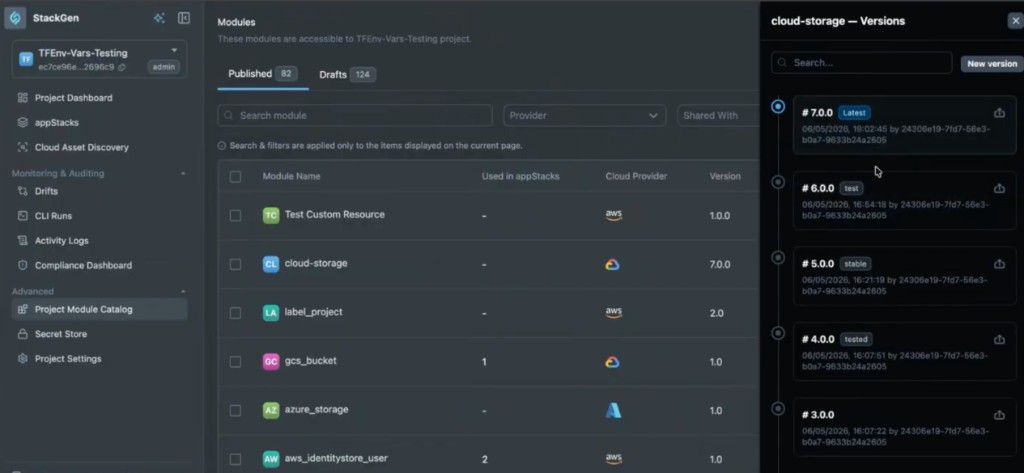
We've added support for Labels on custom modules, allowing teams to tag specific module versions with identifiers like stable, test, or production directly within the module catalog.
Key Features
-
Version Tagging - Users can manually add or remove labels on different versions of a custom module.
-
Latest Tag - A latest label is automatically applied to the most recently imported version of a module. This specific tag cannot be moved or deleted manually.
-
Dynamic Version Pinning - Instead of pinning an appStack to a static version number, users can pin it to a label (for example stable).
-
Automated Updates - appStacks pinned to a label automatically adopt the version currently associated with that label. This ensures that all consuming appStacks stay synchronized with the most current stable or latest definitions without manual intervention.
-
Broad Compatibility - This labeling system also applies to resource packs and snapshots, allowing them to be pinned to specific labels for consistent behavior.
Why It Matters
Labels provide a powerful way for infrastructure teams to manage module lifecycles. They enable developers to stay on approved, stable versions that can be updated globally by admins, reducing the need for manual version management across numerous appStacks.
What's Enhanced
IaC Defaults Preferences
Click to view
We've introduced a new Preference that allows admins to automatically include Default Provider Blocks and variables in all new appStacks. This ensures that infrastructure definitions are ready to run immediately upon creation, with complete baseline IaC instead of an empty export directory.
Key Features
-
Automated Provider Injection - When enabled, the platform automatically adds the necessary provider block (for example AWS, Azure, or Google) based on the cloud type chosen for the appStack, along with default variables where the preference applies.
-
Success by Default - This addresses cases where StackGen inbuilt modules (like an S3 bucket) would fail to plan because they lacked a required provider block. New appStacks no longer need manual provider wiring before the first successful plan.
-
Cloud-Specific Defaults - The platform provides the correct default format for the chosen cloud (GCP, Azure, or AWS) rather than defaulting every appStack to an AWS block.
-
Opt-out for Customization - The preference defaults to true to aid new users, but Admin and DevOps users can set it to false at tenant or project scope if they prefer a clean slate or use highly customized or private providers.
-
Broad Support - While intended to help with inbuilt modules, default blocks and variables also support custom modules by providing the baseline infrastructure wiring they need to function.
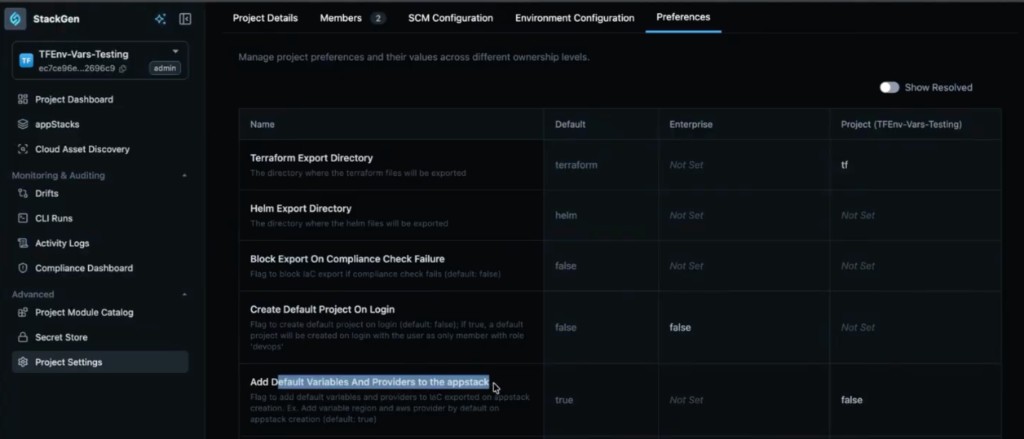
Why It Matters
Standardizing these defaults removes the manual boilerplate work of adding provider blocks and core variables for every new appStack. Plans are more likely to succeed the first time, deployment cycles start faster, and developers see less friction when they create or extend topologies.
Sidebar Menu Consolidation
Click to view
We have updated the structure of the sidebar to improve navigation by consolidating various options into two primary, distinct menus. This reorganization separates personal user settings from organizational management tools to create a cleaner interface.
Key Changes
-
User Menu - This new consolidated menu at the bottom of the sidebar now contains personal and profile-related items including profile details, Personal Access Tokens (PAT), MCP configuration, and documentation.
-
Enterprise Configuration - This section now groups all administrative and governance tools in one place, including projects, members, policy tab, and governance.
-
Menu Repositioning - Previously, options like What's New (Change Log) and general settings were scattered; they are now integrated into this more logical two-menu system.
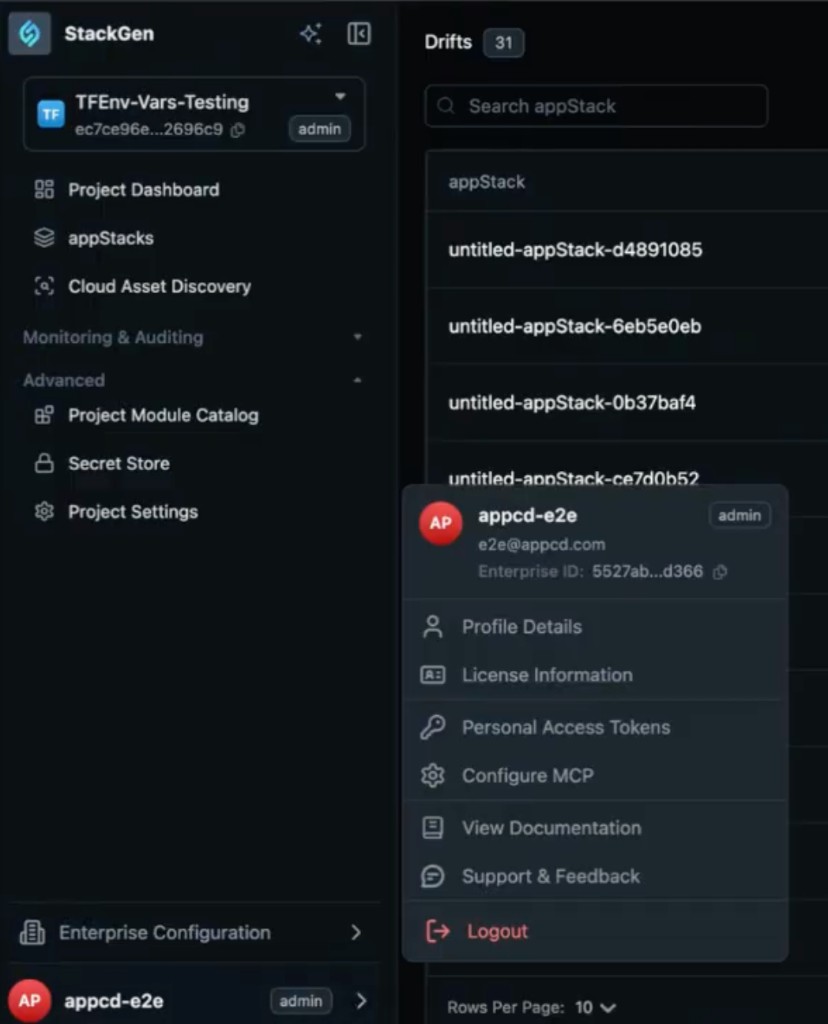
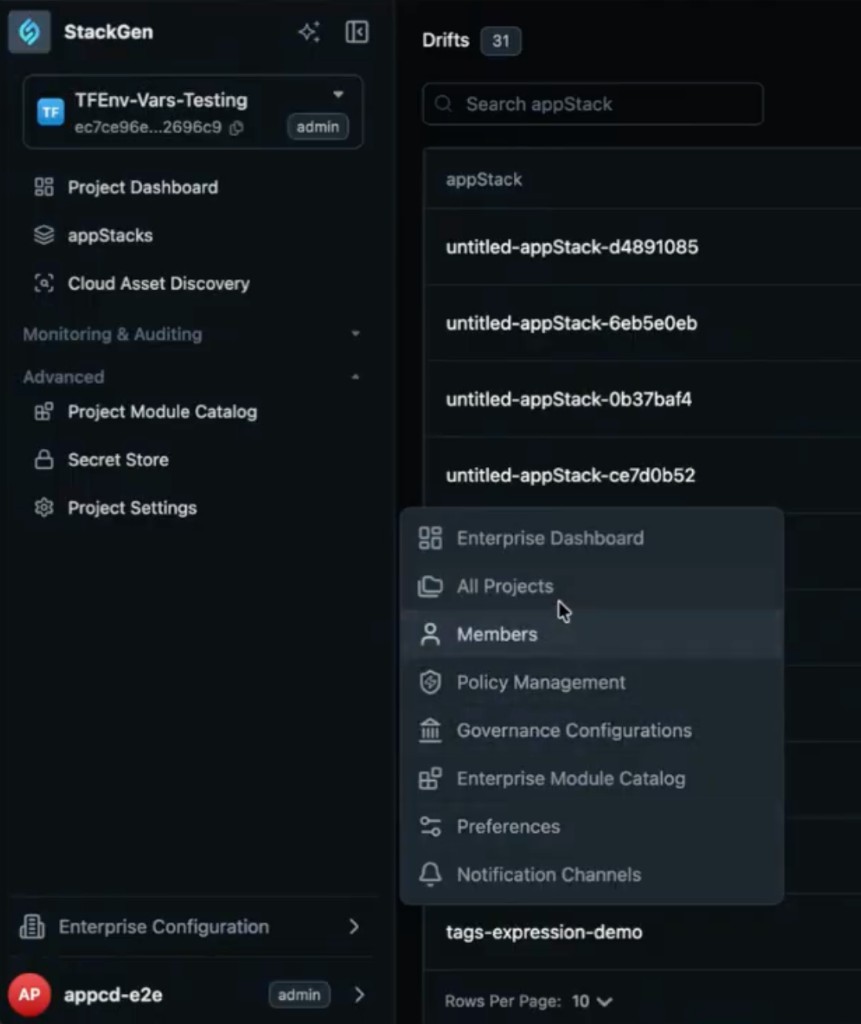
Why It Matters
Consolidating the sidebar makes it easy for you to navigate by grouping related tasks together. You can quickly distinguish between managing your own profile and tokens versus managing enterprise-level projects and policies.
Environment Configuration in the Audit Log
Click to view
The Audit Manager has been enhanced to include environment configuration actions in the activity logs. Previously, logs were primarily limited to topology-level actions like creation or updates.
Key Features
-
Expanded Audit Coverage - Manual changes made to environment configurations are now captured and displayed in the activity logs.
-
Detailed Log Metadata - Logs now include critical details such as who performed the action, what was created (for example a default environment), and the specific orchid context it was created in.
-
Visibility - This ensures that environment-level changes are no longer silent actions and can be tracked for compliance and troubleshooting.
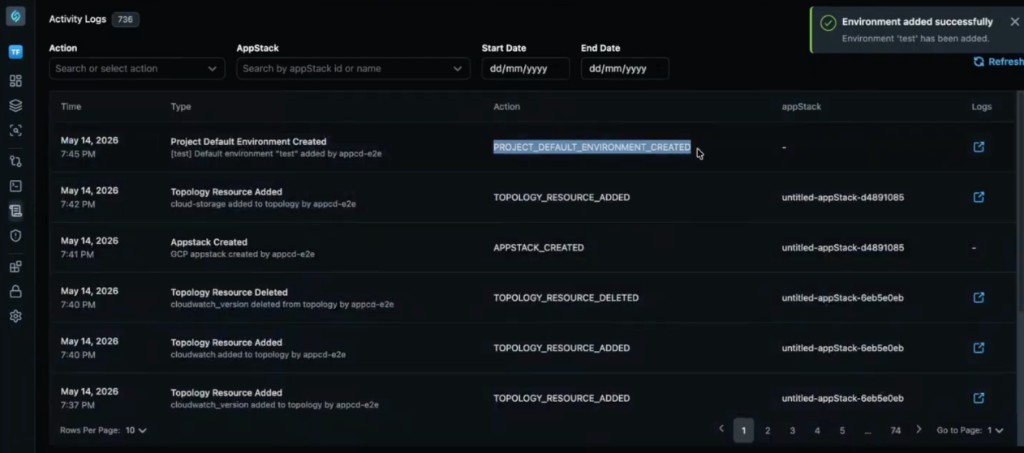
Why It Matters
By recording environment setup and modifications in the activity table, platform admins gain a complete audit trail of how an infrastructure's runtime context is being managed beyond just the visual topology.
What's Changed
Removal of Version Suffixes
Click to view
Since the platform has moved away from appStack versioning, we have removed its occurrence in several areas of the interface and CLI to reduce clutter.
Key Changes
-
Activity Logs - The version suffixes (such as
-v1or-v2) have been removed from the activity table. Previously, these suffixes were added to action entries even if multiple versions were not present. -
CLI Drift Commands - In the CLI tab of an appStack, the drift detection commands have been modified to remove the version information suffix.
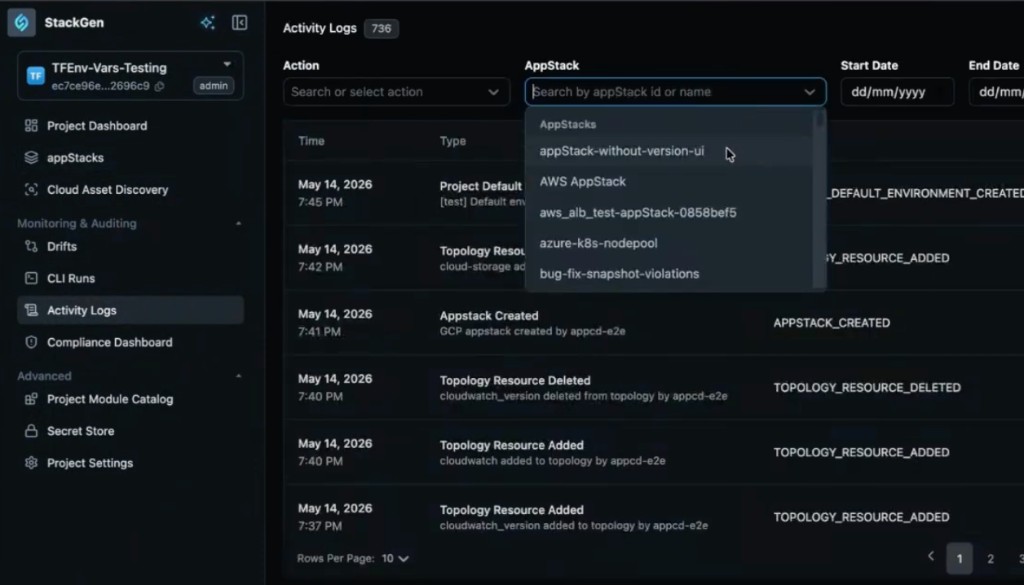
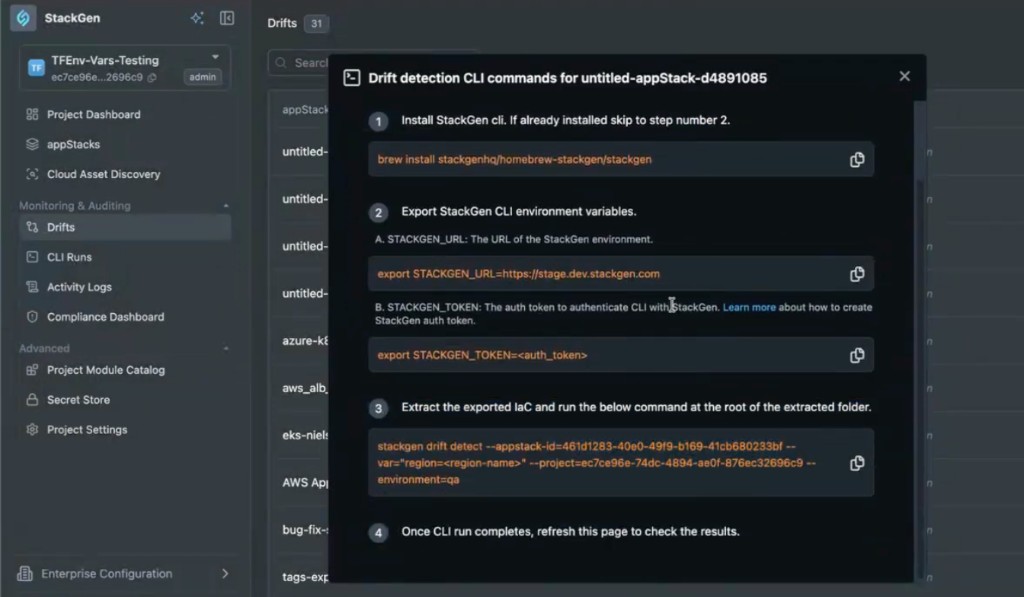
Why It Matters
Removing these redundant suffixes simplifies the UI and ensures that activity logs and CLI commands are easier to read and copy without extra versioning noise.
What's Fixed
IaC export compliance preference
Click to view
We have fixed a bug in Preferences where the block export on compliance failure setting did not affect export behavior. Previously, toggling the preference to true or false had no impact on whether an appStack could be exported.
IaC export now respects the compliance violation preference. When the block is enabled and policy violations are present on the canvas, export is blocked. When the preference allows export, exports proceed according to your configuration.
GCP module action count mismatch
Click to view
We have fixed a UI bug in the internal GCP module where the actions required count in the module header did not match the count shown elsewhere in the interface.
The header count now aligns with the total actions required across the module surfaces, so you see one consistent number while you finish GCP configuration.
Terraform expression empty values
Click to view
We have fixed an issue where saving an empty attribute value with Terraform expression mode enabled returned an error even when clearing the field was intentional.
You can now save an empty value in expression mode without a spurious validation failure when you remove an expression or leave a field unset during topology edits.
CLI Run project switch URL
Click to view
We have fixed an issue where switching projects from a CLI Run details page left a stale CLI Run ID in the URL. That mismatch broke navigation when you opened runs or shared links after changing project context.
Changing project from CLI Run details now updates the URL and view so you stay on a valid run for the selected project.
appStack filter search on activity logs
Click to view
We have fixed an issue where appStack filter search on the activity logs page did not return or narrow results correctly.
The appStack filter now works as expected when you search activity logs by appStack, so audits and troubleshooting start from the right scope.