GitLab CI
GitLab CI
You can use Shipyard's GitLab CI/CD component to run GitLab CI jobs on ephemeral environments which were automatically deployed by Shipyard, authenticating into them via a bypass token. The component adds a job that waits for the Shipyard environment of the pipeline's branch or merge request, then passes its URL and bypass token to later jobs, so they can run E2E tests where authentication via OAuth is normally required.
Before you start
Get your token
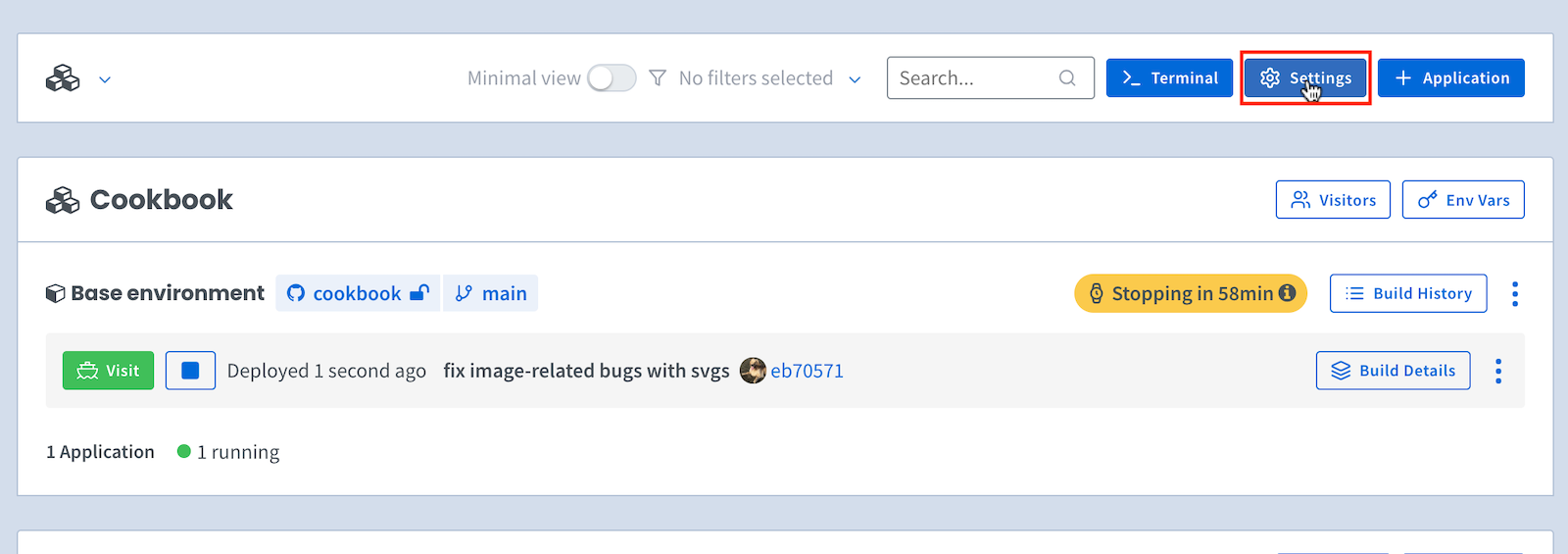
To access your Organization Settings page, click on Settings at the top of your main dashboard:
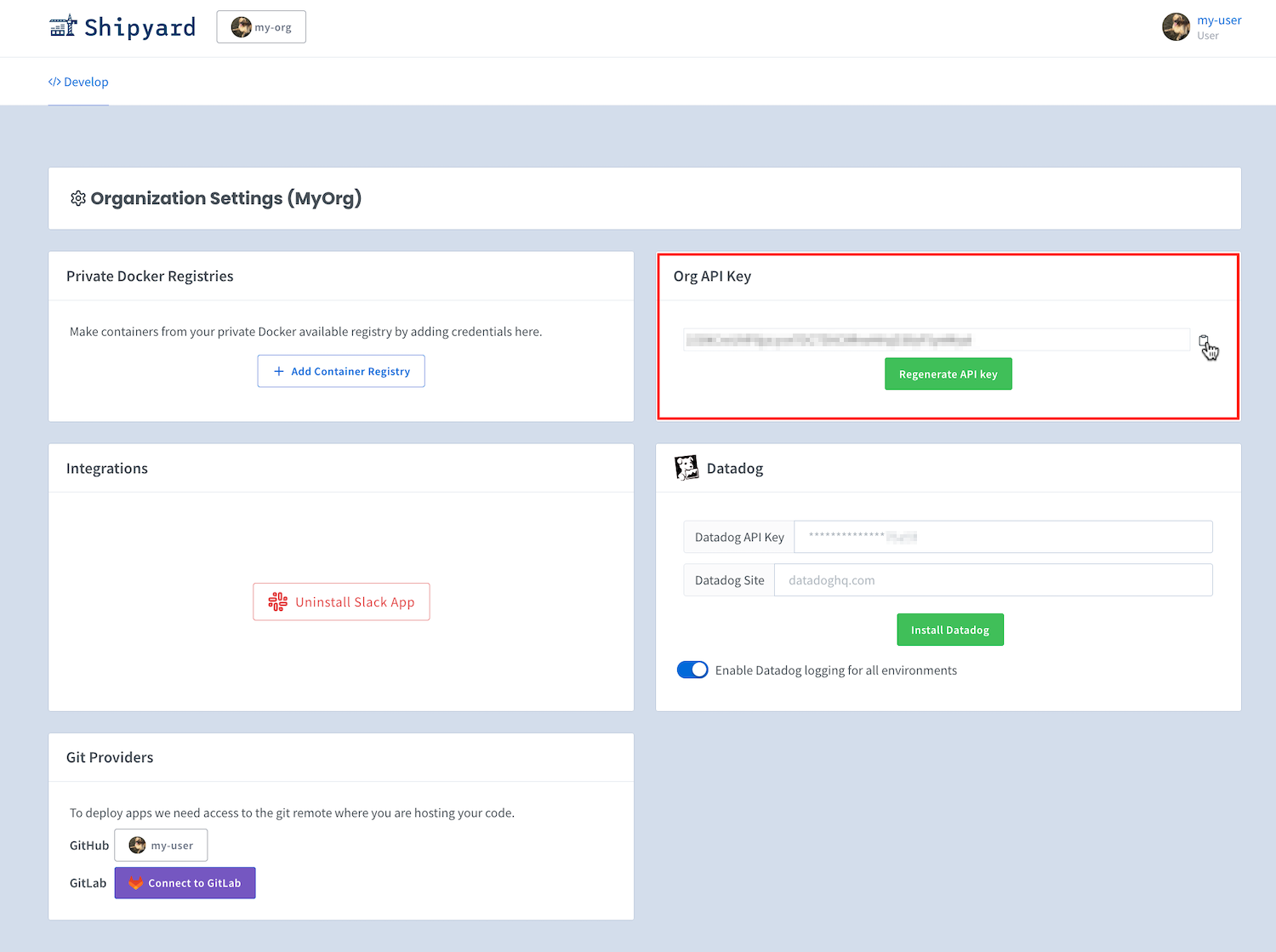
If you have the Shipyard API enabled for your organization, you can grab its token by going to the Org Settings page and clicking the copy button:
Store the token in GitLab
In your GitLab project, go to Settings > CI/CD > Variables and add a variable:
- Key:
SHIPYARD_API_TOKEN - Value: your Shipyard API token
- Visibility: Masked
- Protect variable: leave unchecked, so merge request and feature branch pipelines can use it
How to use
Include the component, then read its variables from a job that needs it:
include:
  - component: gitlab.com/shipyardbuild/ci-component/fetch-shipyard-env@1.0.0

e2e:
  stage: test
  needs: [shipyard]
  image: node:20
  script:
    - export CYPRESS_BASE_URL="$SHIPYARD_ENVIRONMENT_URL"
    - export CYPRESS_BYPASS_TOKEN="$SHIPYARD_BYPASS_TOKEN"
    - npm ci
    - npm test
The component's job is named shipyard and runs in the test stage by default.
Run it on branch or merge request pipelines. On a merge request pipeline, the job looks up the environment of the merge request's source branch. Tag pipelines are rejected, since Shipyard environments are per branch.
Keep the project's job timeout (Settings > CI/CD > General pipelines > Timeout) above the component's timeout-minutes, so a slow environment fails with Shipyard's message instead of a GitLab timeout.
Inputs
| Input | Description | Required | Default |
|---|---|---|---|
| job-name | Name of the job the component adds | no | shipyard |
| stage | Stage the job runs in | no | test |
| timeout-minutes | Minutes to wait for the environment before failing | no | 60 |
| app-name | Only match environments of this Shipyard application | no | |
| api-url | Shipyard API base URL | no | https://shipyard.build |
| image | Image the job runs; pin a version for reproducible pipelines | no | ghcr.io/shipyard/ci-plugin:1 |
| artifact-expire-in | How long the job's dotenv artifact is kept | no | 1 day |
include:
  - component: gitlab.com/shipyardbuild/ci-component/fetch-shipyard-env@1.0.0
    inputs:
      timeout-minutes: 30
      app-name: frontend
To look up a different repository or branch than the pipeline's, set SHIPYARD_REPO_OWNER, SHIPYARD_REPO_NAME or SHIPYARD_BRANCH as CI/CD variables.
Variables
Jobs that needs the component's job get these variables:
| Variable | Description |
|---|---|
| SHIPYARD_ENVIRONMENT_URL | URL of the ephemeral environment |
| SHIPYARD_ENVIRONMENT_ID | ID of the ephemeral environment |
| SHIPYARD_BYPASS_TOKEN | Token to bypass authentication |
| SHIPYARD_ENVIRONMENT_COMMIT_HASH | Commit the environment was built from, when known |
SHIPYARD_DOMAIN_<NAME> | URL of each routed service, one variable per service. <NAME> is the service name, so it varies by app (for example SHIPYARD_DOMAIN_API) |
<NAME> is the Compose service name in upper case, with every character other than a letter or digit replaced by _. For example, service api-gw gives SHIPYARD_DOMAIN_API_GW. Services that share a host through path routes all report that host.
About the bypass token
GitLab passes variables to later jobs through a dotenv artifact, and doesn't mask variables that come from one. The component limits who can read it:
- The artifact is only available to project members with at least the Developer role, and expires after
artifact-expire-in. - The component never prints the token. Avoid echoing
$SHIPYARD_BYPASS_TOKENin your own jobs.