Docker Compose
Docker Compose
Shipyard parses all the data it needs from Compose services and volumes.
Supported service labels for all environments
The following labels are available on all environments (Shipyard-hosted or user-hosted), unless specified:
Initialization
shipyard.init
Command to run before your service starts
Example:
shipyard.init: 'python manage.py db migrate'
Jobs
shipyard.job
Run this service as a Job
Example:
shipyard.job: true
shipyard.job.schedule
Run this service as a scheduled CronJob
Example:
shipyard.job.schedule: '*/2 * * * *'
shipyard.job.*
Specify additional Kubernetes job labels
Example:
cronjob:
    labels:
      shipyard.job: true
      shipyard.job.schedule: '*/2 * * * *'
      shipyard.job.restartPolicy: Never
      shipyard.job.backoffLimit: 2
      shipyard.job.activeDeadlineSeconds: 60
      shipyard.job.successfulJobsHistoryLimit: 5
      shipyard.job.failedJobsHistoryLimit: 3
      shipyard.job.concurrencyPolicy: Forbid
Liveness
shipyard.liveness.exec.command
The command to be executed, formatted as a JSON array
Example:
shipyard.liveness.exec.command: '["bash", "some-script.sh"]'
shipyard.liveness.failure_threshold
The number of probe attempts before the container is restarted
Example:
shipyard.liveness.failure_threshold: 1
shipyard.liveness.http.headers
JSON string of headers to include with your probes
Example:
shipyard.liveness.http.headers: '{"x-reason": "health"}'
shipyard.liveness.http.path
The GET path the probe should hit
Example:
shipyard.liveness.http.path: /healthz
shipyard.liveness.initial_delay
The number of seconds to wait before starting probes
Example:
shipyard.liveness.initial_delay: 10
shipyard.liveness.period
The number of seconds between your probes
Example:
shipyard.liveness.period: 15
shipyard.liveness.timeout_seconds
The number of seconds after which the probe times out
Example:
shipyard.liveness.timeout_seconds: 10
Multi-repo dependencies
shipyard.depends_on
Specifies cross-repository dependencies for multi-repo applications. Use this label when your application spans multiple repositories and a service in one repo depends on services from another repo.
Important: This label is specifically for multi-repo setups. For dependencies within the same repository, use the standard Docker Compose depends_on property instead.
How it works:
- When Shipyard builds an environment, it checks for
shipyard.depends_onlabels - Services with this label will wait for the specified services from other repositories to be ready before starting
- The value should reference the service name as defined in the other repository's Compose file
Example:
If you have two repositories:
frontend-repo- Contains your frontend applicationbackend-repo- Contains your API and database services
In your frontend-repo docker-compose.yml:
services:
  frontend:
    build: .
    labels:
      shipyard.route: '/'
      shipyard.depends_on: 'api'
    ports:
      - 3000:3000
In your backend-repo docker-compose.yml:
services:
  api:
    build: .
    labels:
      shipyard.route: '/api'
    depends_on:
      - db
    ports:
      - 8080:8080

  db:
    image: postgres:15
In this example, the frontend service will wait for the api service (from backend-repo) to be ready before starting.
Multiple dependencies:
You can specify multiple cross-repo dependencies using a comma-separated list:
shipyard.depends_on: 'api,auth-service'
Primary route
shipyard.primary-route
If enabled, Shipyard will route a user to this service when they click the green Visit button on an environment (useful for multi-domain environments)
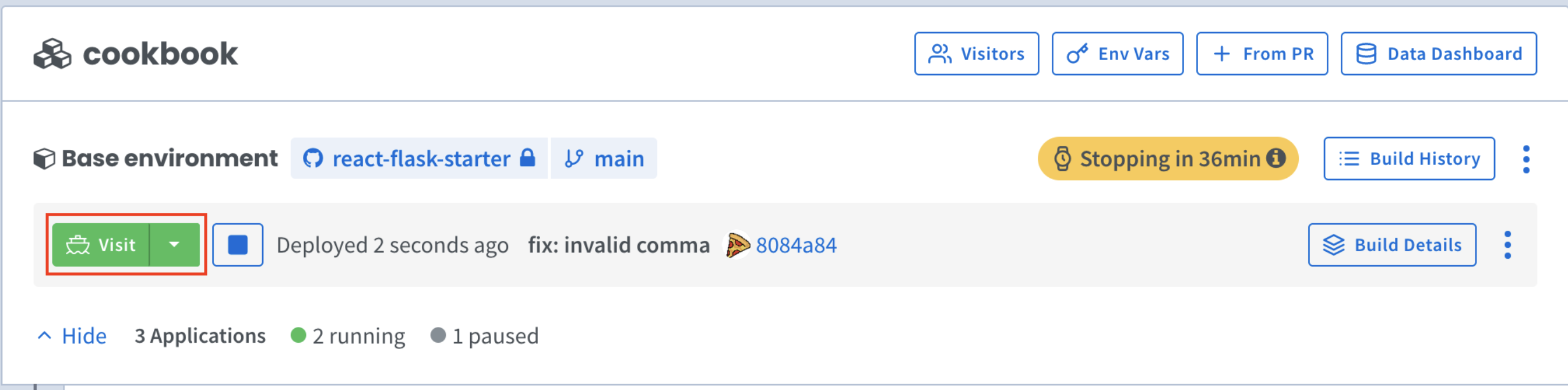
Example:
shipyard.primary-route: true
Readiness
shipyard.readiness.exec.command
The command to be executed, formatted as a JSON array
Example:
shipyard.readiness.exec.command: '["bash", "some-script.sh"]'
shipyard.readiness.failure_threshold
The number of probe attempts before the container is considered unready and stops receiving traffic
Example:
shipyard.readiness.failure_threshold: 1
shipyard.readiness.http.headers
JSON string of headers to include with your probes
Example:
shipyard.readiness.http.headers: '{"x-reason": "health"}'
shipyard.readiness.http.path
The GET path the probe should hit
Example:
shipyard.readiness.http.path: /healthz
shipyard.readiness.initial_delay
The number of seconds to wait before starting probes
Example:
shipyard.readiness.initial_delay: 10
shipyard.readiness.period
The number of seconds between probes
Example:
shipyard.readiness.period: 15
shipyard.readiness.success_threshold
The number of consecutive successes for the probe to be considered successful after having failed
Example:
shipyard.readiness.success_threshold: 1
shipyard.readiness.timeout_seconds
The number of seconds after which the probe times out
Example:
shipyard.readiness.timeout_seconds: 10
Routing
shipyard.route
Send HTTP requests with this prefix to this service's first defined container port
Example:
shipyard.route: '/'
shipyard.route.{{ path_of_route }}
Specify any number of named routes
Example:
shipyard.route.api: '/api'
shipyard.route.oauth.redirect-uri1
The callback path the Callback Gateway should send requests to
Example:
shipyard.route.oauth.redirect-uri: /callback/oauth/github
shipyard.route.oauth.{{ name }}.redirect-uri1
To specify any number of callback paths for Callback Gateway
Example:
shipyard.route.oauth.google.redirect-uri: /callback/oauth/google
shipyard.route.rewrite1
If enabled, prepend the shipyard.route path prefix to requests that don't have it
Example:
shipyard.route.rewrite: true
shipyard.host.{{ name }}
In addition to the default URL generated for a service, expose any number of additional URLs (with optional named route and port defined), formatted as a JSON string.
| Options | Data type | Description | Default |
|---|---|---|---|
| prefix | Str - Req | Must start and end with an alphanumeric character, can contain hyphens | n/a |
| route | Str - Opt | Must be a valid route beginning with /, with no query parameters | shipyard.route label value |
| port | Int - Opt | Must be exposed in the Compose definition | First exposed port in Compose service |
Examples:
shipyard.host.api: '{ "prefix": "api" }'
Creates an additional URL prepended with api- mapped to the service's default route (specified by shipyard.route label) and first defined container port.
ex: api-flask-pr1.dev.docker.shipyard.host
shipyard.host.api-with-route: '{ "prefix": "api", "route": "/api/v1" }'
Creates an additional URL prepended with api- and named route /api/v1.
Uses the first defined container port as a port is not specified.
ex: api-flask-pr1.dev.docker.shipyard.host/api/v1
shipyard.host.api-with-port: '{ "prefix": "api", "port": 9090 }'
Creates an additional URL prepended with api- mapped to the defined port on the service.
Uses the default route as a named rotue is not specified.
ex: api-flask-pr1.dev.docker.shipyard.host
shipyard.host.api-with-route-and-port: '{ "prefix": "api", "route": "/api/v1", "port": 9090 }'
Creates an additional URL prepended with api- mapped to the defined named route and port on the service.
ex: api-flask-pr1.dev.docker.shipyard.host/api/v1
Workload spawner
shipyard.workload-spawner
Lets this service create Kubernetes Pods, Services, Secrets and NetworkPolicies in its own environment at runtime. Use it for tools that launch their own containers, such as agent frameworks that start a provider container per integration.
This feature is off by default. Contact support@stackgen.com so we can enable it for your organization. On user-cloud clusters it requires Kubernetes 1.30 or later.
Example:
shipyard.workload-spawner: true
How it works:
- The labeled service runs as a Kubernetes service account that can create, read, update and delete Pods, Services, Secrets and NetworkPolicies in the environment's namespace. Other services in the environment keep their default permissions.
- Only the service with this label gets these permissions. It can't access other environments or anything outside its namespace.
- Pods it creates are deleted automatically when the service's pod is deleted or replaced, including when the environment is stopped or redeployed. A container restart inside the same pod doesn't remove them.
- Services, Secrets and NetworkPolicies it creates remain until the environment is deleted.
Restrictions on created resources:
To keep environments isolated, requests from this service are rejected if they break any of the following rules:
- Pods must:
- run as the namespace's
defaultservice account - use only
configMap,secret,emptyDir,projectedanddownwardAPIvolumes (no persistent volumes or host paths) - not be privileged, use the host network, PID or IPC namespaces, or bind host ports
- not add Linux capabilities beyond the Kubernetes baseline set, or set sysctls or unconfined seccomp, AppArmor or SELinux profiles
- not set
nodeName, a system priority class, or thereleaseorshipyard-typelabels
- run as the namespace's
- Services must be
ClusterIP(noNodePort,LoadBalancerorExternalName) and can't setexternalIPs. - Secrets can't be service account token secrets.
- Resources managed by Shipyard, such as your environment's Services and Secrets, can't be changed or deleted.
A rejected request returns an error that names the rule, for example:
ValidatingAdmissionPolicy 'workload-spawner-pods' ... denied request: workload-spawner pods may not use host namespaces
Each environment that uses this label can have at most 100 pods, 100 services, 100 secrets and 100 NetworkPolicies, including the ones Shipyard creates.
Supported service labels for Launch Environments (User-cloud Environments)
The following labels are only available when deploying environments to a user's cloud:
CloudSQL
shipyard.cloudsql.sidecar
If enabled, start this container with a GCP CloudSQL sidecar
Example:
shipyard.cloudsql.sidecar: true
Deploying
shipyard.deploy.disk.size
Allocate a disk of the specified size to serve as this volume
Example:
shipyard.deploy.disk.size: 10Gi
Lifecycle
shipyard.lifecycle.postStart.exec.command
Command to run on Kubernetes post-start event (as JSON string)
Example:
shipyard.lifecycle.postStart.exec.command: "[\"sh\", \"/srv/poststart.sh\"]"
shipyard.lifecycle.preStop.exec.command
Command to run on Kubernetes pre-stop event (as JSON string)
Example:
shipyard.lifecycle.preStop.exec.command: "[\"sh\", \"/srv/prestop.sh\"]"
Security context
shipyard.securityContext
Direct definition of Kubernetes security context (as JSON string)
Example:
shipyard.securityContext: '{"capabilities": {"add": ["SYS_ADMIN"]}}'
Pod anti-affinity
shipyard.remote.podAntiAffinity
Encourages replicas within the same deployment to schedule on different nodes.
Example:
shipyard.remote.podAntiAffinity: true
Pods have a label component: {{ .deploymentName }}, so this sets a k8s anti-affinity deployment spec like so:
affinity:
  podAntiAffinity:
    preferredDuringSchedulingIgnoredDuringExecution:
    - weight: 75
      podAffinityTerm:
        topologyKey: "kubernetes.io/hostname"
        labelSelector:
          matchExpressions:
          - key: component
            operator: In
            values:
            - {{ .deploymentName }}
Supported service properties
The following Compose service properties are supported:
| build.context | deploy.replicas | image |
| build.dockerfile | entrypoint | labels |
| command | env_file | ports |
| container_name | environment | volumes |
| depends_on | expose | working_dir |