Module Preview and Stability Fixes
This release (v2026.9.6) makes it easier to inspect module code before you use it, and cleans up a few everyday UI snags. Here's what you can now do:
- Preview module code in a read-only editor from the Module Catalog and the appStack canvas.
- Browse appStacks without flicker when a project has governance assigned.
- Fill Jira project, assignee, and label pickers when you use a scoped Atlassian API token.
Here's everything in this release:
| Area | Update | |
|---|---|---|
| What's New | Modules | Module Preview |
| What's Fixed | appStacks | appStack Table Flicker |
| Jira | Jira Scoped Token Pickers |
What's New
Module Preview
Click to view
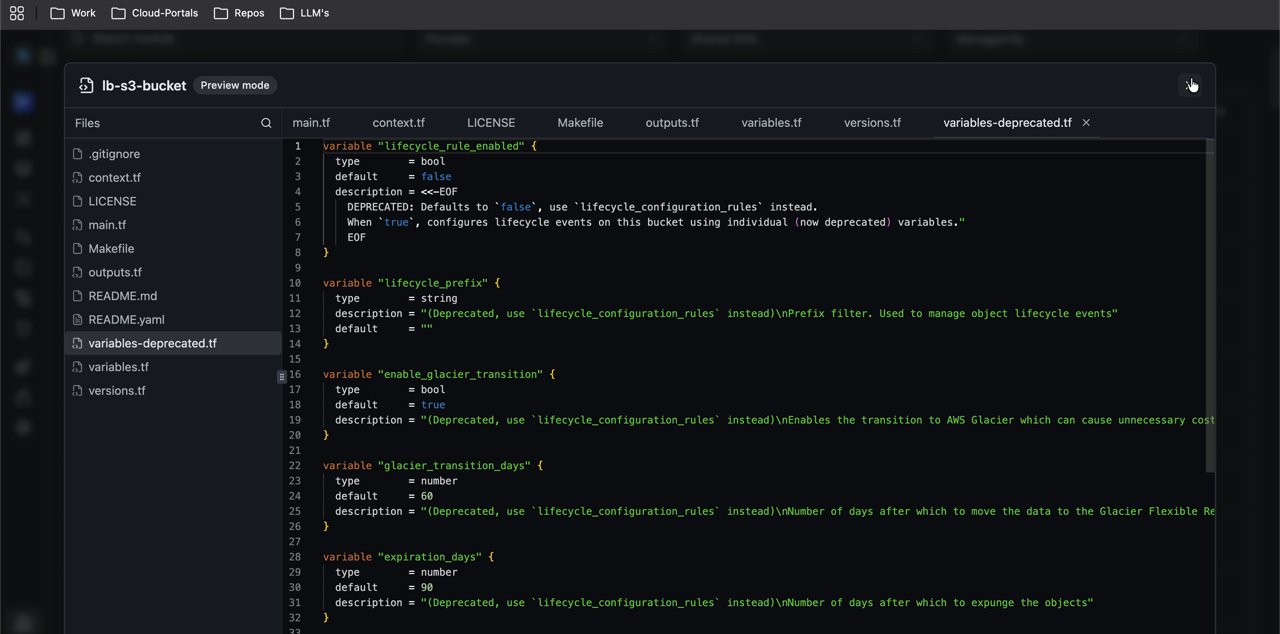
Want to check what a module contains before you add it to an appStack? You can now open a read-only preview of the module code without leaving StackGen.
Preview opens a module editor view where you can browse files such as main.tf, variables.tf, and outputs.tf.
Where you can preview
- From the Enterprise or Project Module Catalog: open a module's Actions menu and choose Preview.
- From an appStack: open Preview on a custom module or an appStack-owned module in the resource panel, or when you hover it on the canvas.
Where you can't preview
- Preview is not available for StackGen built-in resources (the ones that ship with the product) in the resource panel or on the canvas.
For catalog and editor workflows, see Module Catalog and Module Editor.
What's Fixed
appStack Table Flicker
Click to view
Previously, if a project had governance assigned, the appStacks table would keep flickering. The table now stays steady, so you can browse and open appStacks.
Jira Scoped Token Pickers
Click to view
Previously, if you connected Jira with a scoped Atlassian API token, the Projects, Assignees, and Labels pickers could stay empty. Those pickers now load correctly with scoped tokens, so you can choose a project, assignee, and labels as usual.
For connecting Jira, see Integrations.