appStack Agent
This feature is behind a feature flag and is currently enabled only for select customers. Contact support@stackgen.com or your Customer Service Manager for access.
Overview
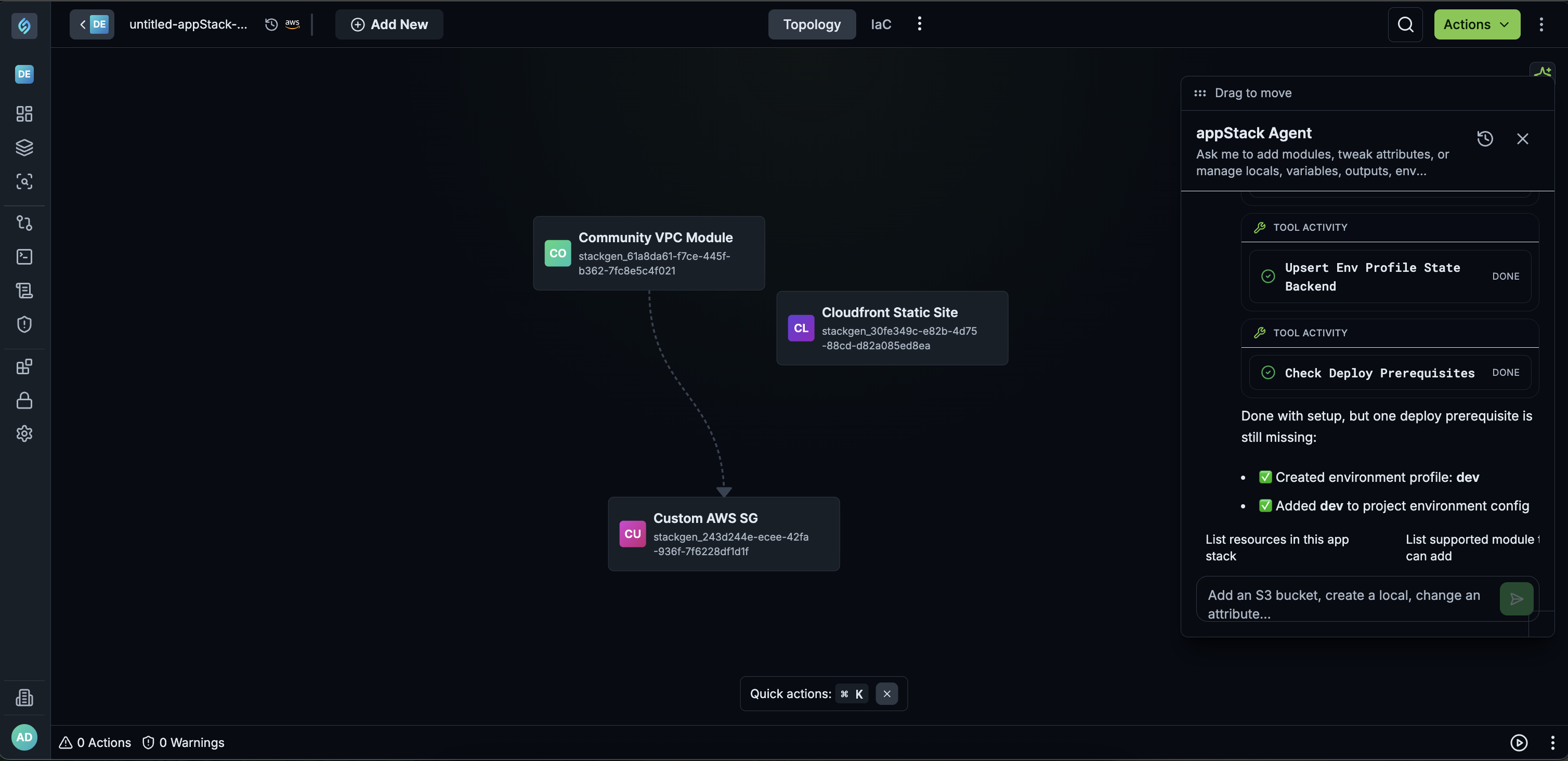
The appStack Agent lets you describe what you want to build in plain language, and have StackGen translate that intent into topology updates, Terraform configuration changes, and run actions on the same canvas. Instead of stitching resources manually, you can prompt, review, and iterate faster with a safer rollback path through snapshots.
What you can do with the appStack Agent
The appStack Agent is an interactive canvas agent built into the visual topology interface. It translates plain-language commands into visual infrastructure nodes, Terraform configurations, and deployment pipeline runs. You can use it to add and connect modules, manage Terraform configuration blocks, and run plan or deploy actions directly from the canvas.
Use it to eliminate manual wireup, speed up infrastructure scaffolding, and safeguard modifications.
- Eliminate manual wireup: Avoid manually searching through UI menus, linking outputs, or writing repetitive Terraform block code.
- Speed up infrastructure scaffolding: Rapidly generate multi-resource architectures with connected dependencies in seconds.
- Safeguard modifications: Automatic state snapshots are captured prior to applying agent-generated changes so work can be rolled back safely if needed.
Use Cases
- Prototyping Infrastructure: Quickly drafting a cloud architecture on canvas without navigating manual setup forms.
- Configuring Environments: Automatically creating isolated environment profiles and assigning remote state storage backends.
- Automated CI/CD Validation: Running execution plans against targeted staging or QA environments directly from the canvas interface.
Why It Matters
Building and configuring an appStack usually means jumping across UI menus to add modules, connect resources, set Terraform blocks, and then run plan or deploy. With the appStack Agent, those topology and configuration tasks become a single conversational request on the canvas, while automatic snapshots keep a rollback path if an agent-driven change needs to be undone.
Core Capabilities
Manage topology
- Adding Modules: Prompt the agent to place single or multiple modules onto the canvas (e.g.,
Add an S3 bucket and Athena to the appStack). - Configuring and Connecting Modules: Set attributes, apply default configurations, and wire inputs from one resource output to another (e.g.,
Configure the modules with sensible defaults and also connect the two). - Deleting Modules: Remove infrastructure components and their associated bindings from the active stack (e.g.,
Delete the Athena resource).
Manage Terraform configuration
Manage variables, local values, environment profiles, and state backends across the appStack's Terraform Configuration tabs:
| Configuration Tab | Action Example | Agent Execution |
|---|---|---|
| Variables | Add a variable named bucket_name and then use its value to configure the bucket name | Creates a new variable and updates the target module attribute to ${var.bucket_name}. |
| Locals | Use the local name for the bucket | Binds the module configuration to an existing or created local value ${local.bucket_name}. |
| Environments & State Backend | Add a new environment called ai and add a sensible backend for it with S3 config | Creates the target environment tab and sets up an encrypted AWS S3 remote state backend. |
Supported configuration areas include: Variables, Locals, Outputs, Providers, State Backend, and Environments.
Plan and Deploy Actions
When valid cloud credentials are provided in the environment profile, you can trigger run actions directly through the agent prompt:
- Plan: Prompt the agent to run an infrastructure plan (e.g.,
Run plan for the appStack against qa environment). The agent validates deployment prerequisites, processes the run, and displays summary details including added, changed, or destroyed resources. - Deploy: Execute deployment runs directly against designated cloud environments.
Example Prompts and Tips
Click to view
Output quality depends on how the action is described. Specific, topology-oriented prompts work best. Generic requests outside topology actions will fail. Example prompts
Build an infra for a simple web applicationAdd an S3 bucket and Athena to the appStackConfigure the modules with sensible defaults and also connect the twoDelete the Athena resourceAdd a variable named bucket_name and then use its value to configure the bucket nameUse the local name for the bucketAdd a new environment called ai and add a sensible backend for it with S3 configRun plan for the appStack against qa environment