IaC from Templates
An appStack template is an appStack that you mark as a blueprint. When you use a template to create a new appStack, StackGen copies resources, Environments, Variables, and Locals from that template appStack into the new appStack. After the initial creation, the new appStack operates independently.
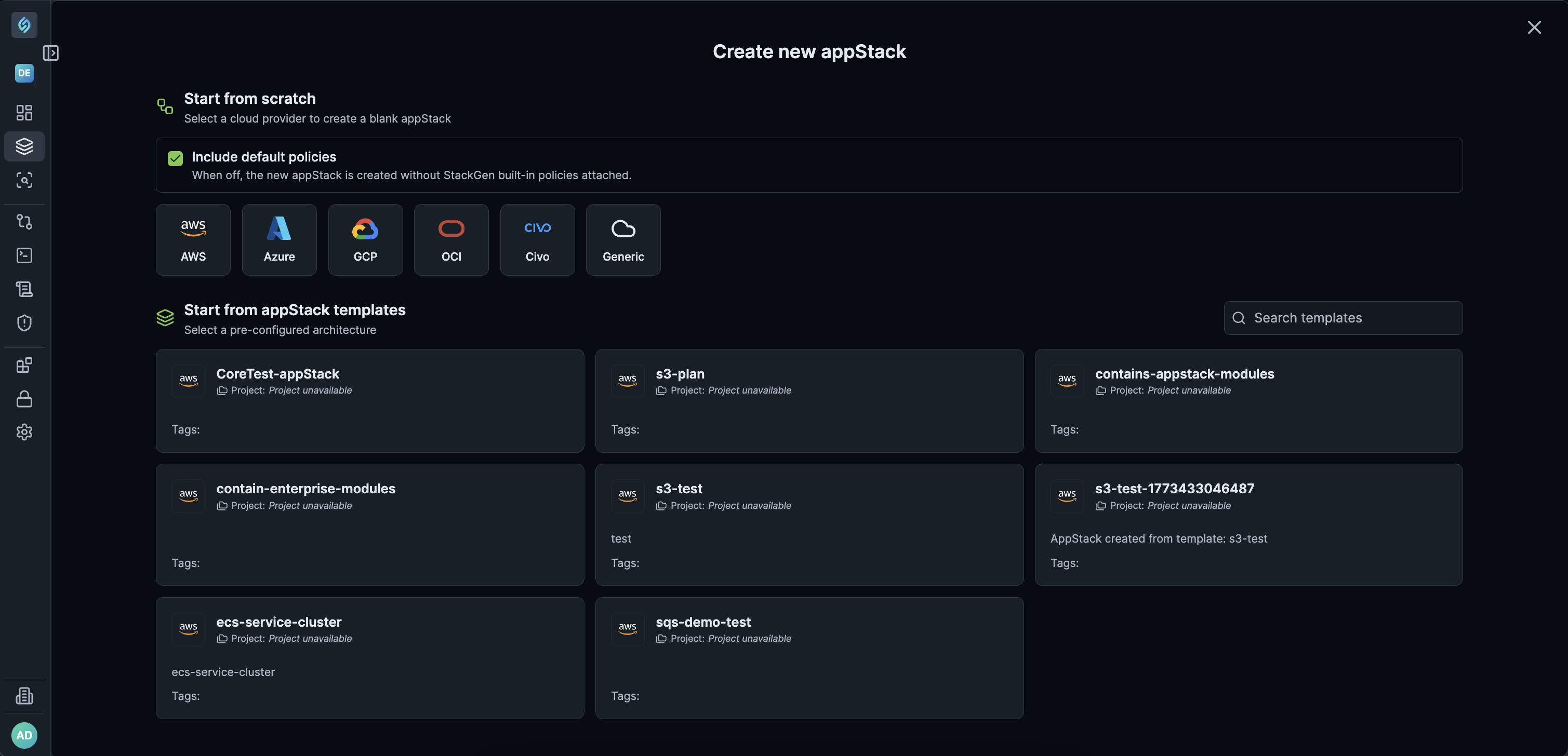
Templates are shared at the enterprise (tenant) level. Any appStack marked as a template in any project is available under Start from appStack templates across every project in your tenant.
Project-Level Templates Are No Longer Available
Click to view
appStack Templates at the project level have been discontinued. You no longer maintain a separate template copy per project.
Templates are managed and shared at the enterprise level. Mark an appStack as a template once, and teams in any project in the tenant can create new appStacks from it (subject to module compatibility).
How Enterprise-Level Template Sharing Works
Previously, appStack templates were restricted to the project where they were created. With enterprise-level template sharing, any appStack marked as a template in any project becomes available across the entire tenant. Teams in different projects can reuse the same standard architectures without recreating configurations manually.
Who Can Manage Template Creation
Only Admins and DevOps can create an appStack template (mark an appStack as a template). Developers cannot create templates. Developers can still create new appStacks from templates that already exist.
| Role | Capabilities |
|---|---|
| Admins and DevOps | Mark an appStack as a template (create a template). Create new appStacks from templates. |
| Developers | Create new appStacks from existing templates. Cannot mark an appStack as a template or otherwise create a template. |
Why and When to Use
Why
- Centralization: Eliminates the need to copy-paste or duplicate configurations across multiple isolated projects.
- Consistency: Ensures all teams in an organization construct infrastructure using pre-approved patterns and compliant configurations.
When
- Standardizing infrastructure layouts (for example, core VPC networks, serverless baselines, or Kubernetes clusters) across multiple engineering teams.
- Onboarding new projects quickly by launching pre-configured appStacks from the template gallery.
- Allowing team members to use templates created by users who are not part of their specific project.
How Templates Work
When you create a new appStack from a template, StackGen performs a one-time copy of the template's configuration.
Inheritance and updates
-
Initial copy: The new appStack inherits all Environments, Variables, and Locals exactly as they are saved in the template. Topology, resources, output definitions, and Terraform configurations are also cloned when creation succeeds.
-
No auto-updates: If you change a template later, existing appStacks created from it do not change. Only new appStacks created after the update will reflect the changes.
-
Enterprise scope: Templates are available across every project in your tenant. They are no longer locked to the project where they were created.
Snapshots: StackGen does not carry forward snapshot history from the template appStack when you create a new appStack from a template. The new appStack starts its own snapshot timeline after create. For how snapshots work on an appStack, see Snapshots.
Comparison with resource packs
appStack templates and resource packs both reuse saved work, but they fit different steps. Use the table below to choose the right path.
| Feature | appStack template | Resource pack |
|---|---|---|
| Best use case | Start a complete new layout when you create an appStack (copy from a marked template). | Add specific groups of resources to an existing layout. |
| Scope | Enterprise-wide (visible across all projects in the tenant). | Pack availability can still be limited by project or module access. |
| Limitation | Creation fails if the template contains modules that are not accessible in the target project (see System Rules and Compatibility). | Limited by technical constraints documented for packs; not a full substitute for copying an entire appStack. |
Pick templates for a new appStack that follows the same blueprint. Pick resource packs for adding a standard resource bundle to an appStack you already have.
System Rules and Compatibility
When you create an appStack from a tenant-shared template, these rules determine whether creation succeeds based on the modules in the original template.
| Rule / Scenario | Behavior and Result |
|---|---|
| Tenant accessibility | Any appStack marked as a template under any project is immediately accessible across the entire tenant to all other projects. |
| Cross-user access | Templates created by a user are accessible in all projects, even if the user accessing or instantiating the template is not a member of the originating project. |
| Project-scoped modules | Creating an appStack from a template that contains a project-scoped module outside its home project fails with: Cannot clone topology, contains one or more inaccessible modules. |
| appStack-owned modules | Creating an appStack from a template that contains an appStack-owned module outside its home project fails with: Cannot clone topology, contains one or more inaccessible modules. |
| Built-in / tenant modules | Creating an appStack from a template that uses standard built-in or tenant-accessible modules across projects succeeds. |
| Unmarking / deleting template | Deleting an appStack template or removing its template label immediately removes it from the Start from appStack templates selection menu in all projects. |
For templates that teams will reuse across projects, prefer built-in or tenant-accessible modules. Avoid project-scoped and appStack-owned modules in shared templates unless every target project can access them.
Editing a shared template across projects
When a template is created in Project A and contains project-scoped or appStack-owned modules:
- Creation inside the original project succeeds: Any user in Project A can create new appStacks from that template without errors, because they have local access to those modules.
- Creation outside the original project fails: Users in Project B still see the template in their gallery (templates are tenant-visible), but clicking it shows:
Cannot clone topology, contains one or more inaccessible modules.
Template remediation and module unblocking
If a tenant-wide template is failing for other projects because of project-scoped or appStack-owned dependencies, you do not need to recreate the template.
- Open the template appStack inside its originating project.
- Remove any project-scoped or appStack-owned modules from the topology canvas.
- Save the changes.
Once saved, the template becomes valid for all other projects across the tenant without recreating it from scratch.
Template Creation and Usage
Click to view
Mark an appStack as a template
Admins and DevOps can mark an appStack as a template. Developers cannot.
- Open your project and select appStacks from the left navigation menu.
- Open the appStack you want to use as a blueprint (or create one with + New appStack and add the required resources or custom modules on the topology canvas).
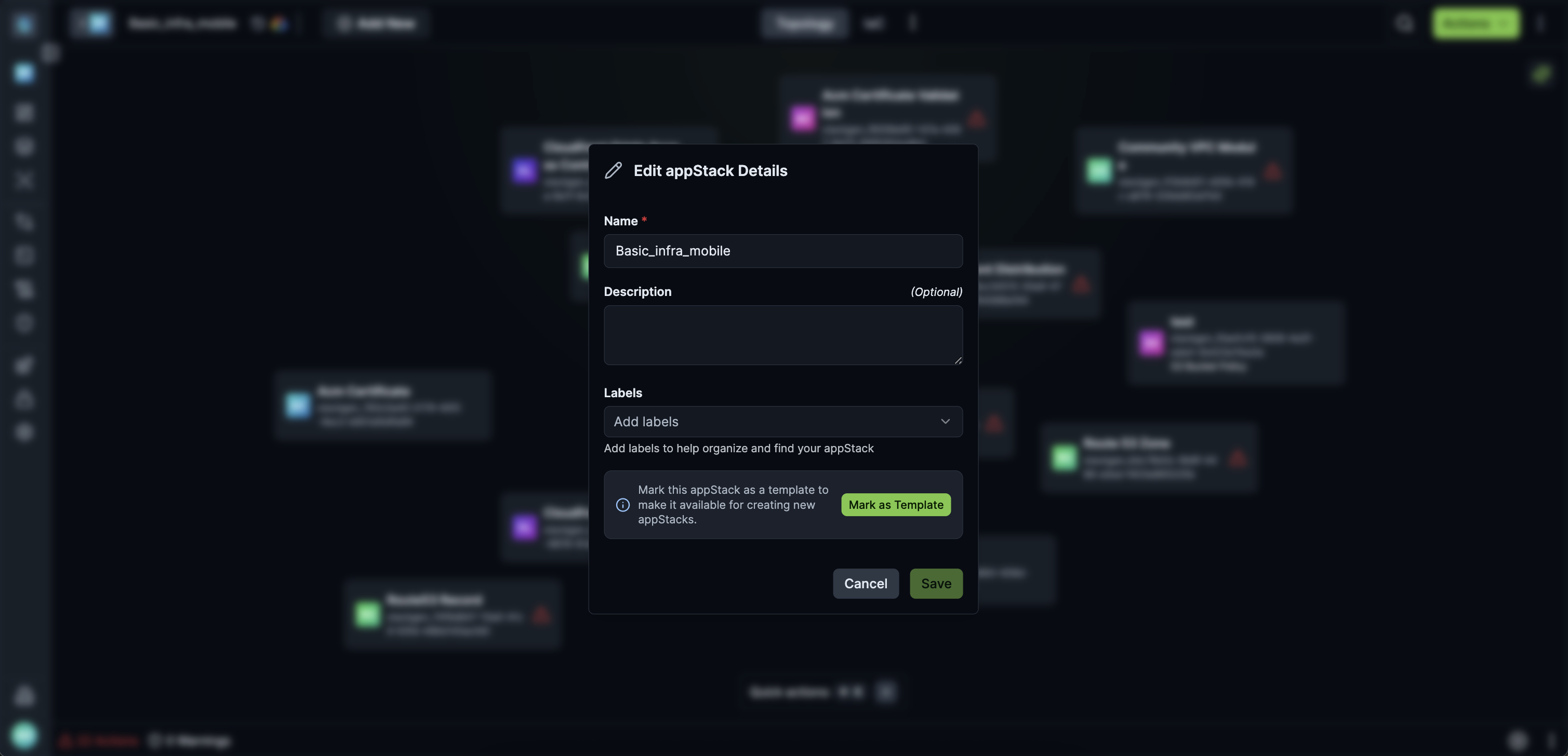
- Open the Edit appStack Details modal (click the edit icon near the appStack title).
- Click Mark as Template (this attaches the
templatelabel). - Click Save.
You can also mark an appStack as a template in these ways:
- appStack actions menu: Open the appStack actions menu and choose Mark as template.
- Label: Add a label named
templateto the appStack.
Create a new appStack from a template
- Switch to any target project in your tenant.
- In the left navigation, open appStacks.
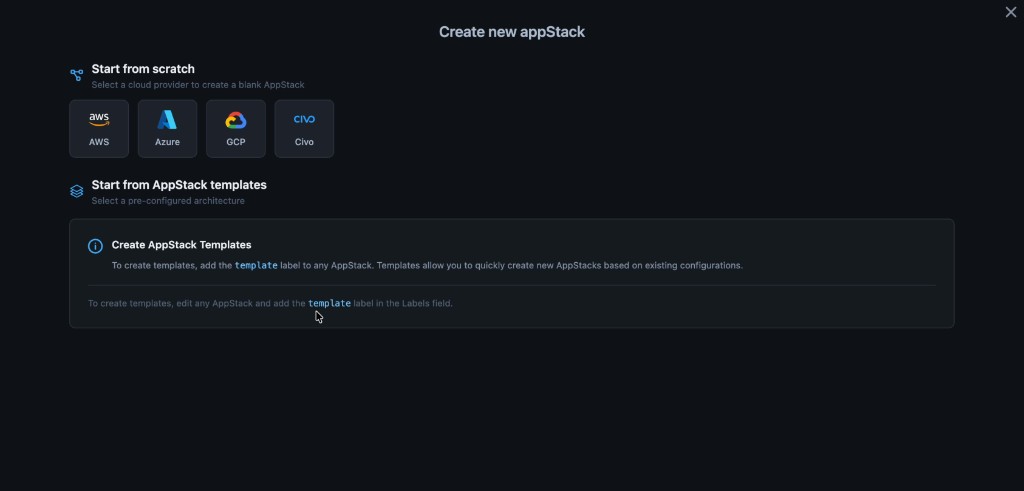
- Click + New appStack.
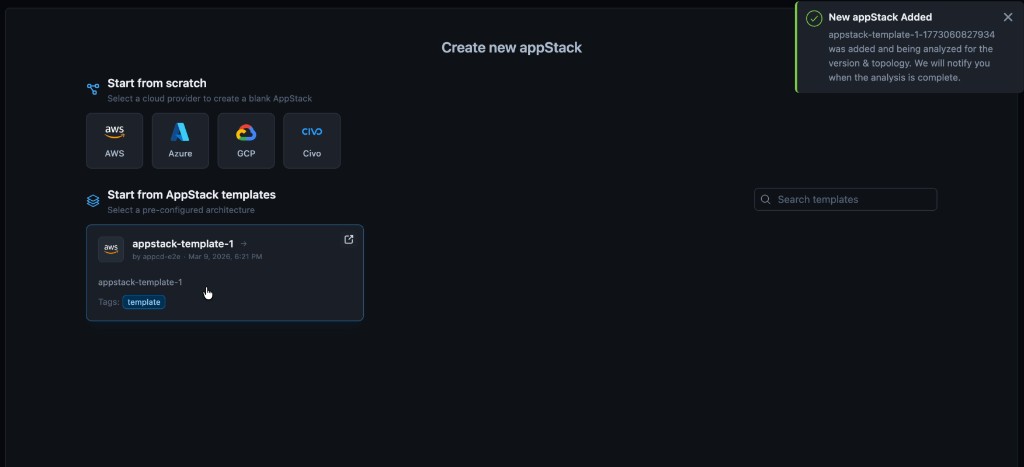
- Under Start from appStack templates, locate the tenant template. Your tenant may show Start from abstract template, Start from appStack templates, or similar wording for the same option.
- Click the template card:
- Success: If all modules are accessible, the new appStack is generated with topology, resources, output definitions, and Terraform configurations cloned from the template.
- Failure: If the template contains project-scoped or appStack-owned modules that are not accessible in the target project, an error notification appears:
Cannot clone topology, contains one or more inaccessible modules.
Remove a template from tenant selection
To remove an appStack template from the gallery in all projects, choose one of the following methods.
Option A: Unmark the template
- Open the template appStack details.
- Click Unmark Template, or delete the
templatelabel tag. - Click Save.
Option B: Permanently delete the template appStack
- Go to the appStacks list page.
- Click the context menu (
⋮) next to the template appStack and select Delete. - Select Delete permanently, enter the appStack template name in the input box to confirm, and click Delete permanently.
Templates and Project Environment Configuration
Project-level Environment Configuration is not applied when you create from a template. For that flow, StackGen only copies what is saved on the template appStack: Environments, Variables, Locals, and resources.
Environment Configuration under Project Settings can still define defaults for the project, but it is not merged in so that missing items on the template are filled from the project. If something is not on the template appStack at create time, do not expect it to appear on the new appStack because of project settings alone.
Click to view
How this shows up in two common cases:
-
Environment Configuration is set for the project, and you create or maintain a template appStack that still includes the environments and variables you want. You mark that appStack as a template. New appStacks created from it receive Environments, Variables, Locals, and resources as saved on the template. The result may look like the project defaults because the template appStack actually contains them, not because StackGen merged Environment Configuration during create-from-template.
-
Environment Configuration is set for the project, but you removed default environments, variables, or related configuration from the template appStack (for example you deleted an environment that still exists at the project level). New appStacks created from that template do not get those removed items back from project Environment Configuration. They only get what remained on the template when the copy ran.
After create, check the new appStack's Environments, Variables, and Locals yourself. Do not assume they match Environment Configuration if the template appStack was edited away from those defaults.
Limitations
- Module accessibility: Creating from a template fails when the template includes project-scoped or appStack-owned modules that are not accessible in the target project. See System Rules and Compatibility.
- No live sync: Changes to a template do not update appStacks that were already created from it.
Best Practices for appStack Templates
Manage permissions and labeling
Manage permissions and labeling
- Have Admins or DevOps own creating templates (marking appStacks as templates). Developers cannot create templates, so keep initial blueprint setup and use of the
templatelabel with those roles. - Use the
templatelabel in a consistent way (along with Mark as Template if you use it) so templates are easier to find and audit across the tenant.
Keep the template accurate before you mark it
Keep the template accurate before you mark it
- Before you select Mark as Template, confirm Environments, Variables, and Locals on that appStack match what every new appStack should inherit. appStacks that were already created from the template do not update when you change the template later.
Design for cross-project reuse
Design for cross-project reuse
- Prefer built-in and tenant-accessible modules in templates that other projects will use.
- Avoid project-scoped and appStack-owned modules in enterprise templates unless you know every target project can access them. Otherwise creation fails with the inaccessible modules error.
Align with environment configuration
Align with environment configuration
- Creates from a template follow the template appStack, not a full merge with Environment Configuration. If new appStacks must include specific project-style variables or environments, add them on the template appStack before others create from it.
Verify each new appStack
Verify each new appStack
- Right after create, review Topology and Environment settings on the new appStack. Templates can diverge from project defaults; a short audit catches missing variables or environments early.
When to use templates vs resource packs
When to use templates vs resource packs
- Use templates when you need a full starting layout for a new appStack across the tenant.
- Use resource packs when you need reusable resource bundles on an existing appStack and a full appStack copy is not required. See Comparison with resource packs.