Writing Effective Knowledge Base
Writing Effective Knowledge Base
Write knowledge base documents so Aiden can reason about your environment, route queries to the right tools, and reduce ambiguity during incidents. This page covers best practices and an example of discovery-generated content.
How Aiden Uses Knowledge Base Content
- Context: Aiden uses your base knowledge to understand how your infrastructure and processes work.
- Discovery: After Discovery runs, Aiden can add documents to the Knowledge Hub (e.g., clusters, datasources, services). You can view and edit these in the Knowledge Hub.
- Responses: Targeted titles and clear structure help Aiden reference the right context when answering questions or assisting with SRE workflows.
Example: Discovery-Generated Document
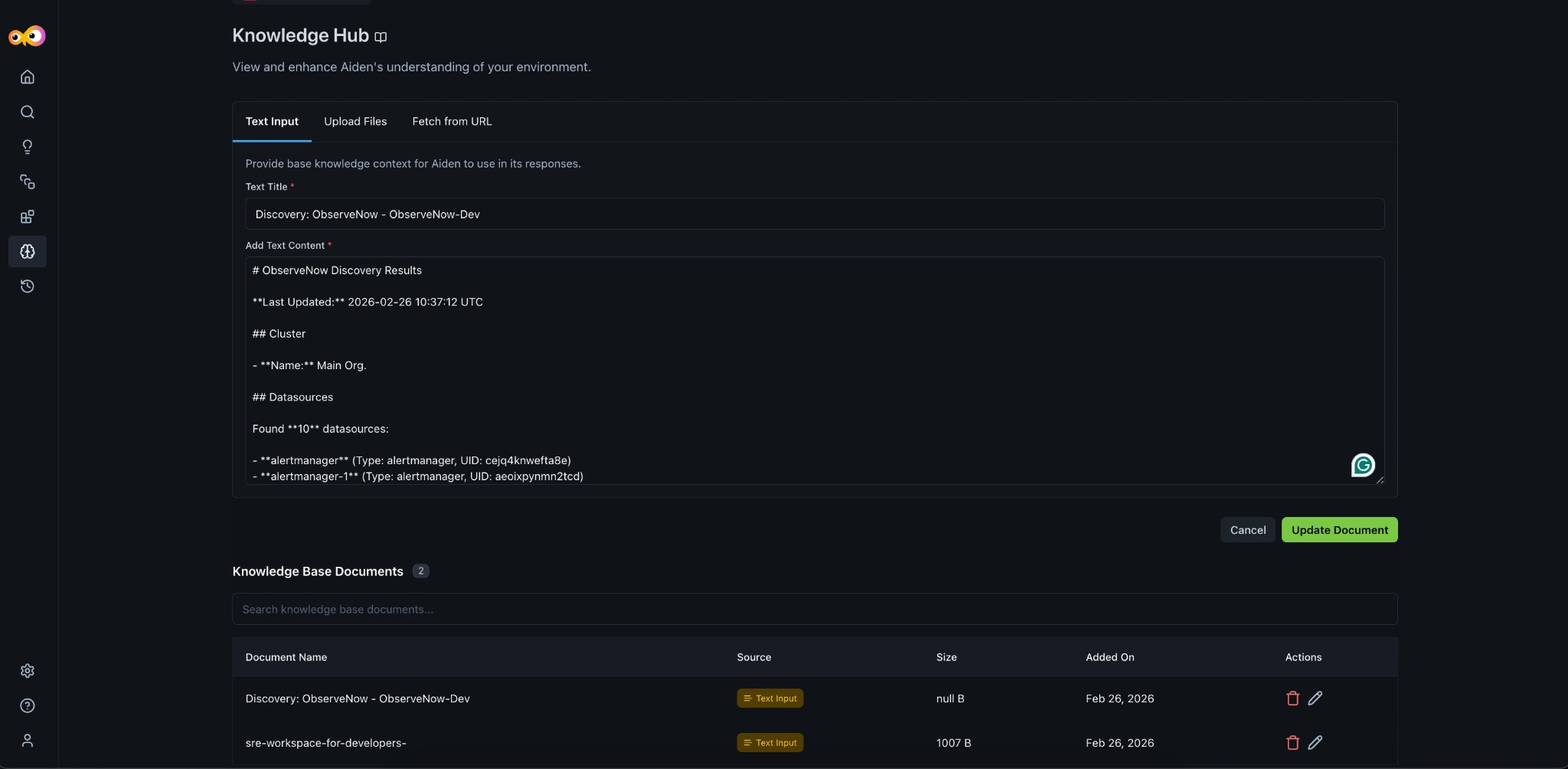
When Discovery runs, Aiden may create or update a knowledge base document with results from your integrations. The following is an example of what that content can look like. Use a clear Text Title (e.g., Discovery: ObserveNow - ObserveNow-Dev) and structure sections so Aiden can parse clusters, datasources, and services.
# ObserveNow Discovery Results

**Last Updated:** 2026-02-26 10:37:12 UTC

## Cluster

- **Name:** Main Org.

## Datasources

Found **10** datasources:

- **alertmanager** (Type: alertmanager, UID: cejq4knwefta8e)
- **alertmanager-1** (Type: alertmanager, UID: aeoixpynmn2tcd)
- **ClickHouse Logs** (Type: grafana-clickhouse-datasource, UID: aevc42l9kymtca)
- **clickhouse-cloud** (Type: grafana-clickhouse-datasource, UID: ceytp3khp5mv4a)
- **ClickHouseObserve** (Type: grafana-clickhouse-datasource, UID: clickhouse)
- **Logs** (Type: loki, UID: loki)
- **MetricsServer** (Type: prometheus, UID: metrics)
- **Profiling** (Type: pyroscope-datasource, UID: g5lW0xp4z)
- **tempo** (Type: tempo, UID: dfar9p0xnvgg0f)
- **Traces** (Type: jaeger, UID: jaeger)

## Services

Found **51** services:

- ad, ad-service, argo-rollouts, argocd-app-cntlr, argocd-appset-cntlr, argocd-notif-cntlr, argocd-reposvr, argocd-server, cart, cart-service, civo-csi-controller, civo-csi-node, coredns, currency, currency-service, devopsnow-agent-agent, dynatrace-operator, ebs-csi-controller, email-service, flask-prometheus, fraud-detection-service, frontend, frontend-logs, ingress-nginx, k8s-event-logger, kafka, kafka-service, kube-proxy, kubestatemetrics, load-generator, mongodb, mysql, opensearch, opentelemetry, payment-service, postgres-exporter, product-catalog, product-catalog-service, quote, quote-service, recommendation, recommendation-service, redis-exporter, tech-store-order-service, tech-store-payment-service, tech-store-user-service, traefik, valkey-cart, valkey-cart-service, victoria-metrics-agent
In the Knowledge Hub you can add or edit such content via Text Input, and manage documents (search, view source, size, date, delete, edit) in the Knowledge Base Documents list.
Best Practices
- Write for a senior DevOps reader: Explain your setup as you would to a new team member. For example, We use a centralized ArgoCD instance for all our deployments. Applications are segregated using ArgoCD projects, with each team having their own project.
- Use clear titles: Make the Text Title specific (e.g.,
Discovery: ObserveNow - ObserveNow-Dev) so Aiden can refer to the right context. - Use markdown: Write knowledge base content in markdown (headings, lists, bold, code) so structure is clear and Aiden can parse it effectively.
- Be specific: Include details that make your environment unique (naming conventions, labels, tags).
- Include context: Add why certain choices were made (e.g., alert routing, namespace ownership).
- Document exceptions: Note special cases or variations in processes and tool usage.
What to Document
Consider documenting:
- Deployment workflows and practices
- Infrastructure architecture and patterns
- Security policies and compliance requirements
- Development environments and configurations
- Release processes and gates
- Incident response procedures
- Cluster, datasource, and service layout (especially when combined with Discovery output)
Additional Resources
- Knowledge Hub: Overview and how to add content (Text Input, Upload Files, Fetch from URL)
- Discovery: How discovery populates the Knowledge Hub
- Aiden SRE: Onboarding and context input