2026 Release Notes
2026 Release Notes
Everything new in StackGen Platform during 2026, in full. Filter by month, or open a release to also see what was enhanced and fixed. For 2025 and earlier, see Archived.
August 2026
Entra Group Membership Sync and GitHub Secret Selection Fix
Sync Entra group memberships, and select GitHub secrets without crashes.
Entra Group Membership Sync
Entra ID group sync is not available out of the box. Contact support@stackgen.com and we'll enable it for your tenant.
Once it's on, StackGen keeps membership in sync for any groups linked to an Entra group. See Implications of Externally Linked Groups for the details.
StackGen now syncs user group membership from Microsoft Entra ID to any linked StackGen user groups. When someone new is added to an Entra group, they need to sign in to StackGen once before their membership shows up on the StackGen side.
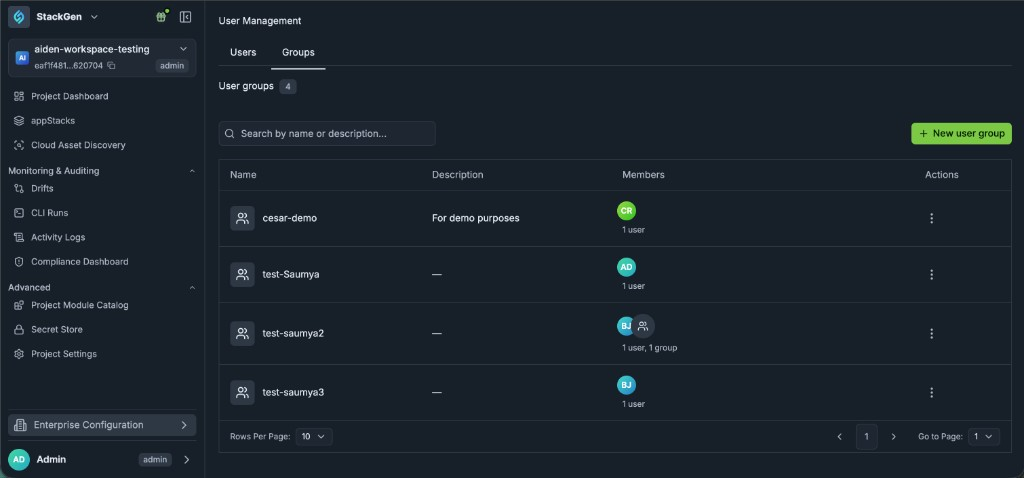
To find your user groups in StackGen:
1. Click Enterprise Configuration and select User Management. 2. Click the Groups tab.
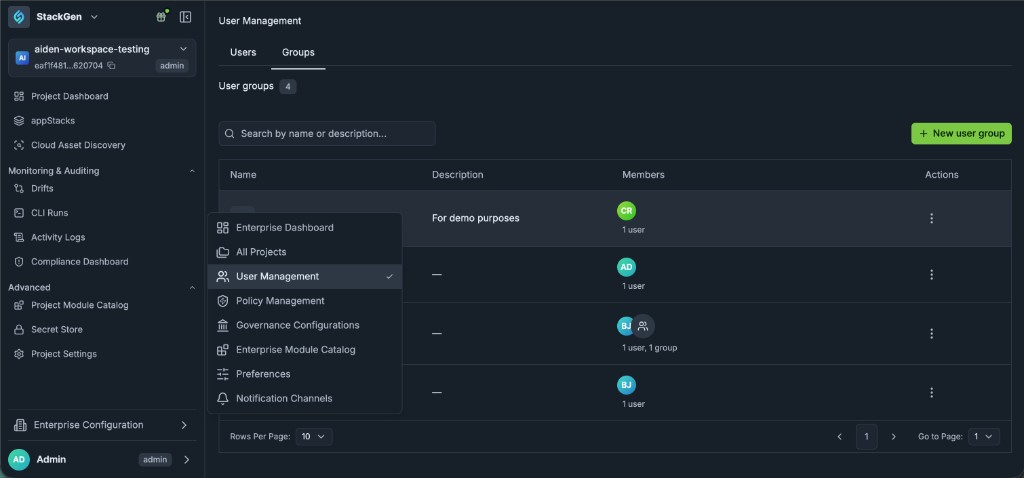
Want more detail? Take a look at User Groups.
User Groups, Entra ID Sync, and Policy Selection by Expression
Manage access with user groups and Entra ID sync, and select governance policies at scale with expressions.
User Groups and Entra ID Group Sync
Group sync from Microsoft Entra ID requires StackGen to enable a tenant flag (Helm chart). Customers cannot turn sync on by themselves in the UI yet. Contact support@stackgen.com or your Customer Service Manager to enable it.
User group membership from Entra is not synced automatically in v2026.8.4. Automatic membership sync shipped in v2026.8.8. See User Groups.
The UI for groups is available on Infra Ops (StackGen core) today. Group data is available through the API across apps (for example Backstage-driven flows). Expanding the groups UI beyond Infra Ops is a follow-up.
We've added user groups so you can manage project access at scale instead of only assigning individuals.
Previously, project membership was oriented around individual users, which is hard to maintain as organizations grow and already manage access in Entra ID. Now, you can create groups in StackGen, optionally nest groups, add members, and assign a group to a project with a role (Admin, DevOps, or Developer). Customers on Entra ID can sync groups into StackGen when StackGen enables the tenant flag.
Key Features
- Create Groups - From Enterprise user management, open Groups, create a group, and add users.
- Nested Groups - Nest groups when your org structure needs it.
- Assign Groups to Projects - On a project’s members, add a user group and choose the project role for that group.
- Entra ID Group Sync - Sync Entra groups into StackGen when enablement is configured for the tenant (support-assisted today).
- API Access - Group APIs support automation paths (including Backstage) even where the UI is Infra Ops only.
Example
1. Create a group (for example a demo or platform team group) and add members. 2. Open a project, add the group under members, and set the group role to Admin, DevOps, or Developer. 3. Members of that group receive that project role based on group membership.
Current Constraints
- Entra group sync: support-enabled flag required; not self-serve in product yet.
- Entra membership auto-sync: not in v2026.8.4. It shipped in v2026.8.8. See User Groups.
- Groups UI: Infra Ops only in this cut. API covers broader app usage.
Why It Matters
Enterprise customers can map existing IdP group models into StackGen project RBAC, which is required to scale StackGen beyond one-off user invites.
Read more in User Groups, RBAC, Members, and Microsoft Entra ID (Azure AD) OAuth.
Policy Selection by Expression
We've added expression-based policy selection when you create or update a Governance Configuration.
Previously, customers with large policy catalogs had to pick policies one by one, and new modules that matched org naming or tagging conventions often forced a new governance version. Now, you can select policies with expressions (for example by provider, category, or severity) across built-in, module restriction, and security policies.
Key Features
- Expression Filters - While selecting policies for a governance configuration, use expressions such as provider or category equals a cloud (for example Azure), or severity-based filters.
- Built-In and Custom Coverage - Expressions apply across built-in policies, module restriction policies, and security policies.
- Convention-Friendly Governance - Target modules by naming or tag conventions (for example a shared prefix or
allow = truestyle tags). When new modules match the expression, governance can pick them up without rewriting the configuration from scratch. The same pattern applies to security policies scoped by expression.
Why It Matters
Platform teams with many policies and evolving module catalogs can keep governance current with naming and tagging standards, instead of constant manual policy reselection.
Read more in Governance Configuration and Custom Policies.
Multi-Tenant Access and Multiple Auth Providers
Invite across domains, switch tenants from the UI, and run multiple auth providers inside one tenant.
Multi-Tenant Access and Cross-Domain Invites
Tenancy and authentication changes are rolling out gradually. Not every environment has multi-tenant switching enabled yet (for example some shared demo environments may still be single-tenant). Expect growing pains while this lands broadly. Contact support@stackgen.com or your Customer Service Manager if you need enablement.
We've added the ability to belong to multiple tenants under the same DNS namespace and to invite people into a tenant regardless of their email domain.
Previously, getting StackGen or Aiden staff into a customer environment often meant joining the customer IdP (for example Entra), and shared demo tenants made it hard to keep isolated demo data. Now, where enabled, you can switch between tenants you belong to, and tenant admins can invite collaborators (for example CS or SE) directly in product without requiring the same email domain.
Key Features
- Multi-Tenant Membership - One login under a DNS namespace can belong to more than one tenant. Switch enterprises or tenants from the UI when the feature is enabled for that environment.
- Cross-Domain Invites - Invite users into a tenant even when their email domain differs from the tenant’s usual domain.
- Org Admin vs User Affordance - The UI distinguishes org admin from regular user membership on the tenant switcher (icon difference).
Why It Matters
Field and CS teams can get isolated tenants for demos or PoCs, and customers can invite StackGen helpers into their tenant without IdP onboarding as the only path.
Read more in StackGen Settings and Navigating UI.
July 2026
OCI Security Policies, appStack-Owned Modules, and Dashboards GA
Apply OCI security policies, let Project DevOps publish appStack-owned modules, and use project and admin dashboards generally.
OCI Security Policies
We've added support for security policies on Oracle Cloud Infrastructure (OCI).
Previously, early-access OCI work focused on provider support, custom modules, and CLI plan and apply (v2026.7.3 and follow-on fixes). Now, you can author and use security policies for OCI the same way you govern other supported providers with OPA/Rego security policies.
Key Features
- OCI Security Policy Support - Create and apply security policies that target OCI modules or resources in your governance setup.
- Same Governance Path - Assign policies through Governance Configurations so projects and appStacks pick them up like other security policies.
Why It Matters
OCI appStacks can be checked against organization security and compliance rules inside StackGen, not only built and provisioned.
Read more in Custom Policies and OCI provider early access.
Project DevOps appStack-Owned Module Publishing
We've expanded who can own the appStack-owned custom module lifecycle inside a project.
Previously, creating and publishing appStack-owned custom modules often needed a higher-scoped Admin or Enterprise DevOps role. Now, the DevOps role at project scope can create appStack-owned modules and publish them back to the appStack from the Custom Module Editor.
Key Features
- Create in Project Scope - Project DevOps users can create appStack-owned custom modules for appStacks in their project.
- Publish to appStack - After you edit Terraform source or
.stackgen/stackgen.yaml, click Publish to appStack. Placed instances on the Topology canvas pick up the updated schema. - In-Place Sync - Existing attribute values on placed nodes stay in place when you publish. New required fields show a warning until you fill them.
Why It Matters
Project DevOps teams can iterate on appStack-local modules without waiting on enterprise-scoped roles, while catalog and enterprise sharing rules for shared modules stay unchanged.
Read more in Edit and Sync appStack-Owned Modules, Custom Module, and RBAC for Custom Modules.
CLI Local Module Upload, HashiCorp Vault, and Policy UX
Upload custom modules from a local directory, connect HashiCorp Vault as a secret source, and improve policy evaluation UX.
CLI Local Module Upload
We've added support to upload custom modules from a local directory through the StackGen CLI, using the --dir flag on stackgen upload custom-modules.
Previously, CLI custom module upload required a Git source (repository URL, ref, branch, tag, and related flags). Now, you can upload Terraform module code from a local directory as a blob into StackGen, without first syncing that module into a Git repository.
Key Features
- Local Directory Upload - Pass
--dirwith the path to your local Terraform module. Do not combine--dirwith Git source flags (--repo-url,--ref,--branch,--tag,--subdir,--secret-name). - Direct Catalog Publish - Publish modules into StackGen when the platform is your module source of truth, instead of requiring a Git-backed import path first.
- Module Source Preference - Generated Terraform can reference modules from the StackGen Registry by default. To vendor modules into the generated Terraform directory instead, set Module Source to Local in preferences.
Why It Matters
Teams that keep modules outside a synced Git workflow can still get them into the StackGen catalog and use StackGen as the registry for those modules.
Read more in Upload Custom Modules and Module Catalog.
HashiCorp Vault External Secret Source
This is the first version of HashiCorp Vault support. Vault configurations vary; test your auth method, secret paths, and scale before production use. Contact support@stackgen.com or your Customer Service Manager if you need guidance.
We've added HashiCorp Vault as an option when connecting an external secret store.
Previously, external secret stores supported cloud secret managers such as AWS Secrets Manager. Now, you can ingest secrets from HashiCorp Vault as well. This is especially useful for on-prem environments that already store credentials in Vault.
Key Features
- Vault Provider - Choose HashiCorp Vault when you add an external secret store connection.
- Shared Across Products - Once configured, Vault-backed secrets can be used from both StackGen core and Aiden.
- Configure in StackGen Core - Set up the Vault connection in StackGen core secret settings. Aiden uses the same connection after it is configured.
Current Constraints
- First-cut support. Additional Vault scenarios and larger-scale testing are still in progress.
- Connection setup is done in StackGen core today, even when Aiden consumes the secrets.
Why It Matters
On-prem teams that already use Vault can keep secrets in Vault and reference them from StackGen and Aiden, instead of copying them into another store.
Read more in Secret Store.
stackgen.yaml Validation, Multiple Auth Providers, and Policy UX
Validate stackgen.yaml during module authoring, link multiple sign-in providers, and refine custom security policy creation.
stackgen.yaml Syntax Validation
We've added a CLI / API path to validate StackGen YAML (stackgen.yaml) syntax when you author or update custom modules.
Previously, custom module authors had no dedicated validation endpoint to check StackGen YAML before relying on canvas preview. Now, you can validate stackgen.yaml through the API (and related CLI tooling) to confirm schema keys and structure as you iterate on how the module renders on the canvas.
Key Features
- API Validation - Call a validation endpoint to check
stackgen.yamlprogrammatically during custom module development. - CLI Support - Use the same validation capability from CLI tooling so checks fit the module authoring loop.
- Schema Key Checks - Validation focuses on schema keys and YAML structure for how the module is presented on the canvas (display names, parameters, and related UI).
Current Constraints
- This cut is limited to the API path and to schema keys. It is not full semantic or runtime validation of every canvas behavior.
Why It Matters
Teams that build and maintain custom modules at scale can catch StackGen YAML schema issues through an API, instead of discovering them only after preview or drag-and-drop.
Read more in Custom Module Rendering.
Multiple Authentication Providers
We've added support for multiple authentication providers on the same account in both Aiden and StackGen core.
Previously, signing in with Google, GitHub, or another provider could create separate tenants and accounts, which made it painful when a PoC used one identity provider and production needed another. Now, you can associate more than one sign-in method with the same account (for example both Google and GitHub) so the same tenant stays available across providers.
Key Features
- Link Multiple Providers - Connect additional identity providers to an existing account instead of ending up with disconnected tenants.
- Aiden and StackGen Core - The same multi-provider login model applies in Aiden and in the StackGen infrastructure product.
- PoC to Production Continuity - Teams that start on one provider and later standardize on another can keep the same tenant without a separate account migration.
Why It Matters
SaaS customers who change identity providers between evaluation and production can keep one account and tenant, instead of rebuilding access around a second login method.
Read more in Multiple authentication providers on a tenant.
Personal Workspace Secrets Warning
We've added a clear warning when you create secrets from a personal workspace.
Previously, you could create secrets in a personal workspace without a strong signal that the location might be wrong for shared or production use. Now, the UI shows an explicit warning in that flow so the scope is obvious before you proceed.
Key Features
- Clear Warning - Creating secrets from a personal workspace surfaces a warning so you confirm scope before the secret is created.
Why It Matters
Teams are less likely to place secrets in a personal workspace when they intended a shared project or org-scoped location.
Read more in Secret Store.
Resource-Level Policies, OCI Early Access, and Project Invites
Evaluate resource-level policies on plan, try OCI in the CLI, and invite teammates to projects by email.
Resource-Level Policies
We've added resource-level policies in Policy Management. These policies evaluate against a specific Terraform resource type and its attributes, regardless of which module declares that resource.
Previously, IaC policies were primarily module-level: they checked whether you used the right parameters for a given module, and they depended on how that module named and exposed inputs. That worked for StackGen-provided modules and customer custom modules, but it was module-specific and limited when the same resource type appeared across many modules. Now, you can author resource policies that always check the resource when the platform detects it (for example, any AWS DB instance must have storage_encrypted set, or an S3 bucket name must be prefixed with stackgen-).
Policy generation flows (including the LLM-assisted path) have been updated so you can create and work with resource-level policies, not only module-level ones.
Key Features
- Resource-Scoped Checks - Define a policy against a Terraform resource type and attribute. When that resource appears in the appStack IaC, the policy is evaluated against it, no matter which module introduced the resource.
- Works Across Modules - Unlike module-level policies, resource policies are not tied to a single module's parameter names. The same rule applies everywhere that resource type shows up.
- Variable-Backed Attributes - If the attribute under check is a variable (for example a bucket name), the value is not known until you run Terraform or Tofu plan. Resource policies are designed to evaluate those cases using plan output. Module-level policies alone cannot catch them.
- LLM Policy Generation Support - The policy generation flow has been updated so resource-level policies are supported when you generate policies through the assisted / LLM path in Policy Management.
- Open Source Scanner Alignment - Most open source security scanners operate at the resource policy level. Resource policies make it more practical to support those out-of-the-box checks in StackGen, instead of rewriting them around module-specific naming.
Why It Matters
Teams get governance that follows the Terraform resource itself. Security-style checks hold across modules and still apply when values only resolve at plan time, instead of stopping at module parameter names in the UI.
Read more in Custom Policies.
OCI Provider and CLI Early Access
This feature is early access (first cut). Contact support@stackgen.com or your Customer Service Manager for enablement and guidance.
We've added Oracle Cloud Infrastructure (OCI) Terraform provider support and related CLI options so you can run infrastructure lifecycle management for OCI from StackGen.
Previously, v2026.6.12 landed backend framework support for OCI and a generic cloud type behind a feature flag, with CLI provisioning and full plan / deploy still incomplete. Now, OCI is available as a provider in early access: you can use OCI in the provider surfaces, work with custom OCI modules, and run plan and apply through the CLI.
Key Features
- OCI Provider Support - OCI is supported as a cloud provider type for infrastructure lifecycle management. When enabled, OCI appears in the relevant provider UI (including the OCI icon) so you can build and manage OCI-based appStacks.
- CLI Plan and Apply - You can run plan and apply for OCI through the CLI. This cut uses the CLI for provisioning mainly because of limited OpenTofu support for the OCI provider.
- Custom Modules Only - There are no built-in OCI modules in this release. Customers provide their own modules. During an SE engagement, you can create a starter set for the customer and open a PR to the StackGen modules repository if the modules are useful to share. QA-validated examples (such as an object storage bucket) show the expected path.
Current Constraints
- Plan and apply for OCI are available via the CLI in this early-access cut, not as a full UI plan and deploy path.
- Built-in OCI modules are not included. Custom modules (or SE-authored modules) are required.
- This is the first cut. Use it for demos and early customer OCI work with the limits above in mind.
Why It Matters
OCI infrastructure management asks and demos can start now with custom modules and CLI provisioning, without waiting on a full built-in module catalog or broader OpenTofu provider parity.
Read more in IaC from Design and Provision infrastructure with StackGen.
Invite Teammates to Projects by Email
We've added UI support to invite and add users to a project by email.
Key Features
- Email Invites - Invite teammates to a project through email from the project membership UI.
- Add Users to Project - Add users directly to the project so they can collaborate on that project's appStacks and related resources.
Why It Matters
Project owners can bring collaborators onto the right project from the UI, without a separate offline invite path.
Read more in Members and Create a Project with Guided Onboarding.
StackGen to Aiden Product Switcher
We've added a product switcher in the core StackGen platform UI so you can move from StackGen to Aiden.
Key Features
- Switch to Aiden - From the core StackGen UI, use the product switcher to open Aiden.
- Known Limitation - Switching back from Aiden to core StackGen is not available yet. StackGen to Aiden works; Aiden to StackGen still needs to land in a later update.
Why It Matters
Teams that use both products can open Aiden from the core platform in one step, while the reverse switcher is tracked as a follow-up.
Read more in Product switcher.
June 2026
Container Modules, MCP Module Tools, and Plan and Deploy Revamp
Build container-type custom modules, manage modules over MCP, and use the redesigned Plan and Deploy panel.
Container Type Modules Support
We've added native child module support for custom container modules created in the platform. Custom containers now mirror the nested visual behavior of built-in VPC and subnet configurations on the Topology canvas.
Configure this support in the custom module's stackgen.yaml by setting node.display_type to container, then define connection rules and delete behavior so parent and child modules map attributes when a child is placed on a parent.
Key Features
- Child Module Support - Custom container modules now natively support nested child modules on the canvas, matching the grouping patterns you already see with built-in networking containers.
- YAML Configuration - Establish container behavior by setting
display_typeascontainerunderrepresentation.nodeinstackgen.yaml. Use thecontainerblock for delete rules and how other modules connect in. - Connection Rules and Attribute Mapping - Configure connection rules between specific parent and child modules (for example a VPC parent container and a subnet child module). When you drag a child onto the parent on the canvas, valid attributes (such as a VPC ID) map automatically between them based on those rules.
- Deletion Types - Control what happens when the parent container is deleted via the
on_deleteparameter instackgen.yaml: - detach - If the parent container is deleted, nested child modules are detached and remain intact on the design canvas.
- cascade - If the parent container is deleted, both the parent and all nested child modules are removed from the canvas at the same time.
- Important Technical Caveat - Visual grouping and attribute mapping rely on custom, user-defined connection rules built for canvas continuity. This is not a standard restriction imposed by Terraform. The platform will allow you to create and map otherwise uncommon connections (for example connecting an S3 bucket to a route table) as long as your custom YAML rules dictate it.
Why It Matters
Teams that author custom networking or grouping modules can deliver the same nested canvas experience as built-in containers, with explicit control over attribute mapping and delete behavior in stackgen.yaml, without waiting on platform-only module types.
For YAML template examples or technical implementation questions, contact support@stackgen.com or your Customer Service Manager.
Read more in Custom Module Rendering.
MCP Module Management Tools
Previously, the Model Context Protocol (MCP) framework did not natively include mechanisms to create or delete custom modules. Direct support has now been added so you can generate and remove custom modules through MCP, in two scopes.
Key Features
- Create and Delete Support - MCP can now create and delete custom modules. During execution, the tools process the request using the source details you provide and output full logs outlining exactly what module was created and which configuration parameters were used. Matching deletion flows cleanly remove modules in both scopes.
- appStack-Owned Scope - Designate an appStack when creating a module so the module is owned directly by that appStack. These custom modules appear in the individual appStack view rather than the global catalog.
- Tenant Scope - Create custom modules at a tenant-wide level. Tenant-scoped modules display globally in the main Module Catalog interface.
- Scoped Cleanup - Corresponding deletion flows are supported in both scopes so you can remove appStack-owned or tenant-scoped modules without leaving orphaned catalog entries.
Why It Matters
Module lifecycle work that previously required separate UI or catalog steps can stay inside the same MCP-driven IDE flow you already use for topology, environment, and state backend tasks.
Read more in StackGen MCP Capabilities and StackGen MCP.
OCI and Generic Cloud Support
This feature is behind a feature flag and is under active development. It is not yet enabled on customer environments. Contact support@stackgen.com or your Customer Service Manager for status.
We've updated the backend frameworks to support Oracle Cloud Infrastructure (OCI) as an alternative cloud provider type, plus a generic cloud provider option for use cases that do not map to traditional cloud providers (for example importing and managing GitHub modules).
Interface Placements
When enabled, provider selection is surfaced in three areas of the UI:
- appStack Creation - During the initial application stack generation flow.
- Module Import Flow - In the menu where you declare and map the provider type of an incoming module.
- Governance Configuration - Inside the creation workflow for new governance structures.
Current Constraints
- The full feature set remains behind a feature flag and is undergoing active development; it is not yet enabled on customer environments.
- Additional UI elements are still pending for a later release.
- Several core workflows are currently non-functional, including appStack custom creation, CLI provisioning support for the OCI provider type, and full plan / deploy phases.
- New users may see an empty side panel and must manually run the module import flow to get started.
Why It Matters
This release lays the provider framework for OCI and non-traditional module sources so later releases can open enablement without reworking the underlying appStack, import, and governance paths.
Read more in IaC from Design and Cloud Provider Limitations.
Push TF State to Remote Backend
The platform now exposes a direct UI action in state backend settings that lets you push a segregated appStack Terraform (TF) state file to its mapped remote backend storage bucket (such as Amazon S3 or Google Cloud Storage).
While this command logic has historically been available via the CLI (stackgen state push), this update brings the capability into the visual web application for easier accessibility.
Key Features
- UI Push Action - Use the action button in state backend settings to push the appStack state directly to the configured remote backend.
- Cloud Discovery Workflow Exclusivity - This capability is unique to appStacks generated from a Cloud Discovery scan workflow. Standard manually built appStacks do not display this administrative option.
- Automated Failure Intercepts - The platform runs connection checks during execution. The interface throws a processing error and aborts if remote cloud access credentials are expired, cloud permission settings are incorrect, or the target backend storage configuration is misconfigured.
Destructive Data Overwrite: Triggering the push initiates an unmitigated file write that entirely overwrites the target destination state file in the remote cloud backend. The platform processes this change immediately without intermediate warning prompts or safety catches to block unintended state corruption. Confirm you intend to replace remote state before you run the push.
Cloud Discovery Deletion Dependency: State management features are bound to the lifecycle of the parent Cloud Discovery execution entry. If you delete the parent Cloud Discovery record from history, the platform permanently removes the source state view tab, file download buttons, and remote backend push actions from the appStack UI. Do not clean up or remove active Cloud Discovery records until you are certain you will never need to push or modify that appStack's state again.
Why It Matters
Teams that generate appStacks from Cloud Discovery can push segregated state to the mapped remote backend without leaving the UI, while still using the CLI when they prefer a terminal workflow.
Read more in stackgen state push and Cloud Discovery.
Themes, Governance Policy Scans, Direct Git Commits, and In-Place Module Updates
Choose from six UI themes, and update appStack-owned custom modules in place with changes that sync to the topology canvas.
Personalize Your Workspace with UI Themes
StackGen now includes selectable UI themes, letting you choose the color scheme that best fits how you work.
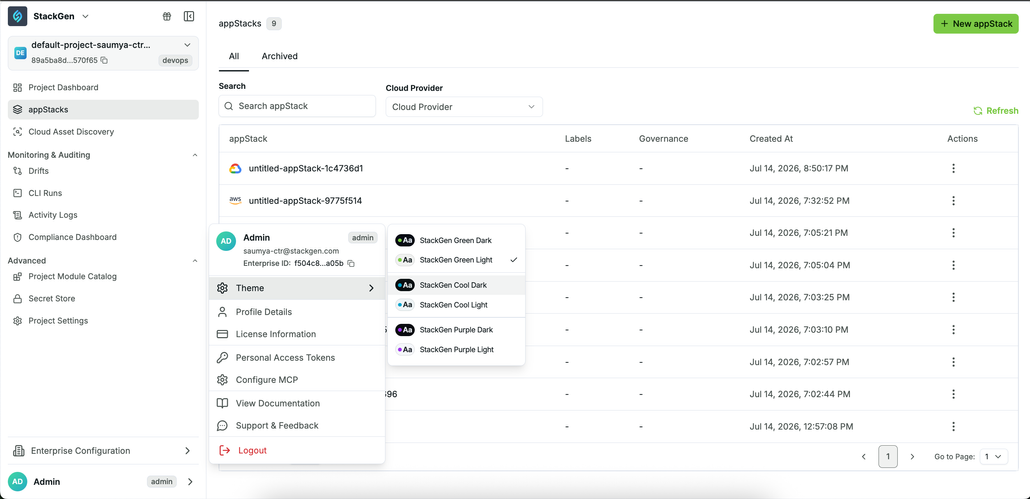
Key Features
- Six themes across three color families : Green, Cool, and Purple, each with light and dark variants.
- Immediate preview: Selecting a theme updates the interface right away, with no refresh required.
How to Change Your Theme
1. From the StackGen Home page, click the dropdown arrow next to your profile. 2. Click Theme. 3. Select one of the available themes.
Why It Matters
Whether you prefer a light or dark interface, StackGen now lets you match the platform to your preference across green, cool, and purple theme families, without changing how you work in the product.
Governance Policy Scans on Terraform Plan Output
StackGen now supports running a governance policy scan directly against Terraform plan output, in addition to the existing static analysis on an appStack.
Key Features
- Run scans from Plan and Deploy: When you execute a terraform plan via the Plan and Deploy dialog, a new Run policy scan button lets you trigger a policy scan directly on that plan. The scan runs against the
plan.jsonfile that is generated for Terraform Plan. This is the same file that your users have historically scanned in their own CI pipelines and it is now available natively in StackGen.
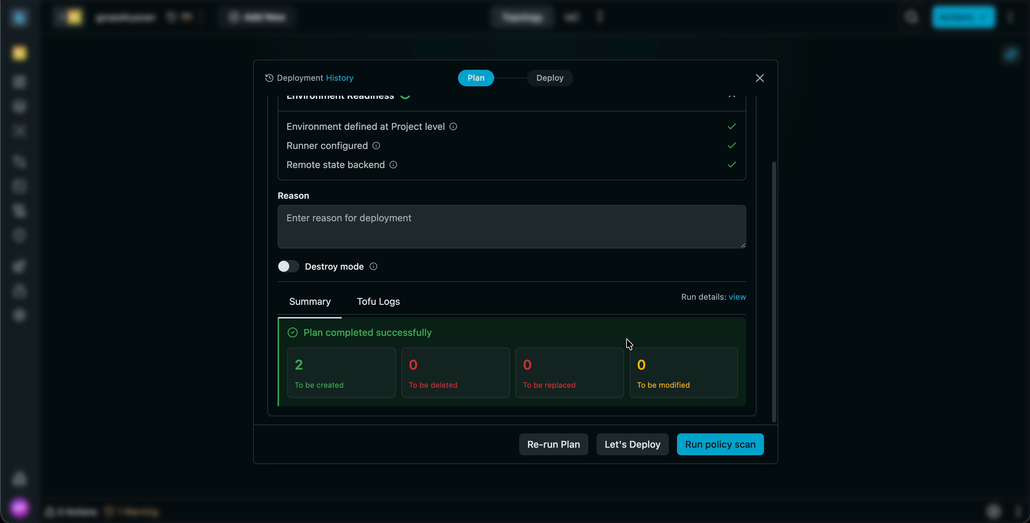
- Violation management: Once the scan completes, it generates policy violations that can be fixed via Actions and Warnings dialog. You can fix these violations before proceeding with your plan, or bypass the violations and continue with the deployment.
- Compliance Dashboard reporting: Scan results also flow into the Compliance Dashboard. Use the
policy eval against planRun Type filter to see which policies passed or failed, when they ran, and which resources were impacted.
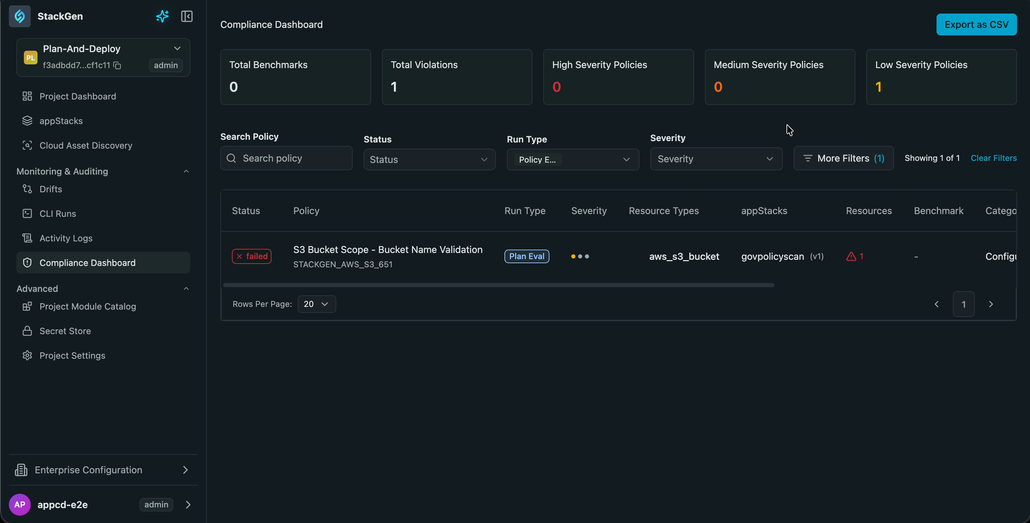
Why It Matters
Policy checks against plan output previously lived outside StackGen, in your CI pipelines. Bringing this scan into the platform means your teams get policy feedback right when you run a Plan, without leaving the UI. You can either fix violations or proceed without interruptions, all while keeping a full compliance record.
Direct Git Commits Without a PR
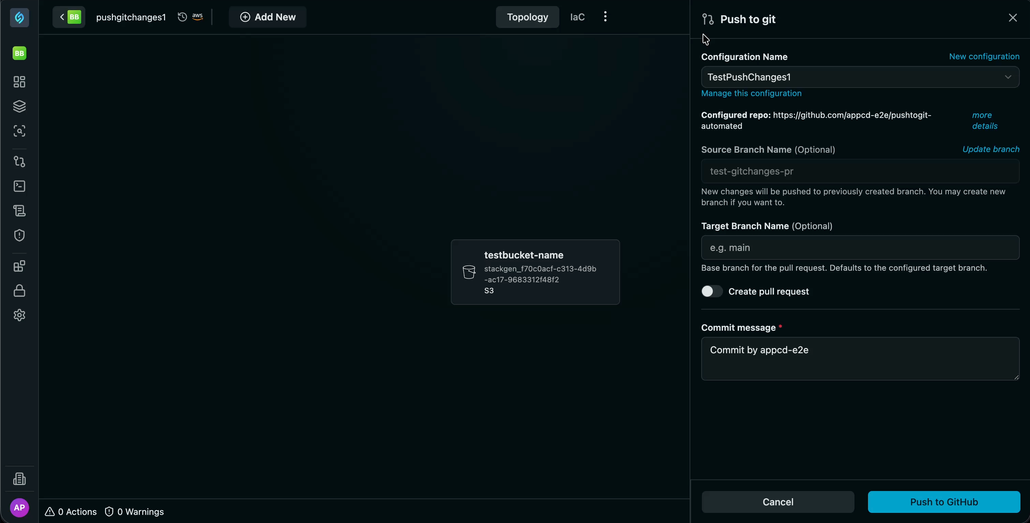
StackGen now includes a toggle that lets you push code changes directly to a branch in your Git repository, instead of creating a pull request.
Key Features
- Toggle for PR vs. Direct Commit: A new toggle controls whether pushes go through a PR or commit directly to the branch.
Disabling the PR option places responsibility on the users to complete their own sanity checks before committing directly to a branch, since the PR review step is bypassed.
- PR flow retained by default: With the toggle turned on, StackGen follows the original workflow, creating a PR for every push.
- Direct commit when disabled: Turning the toggle off pushes your changes straight to the branch, skipping the PR step.
Why It Matters
Not every workflow needs a PR for every change you make. With this new feature, your teams can iterate fast by commmitting changes directly to a branch, while teams that want to enforce review gates can choose to go with the existing PR flow.
AI Assistants, Enterprise Template Sharing, and Module Naming Validation
Ship faster with AI Assistants, share templates across the enterprise, and catch module naming issues before they land in production.
appStack AI Agent
This feature is behind a feature flag and is currently enabled only for select customers. Contact support@stackgen.com or your Customer Service Manager for access.
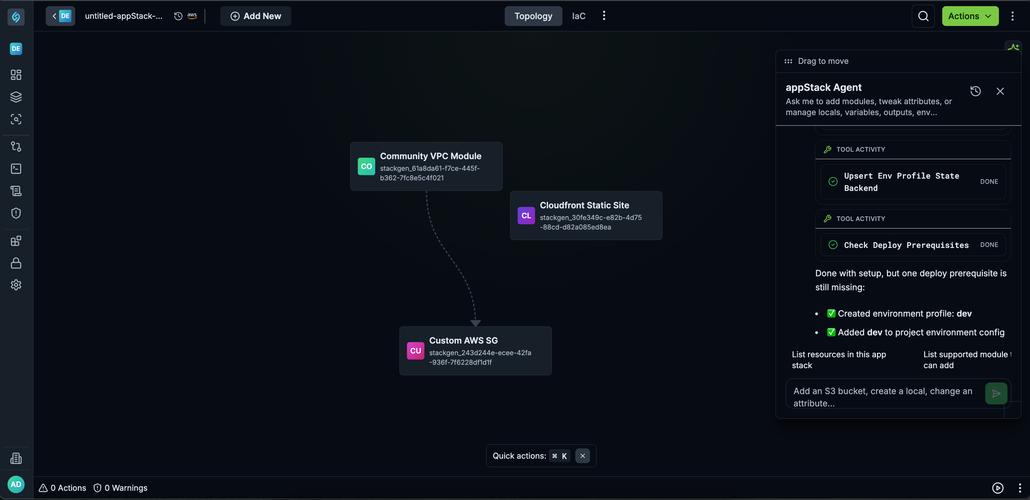
Stackgen now includes an appStack Agent, an in-context assistant available from any appStack, that combines the platform's API/SDK with AI to carry out topology actions on request.
Key Features
- Topology actions: Ask the agent to build an infrastructure (for example,
build an infra for a simple web application) and it adds the relevant modules and base infrastructure to the canvas. - Resource configuration: The agent can configure added resources, including variables and locals, so they're ready to plan and deploy.
- Scoped to appStack context: The agent only understands appStack and topology actions (adding a resource, configuring a resource, adding variables, environments, etc.) It does not perform unrelated platform actions, such as governance setup.
- Prompt-dependent results: Output quality depends on how the action is described. Specific, topology-oriented prompts work best; generic requests outside topology actions will fail.
- Supported functions: Most topology actions, including:
- Adding modules
- Deleting modules
- Configuring modules and resources
- Managing Terraform configuration blocks: variables, locals, outputs, providers, backends, environments
Why It Matters
Whether you already know the infrastructure that goes into your appStack or you are a developer who does not specialize in infrastructure, you can describe what you need in everyday language. The agent adds and connects the relevant resources for you, so you spend less time on canvas setup and more time shipping the application.
Module Catalog Assistant
This feature is behind a feature flag and is currently enabled only for select customers. Contact support@stackgen.com or your Customer Service Manager for access.
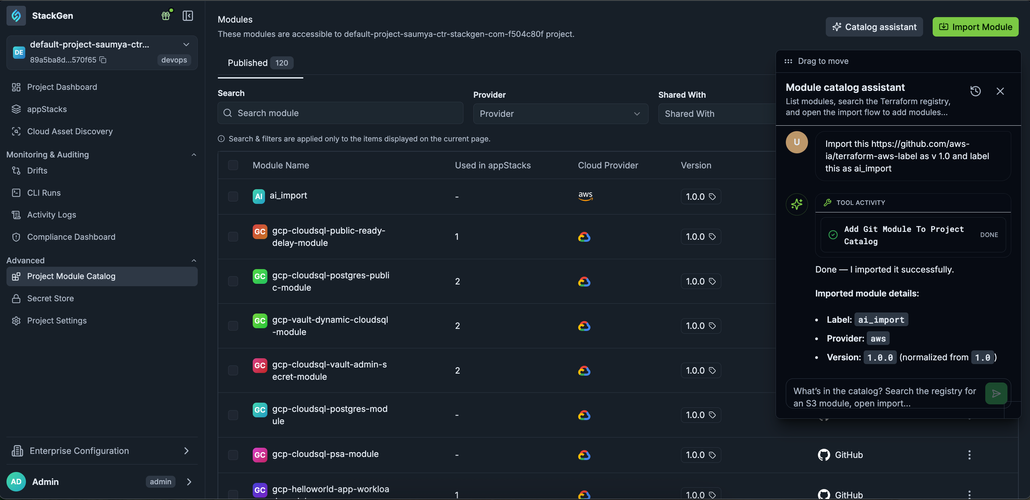
The Module Catalog Assistant is now available on the Project Module Catalog page to help you perform catalog-specific actions.
Key Features
- Module actions: The assistant can import a new module, add a new version of an existing module through conversational prompts.
- Restricted deletion: Deleting a module is not permitted through the chat interface.
Why It Matters
Catalog maintenance tasks that are otherwise multi-step become a single conversational request, while destructive actions stay behind the platform's existing User Interface safeguards.
May 2026
Meta-Arguments and Terraform Outputs
Add count and for_each meta-argument support, and render Terraform outputs in the UI after apply.
Meta-Arguments: count and for_each
We've added support for the count and for_each meta-arguments so you can create multiple resource instances from the Topology canvas using standard Terraform expressions.
Key Features
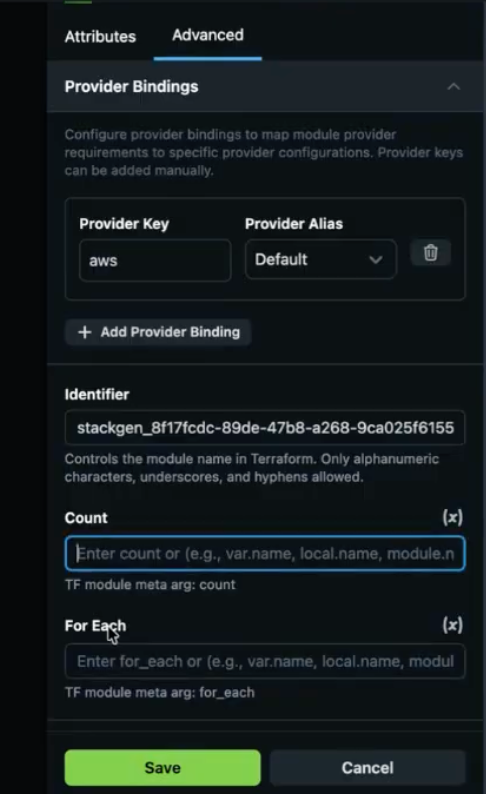
- Dynamic scaling with count - Specify how many identical resource instances to create with a numeric value. For example, a count of three on an S3 bucket module creates three separate buckets.
- Complex iteration with for_each - Iterate over maps or sets of strings like a loop to create resources from defined variables. Use environment variables to set attributes such as bucket names dynamically.
- Terraform expression support - Both meta-arguments accept standard Terraform expressions, including boolean logic, so you can create resources only when a specific variable is enabled.
- Validation and error handling - The platform enforces Terraform standards by blocking count and for_each on the same resource. Plan fails with a specific error when you try an invalid combination.
User Interface and Access
- Advanced pane - Count and for_each live in the new Advanced tab on the resource configuration panel.
- Centralized configuration - The Advanced tab also groups Identifier, Provider Bindings, and other technical settings so the primary attribute form stays uncluttered.
Why It Matters
This update brings the platform closer to native Terraform parity, so infrastructure teams can manage sophisticated scaling requirements and conditional logic without manual resource duplication or complex workarounds.
Advanced Settings Pane
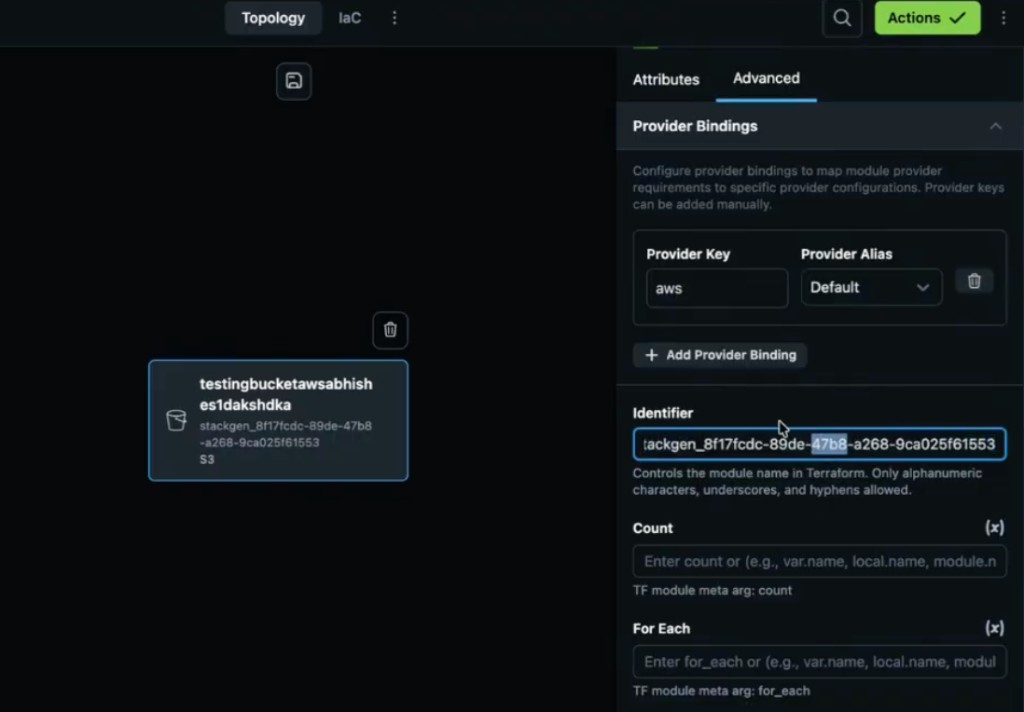
The Advanced settings pane is a new tab within the module and resource attribute panel. It consolidates technical and advanced configuration options so the primary form stays focused on standard settings.
Overview
The goal is to optimize space on the attribute panel. Previously, technical fields such as Identifier sat alongside primary variables, which made the form feel cluttered. Moving those controls to a dedicated tab keeps routine configuration on Attributes while advanced options stay one click away for DevOps users.
Key Features and Controls
The Advanced pane now houses the following configurations:
- Identifier field - Identifies specific modules or resources. Moved from the top of the resource form into this tab.
- Provider bindings - Standard provider configuration settings, centralized in one place.
- Meta-arguments - Home for count and for_each, supporting dynamic resource scaling.
Why It Matters
The attribute panel is easier to scan for day-to-day edits, while experts still have fast access to identifiers, provider wiring, and scaling arguments without crowding the main variable form.
Terraform Outputs Rendering
The platform now automatically fetches and renders Terraform output values in a dedicated table within the UI following a successful deployment.
Key Features
- Automated data population - After apply completes, the platform retrieves output values from the state backend and populates them into the Outputs table.
- Support for multiple sources - Outputs can refer to attributes from a deployed module (for example a bucket ARN) or variables populated at runtime (for example tags or versioning).
- CLI and UI parity - Output rendering is supported whether deployment is triggered through the web interface or via the
stackgen provisioncommand. - Management controls - Add supported output types and delete existing ones as needed from the Terraform Configuration panel.
- Renaming limitation - The UI does not currently support renaming existing outputs.
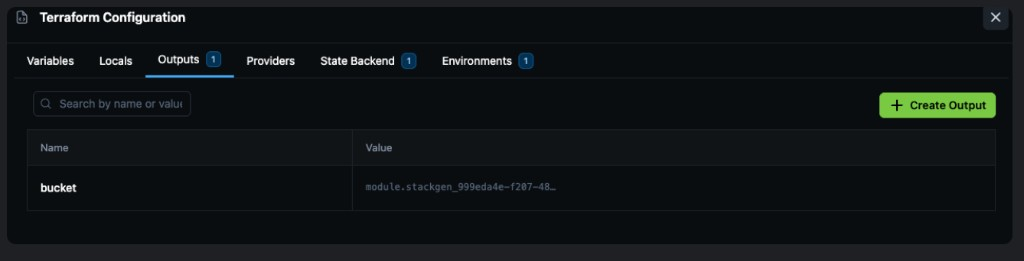
To define stack-level outputs before deploy, see appStack Outputs.
Why It Matters
This feature provides immediate visibility into critical runtime data, such as resource names and ARNs, without requiring you to manually inspect complex state files or logs.
Read more in appStack Outputs.
Confirmed Apply and Destroy Actions
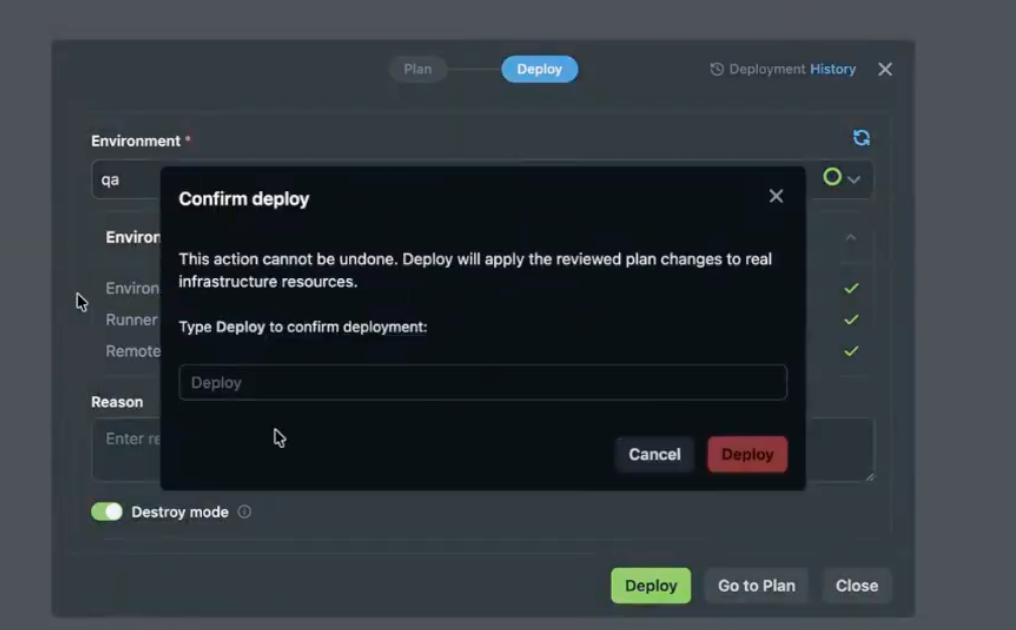
To prevent accidental deployments or infrastructure deletions, we have introduced a mandatory confirmation step for apply and destroy actions.
Key Features
- Manual keyword confirmation - When you initiate apply or destroy, a confirmation popup appears. You must type
deployinto the text field to proceed. - Safety interlock - The final action button (for example Deploy) stays disabled until the correct keyword is entered.
- Intentional execution - This step ensures critical environment changes are deliberate and governed.
Why It Matters
This update serves as a critical guardrail against human error. Explicit textual confirmation reduces the risk of accidental resource destruction or unintended production deployments.
Automated Project Provisioning, Module Promotion, and Sidebar Revamp
Automate project onboarding, strengthen module catalog controls, and refresh sidebar navigation for faster day-to-day work.
Auto-provisioning Projects
We've added an enterprise-level preference that allows the platform to automatically create a Default Project for new users the first time they log in. This feature supports the requirements for individual developers and partnerships using the platform.
Key Features
- Automatic Setup - New users land in a pre-created project instead of an empty state.
- Project Naming - Projects are automatically named following the pattern
default-project-followed by the user's username. - Enterprise Control - This behavior is managed via an Enterprise level preference. The feature only functions when this specific preference is set to true.
- Collaboration Support - Unlike the former personal workspaces, these default projects allow other users to be added, though they function similarly to personal projects in providing individual developer workspace access.
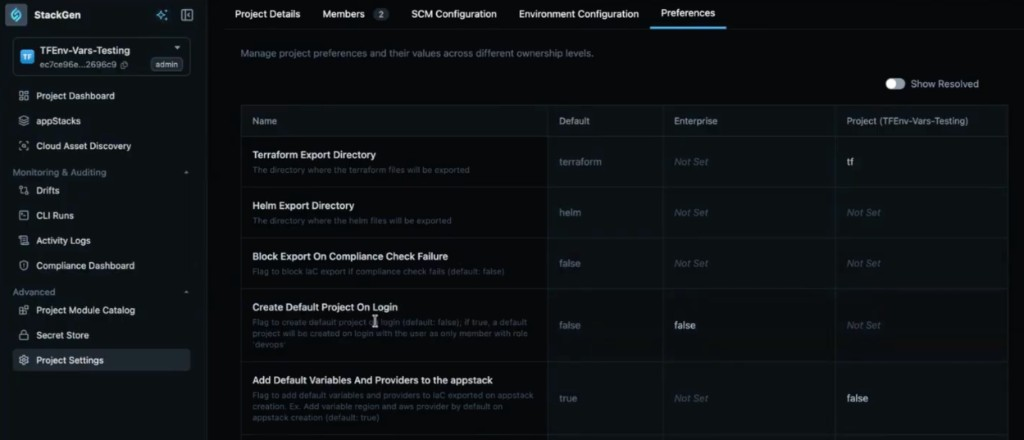
Why It Matters
By automatically provisioning a project, the platform removes the manual overhead for admins to create workspaces for every new user. It ensures that even individual developers have an immediate, governed landing project to begin their work.
Module Access Promotion
The StackGen Catalog has been enhanced to allow users to promote their modules directly within the Enterprise Module Catalog. Previously, if a module was shared only with specific projects, it could not be easily shared with the entire enterprise without deleting and republishing it.
Key Features
- Manage Access - Users can now open a module in the catalog and select Manage Access to switch between Project and Enterprise visibility.
- Multi-Project Sharing - When the access is set to Project, you can add and manage multiple specific projects that should have access to that module.
- Enterprise-Wide Availability - Modules can now be switched to be shared with the entire enterprise directly, ensuring all projects within the organization can utilize them.
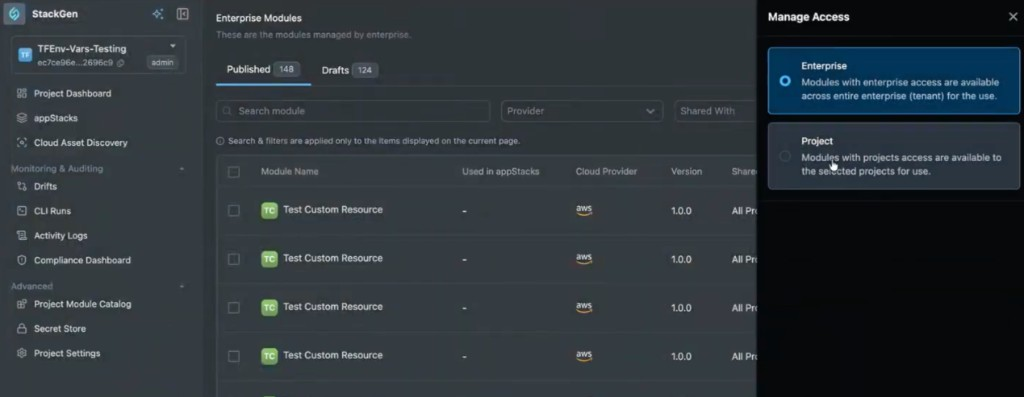
Why It Matters
This update allows project-level modules to be promoted to enterprise-wide visibility without republishing. It eliminates the need for repetitive manual work and ensures that modules can be governed and distributed efficiently as they mature from project-specific tools to enterprise standards.
StackGen Registry
We've introduced a Module Source preference that defaults to the StackGen Registry for custom modules. This update helps the platform achieve parity with standard Terraform registries while providing better internal visibility.
Key Features
- New Module Source Preference - Users can now choose how they want to source their modules through a dedicated preference.
- Registry Hierarchy - The platform supports three primary module sources:
- StackGen Registry - Set as the default source for custom modules to improve tracking.
- Remote - Utilizes a remote Git URL for sourcing.
- Local - Supports local vendoring or inline module definitions.
- Enhanced Data Insights - By routing custom modules through the StackGen registry, the platform can more effectively collect data on which modules are being utilized by customers.
- Custom Module Support - This feature currently applies specifically to custom modules and does not include inbuilt StackGen modules or appStack-specific modules.
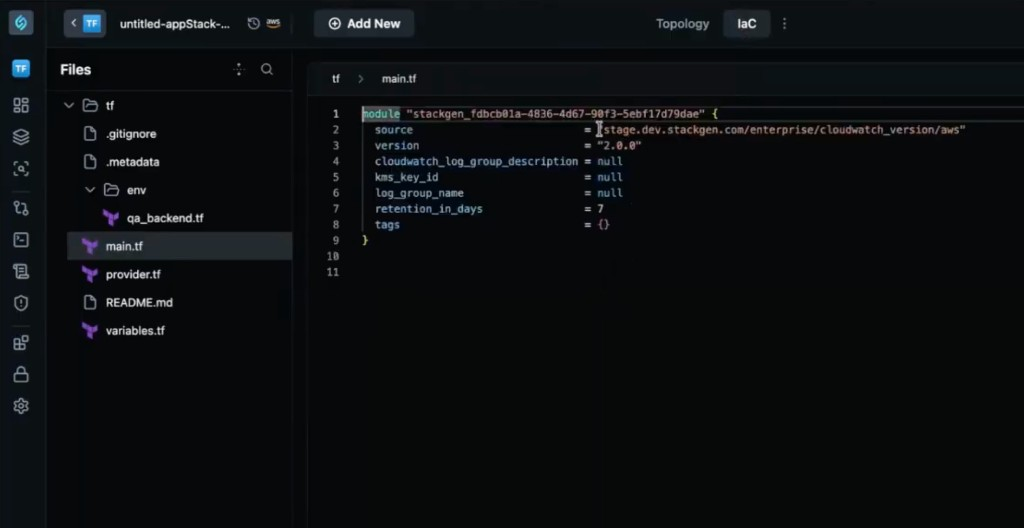
Why It Matters
Centralizing module sourcing improves governance, discoverability, and module usage tracking across environments. It provides a more streamlined way for administrators to manage module sources and for the platform to track usage patterns across different customer environments.
Custom Module Labels
We've added support for Labels on custom modules, allowing teams to tag specific module versions with identifiers like stable, test, or production directly within the module catalog.
Key Features
- Version Tagging - Users can manually add or remove labels on different versions of a custom module.
- Latest Tag - A latest label is automatically applied to the most recently imported version of a module. This specific tag cannot be moved or deleted manually.
- Dynamic Version Pinning - Instead of pinning an appStack to a static version number, users can pin it to a label (for example stable).
- Automated Updates - appStacks pinned to a label automatically adopt the version currently associated with that label. This ensures that all consuming appStacks stay synchronized with the most current stable or latest definitions without manual intervention.
- Broad Compatibility - This labeling system also applies to resource packs and snapshots, allowing them to be pinned to specific labels for consistent behavior.
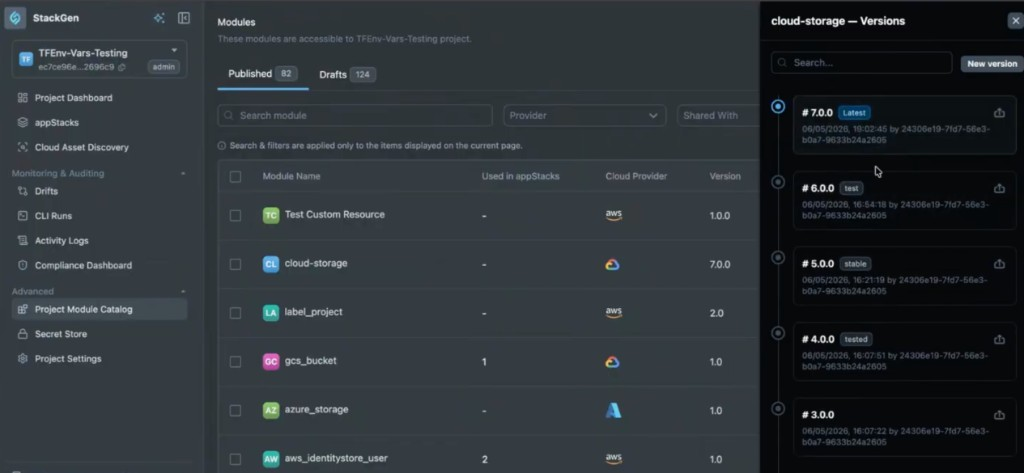
Why It Matters
Labels provide a powerful way for infrastructure teams to manage module lifecycles. They enable developers to stay on approved, stable versions that can be updated globally by admins, reducing the need for manual version management across numerous appStacks.
Read more in Labels.
Admin Dashboard, Project Onboarding, and Enhanced MCP Tools in the IDE
Give admins clearer visibility, onboard projects faster, and work with richer MCP tooling directly in the IDE.
In-App Change Log
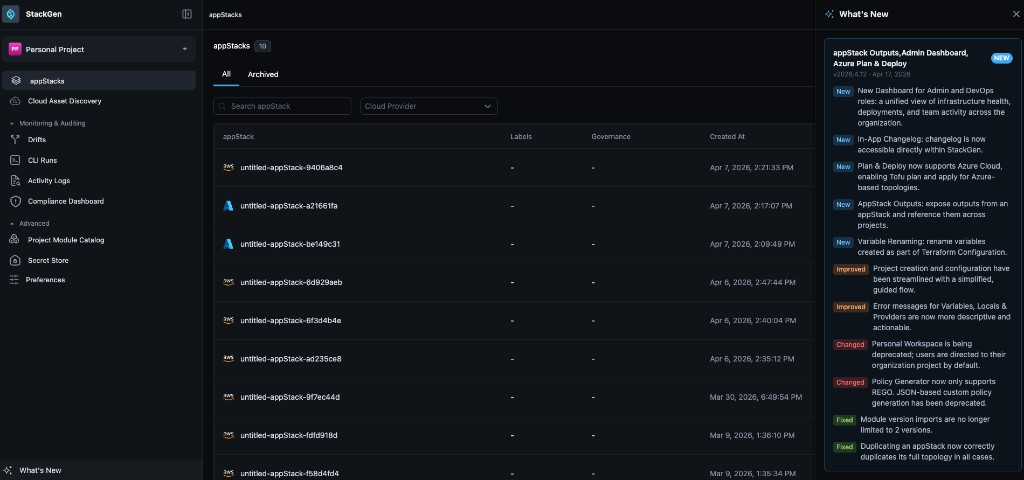
We now support an In-App Change Log so you can see what shipped in recent releases without leaving StackGen UI. A dedicated What's New entry in the UI lets you hover over for a quick highlight of recent work, or click to open a full summary of features, enhancements, and fixes from the latest release.
Why It Matters
As StackGen moves to a faster weekly release cycle, the Change Log gives every role immediate visibility into new capabilities and fixes, without relying on external resources or marketing emails.
Read more in Understanding the StackGen UI.
Preferences UI and IaC defaults
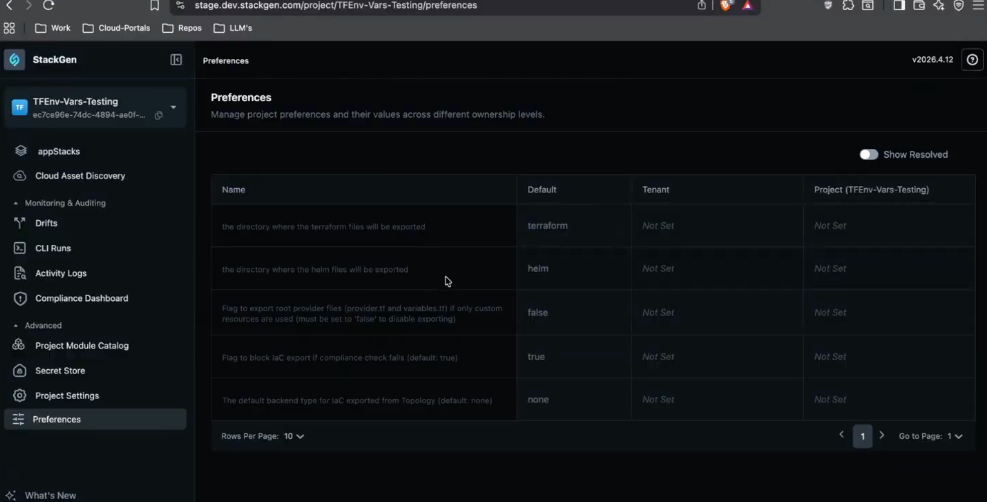
We've added a Preferences UI so you can manage settings in the interface that previously required the CLI. The Preferences feature is released behind a feature flag, so your organisation can enable it when ready. After opening the new UI, you can manage tenant-level defaults and project-level values in one surface instead of splitting work between the terminal and the application.
Key Features
- IaC directory - Change the default IaC directory name (for example from Terraform to TF). Saving the preference updates how related files are rendered for appStacks in that scope right away.
- Preference hierarchy - Project-level values override matching tenant-level defaults. Enablement walkthroughs show the same setting at both levels so you can see which value wins before you rely on it in plans or exports.
- Compliance and naming - Manage compliance export and directory naming preferences in the UI rather than only through external tools or scripts.
- The Preferences entry point and layout in this release are temporary. The product is expected to move Preferences under Project Settings in a future release, so expect navigation to change when that ships.
- When an Admin or DevOps user changes tenant-level preferences while the UI is scoped to a specific project, a new warning appears so you do not treat the edit as project-only. The full behavior is documented under What's Changed in Tenant-level preference warnings below.
Why It Matters
Teams can standardize naming conventions and compliance settings across different projects without jumping to the terminal, ensuring a more consistent and automated workflow across the platform.
Read more in Preferences in StackGen.
Tenant dashboard and setup guides
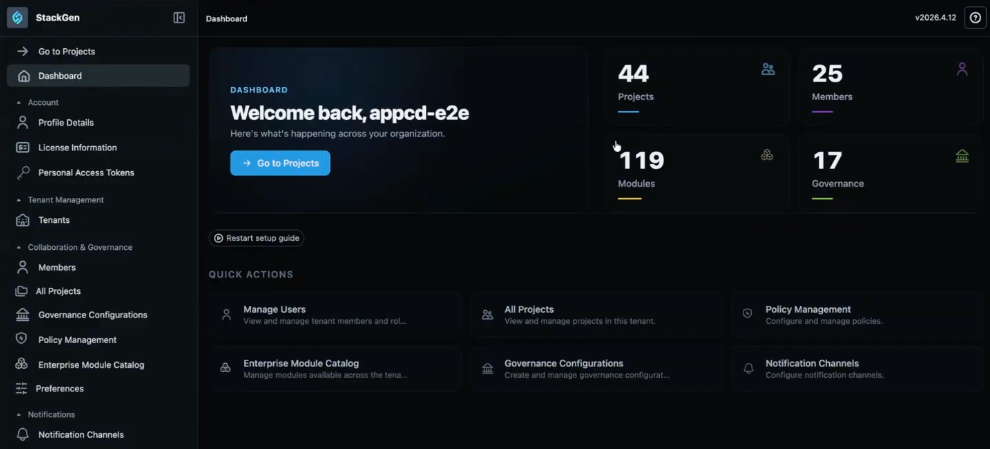
We've added a Tenant Dashboard so Admin and DevOps users see a clear landing view when you sign in, whether it is your first visit or you are coming back to the product. Both the Tenant and Project dashboards include a toggleable setup checklist; this section covers tenant-wide metrics and the tenant checklist. For appStack counts, environment setup, and the project-tailored checklist, see Project dashboard and setup guides below.
Key Features
- Organization metrics - See live counts for projects, members, governance, and onboarded modules on the dashboard cards.
- Toggleable setup guide - Step through first-time work such as creating projects, inviting members, and onboarding a module without losing your place.
- Interactive links - Cards and checklist items take you straight to the right pages (Members, All Projects, Enterprise Module Catalog, and related areas) so you are not hunting through the sidebar.
- Setup guide control - Dismiss the checklist when you are done, or use Restart setup guide when you want to walk through onboarding again.
- For some accounts the dashboard is still reached from Settings today. The product team expects to change how and where you open this view in a future release, so treat the entry point as temporary the same way Preferences placement is called out above.
- Project admins and DevOps also get a similar dashboard at the project level, with metrics and steps scoped to that project.
Why It Matters
You get one place to see how the tenant is doing and to finish baseline setup, with links that drop you on the right management screen for each task.
Read more in Understanding the StackGen UI.
Project dashboard and setup guides
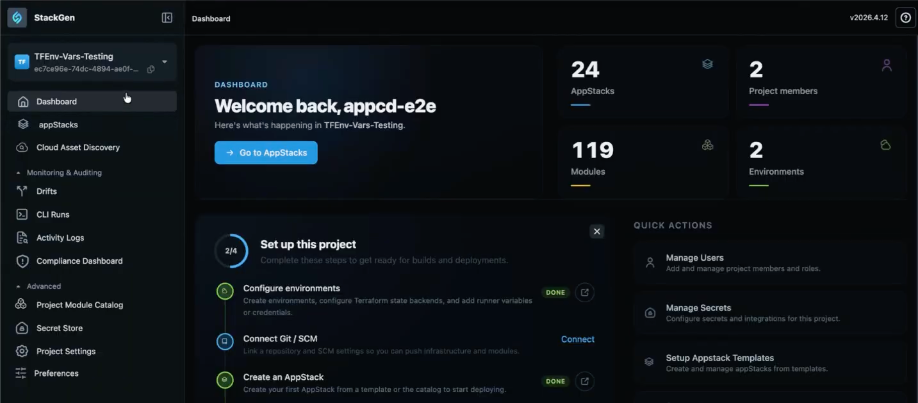
We've introduced a dedicated Project Dashboard for project admins and DevOps so you can see project-specific health and finish late-stage setup in one place. Developers do not see this dashboard, so they stay focused on topology and code. For organisation-wide metrics and the tenant checklist, see Tenant dashboard and setup guides above.
Key Features
- Role-based access - The dashboard is available only to project admins and DevOps. Developer users cannot open it, by design.
- Project metrics - Live counts for appStacks, project members, onboarded modules, and environments reflect the project you have selected.
- Interactive links - Metric cards act as shortcuts into the right surfaces; for example member counts lead to project settings and members, and environment metrics link into environment configuration.
- Toggleable setup guide - Same pattern as the Tenant dashboard: a checklist for integrated onboarding (for example configure environments, connect Git or SCM, create an appStack). If you finish Project Onboarding but skip steps such as SCM or variables, the guide keeps prompting you until you complete the work or dismiss it. Close it when you are done, or use Restart setup guide when you want to walk through initialization again.
- For organisation counts and the tenant checklist, see Tenant dashboard and setup guides above.
Why It Matters
You get one view of how the project is doing, with links that take you straight to members, environments, and related setup, and a setup card that nudges you when anything is still unfinished after onboarding.
Read more in Understanding the StackGen UI and Create a Project with Guided Onboarding.
MCP snapshot support
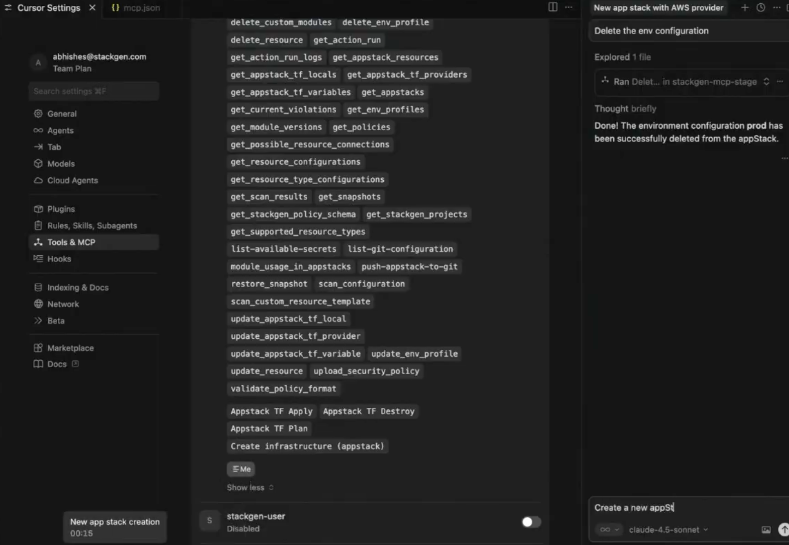
We've added MCP tools so you can create or restore appStack snapshots from your IDE while an assistant helps you edit appStacks. In Tools & MCP you will see actions such as get_snapshots and restore_snapshot next to your other StackGen tools.
Key Features
- Create and restore - Ask the assistant to take a snapshot or restore a snapshot while you stay in the editor.
- Manual prompts - The UI still takes snapshots automatically where that already applies. Over MCP, you choose when to snapshot so long assistant runs do not advance without a save point you picked.
- Rollback for AI edits - If a big batch of assistant changes is wrong, you can go back to a snapshot instead of untangling the diff by hand.
- Delete snapshot is not supported via MCP - Delete snapshot is only available in the main StackGen UI, not through MCP, to prevent accidental deletion of snapshot history through chat workflows.
Why It Matters
You keep rollback close to assistant-driven edits in the IDE, while destructive cleanup stays in the UI where you already confirm risky work.
Read more in appStack Snapshots and StackGen MCP.
MCP environment and state backend tools
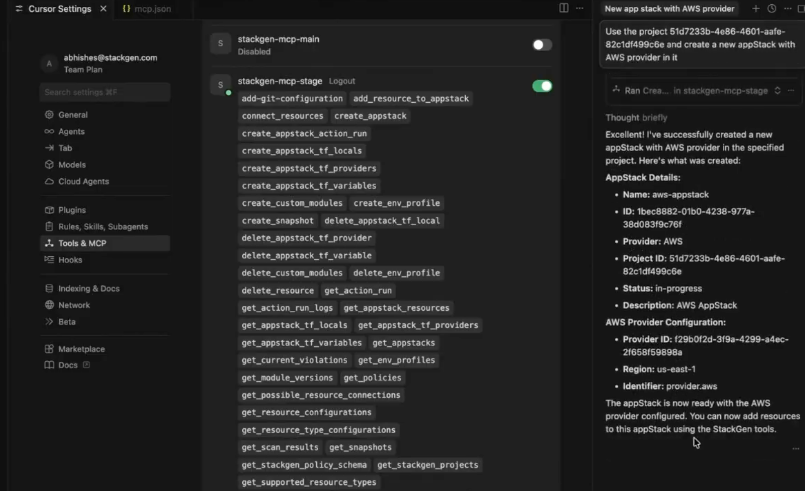
We've added MCP tools so you can add or remove environment configurations and S3 state backends from your IDE with the same assistant you use for appStacks. That matches the StackGen interface you need before plans and deployments run, instead of reserving that wiring for the browser alone.
Key Features
- Profiles and backends - Prompt for changes such as add an environment configuration with an S3 state backend; tools like
create_env_profileanddelete_env_profileperform the work from the MCP list. - Plan and Deploy parity - IDE-driven setup aligns with the requirements for running infrastructure plans and deployments.
- appStack scope - Updates apply to the appStack you are in, not to whole-project defaults, which is how environments are modeled today.
Why It Matters
You configure environments and backends from chat in the IDE, and the appStack Environments view updates the same way it would after a UI change, so teammates still see one shared picture.
Read more in Environment Configurations and StackGen MCP.
Azure Plan and Deploy support
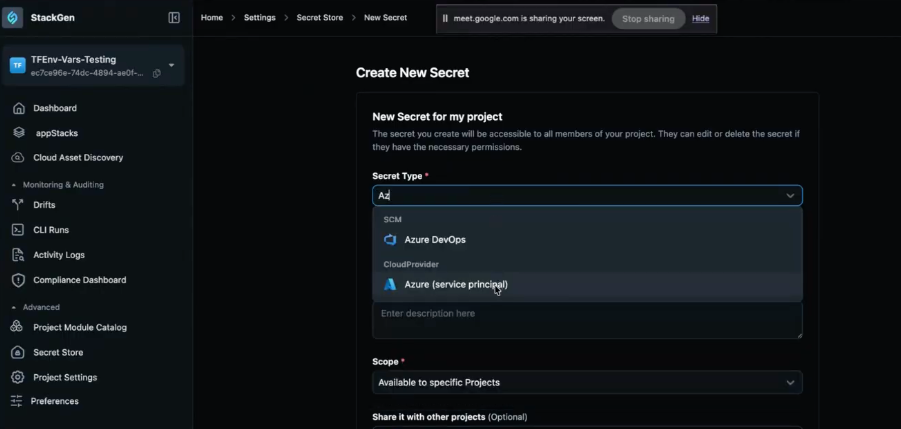
We've expanded built-in Plan and Deploy to include Azure alongside AWS and GCP. You configure an Azure service principal in StackGen, follow the side panel for the Azure portal values you need, then run plans and deployments for Azure appStacks through the same UI flows you already use for other providers.
Key Features
- Azure service principal - Add credentials Plan and Deploy needs from the UI, including CloudProvider: Azure (service principal) when you create a secret under Settings > Secret Store > New Secret.
- In-product guidance - The side panel lists the Azure portal steps to collect fields such as Client ID and Tenant ID next to your StackGen work.
- End-to-end workflow - After the principal is saved, run the full plan and deploy cycle for Azure resources inside StackGen like you do for other clouds.
Why It Matters
DevOps teams get the same Plan and Deploy experience for Azure that they already rely on for other major providers, without maintaining a separate workflow just for Azure infrastructure.
Read more in Plan & Deploy.
Faster Troubleshooting, Reusable Templates, and a Smoother Topology
Speed up troubleshooting, reuse templates across teams, and move through topology edits with less friction.
Error Pop-up with Request ID for Support
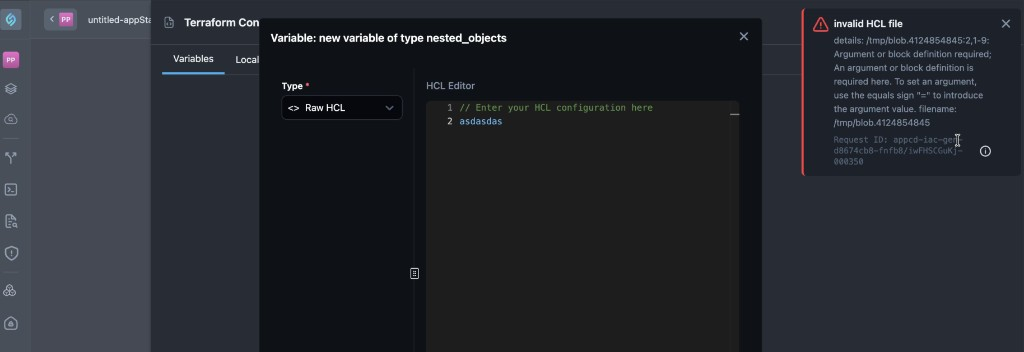
Request IDs in the error experience give you a single, product-surfaced identifier when a request fails. Copy it from the popup and share it with StackGen support so the team can tie your report to the same event in observability and backend logs, without you having to hunt through the browser Network tab first.
Key Changes
- When an error is shown, StackGen can display a popup that includes a request ID (also described as an error ID tied to the failing request). The same value may be referred to in support conversations as a trace ID you can paste so the team can match it in logs.
- A copy control lets you capture that ID in one step and send it to us.
- StackGen can use that ID to locate the event in observability and backend log data, which reduces back-and-forth and speeds up triage from customer environments.
Why It Matters
When you share this ID, support and engineering team from StackGen can look up the exact same error in their tools. They no longer need you to capture the Network tab or send long logs just to find which request failed. That shortens back-and-forth and speeds up fixes for problems you hit in your own StackGen environment.
appStack templates: Start from template
We've added appStack templates so you can start a new appStack from a saved layout instead of adding every resource yourself. On the create appStack page, open Start from appStack template, choose a template, and StackGen auto-populates the new appStack with the resources that were on that template.
Key Features
- Marking an appStack as a template - Use Mark as template on an appStack, or add a
templatelabel so StackGen treats that appStack as a template. - Creating from a template - When you start a new appStack, your templates appear in the list. Selecting one brings the template's resources into the new appStack.
- Templates vs resource packs - Resource packs hit technical limits that could not be solved directly in the product. appStack templates give you the same kind of starting template you can still edit, without relying on resource packs for that workflow.
Template updates and existing appStacks
- Existing appStacks already created from a template do not auto-update when you change the template later.
- New appStacks you create after the template changes do reflect the latest template content.
- StackGen ties an appStack to the template at create time and does not fan out every later template edit to all existing appStacks. That way you can keep older appStacks stable and still use an updated template for new work.
Environment configuration
- Environment configuration is not fully honored together with template-based creates in the way you might expect if you only relied on project settings. The template is the source of truth for what ends up on appStacks you create from it (for example, if you remove QA or Terraform variable definitions from the template, new appStacks from that template will not include what you took off the template).
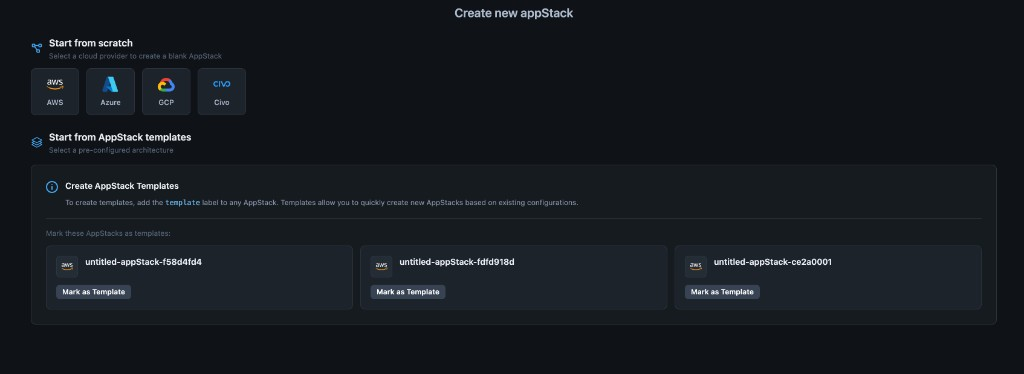
Why It Matters
appStack templates help when resource packs no longer fit what you need: you start from a layout someone already built instead of an empty appStack. Updating the template never rewrites appStacks you created earlier from that template. Only new appStacks you create after the change use the new template content. When you create from a template, the template alone drives what is included on the new appStack, so it may not line up with every environment configuration or project setting you rely on in other paths.
Read more in Create appStacks from Templates.
Topology Command Palette (Command+K and Ctrl+K)
We've added a command palette on Topology so you can search and jump to actions from the keyboard. Open it with Command+K on macOS or Ctrl+K on Windows (the footer in the palette reminds you of the shortcut).
Key Features
- What you can do - Jump to actions such as View IaC and variables. An add path can open the add variables panel directly. The menu can also list variables already on the app stack and other shortcuts shown in the palette.
- Moving in the list - Arrow up and Arrow down move the selection.
- Sub-menus - Enter opens a sub-menu when the item supports one. Backspace or Delete goes back to the previous level.
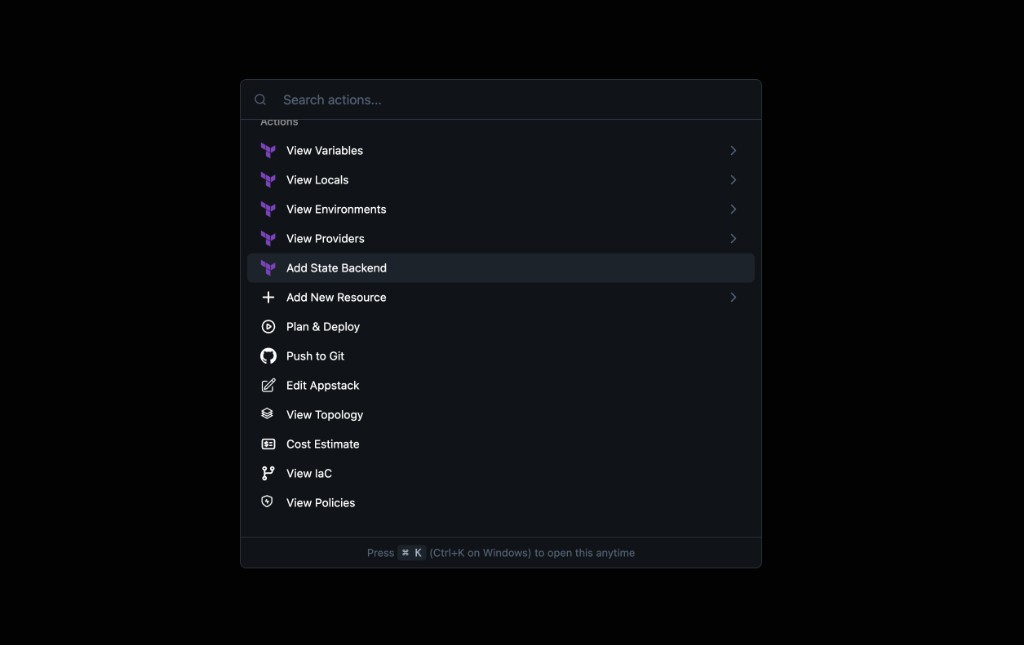
Why It Matters
You can drive frequent Topology actions from the keyboard, spend less time hunting in the UI, and stay focused while you edit a stack.
Streamlined Topology, Enhanced Terraform Expressions, and Simplified Snapshots
Edit topologies more easily, write richer Terraform expressions, and manage snapshots with a simpler workflow.
New Topology Page UI
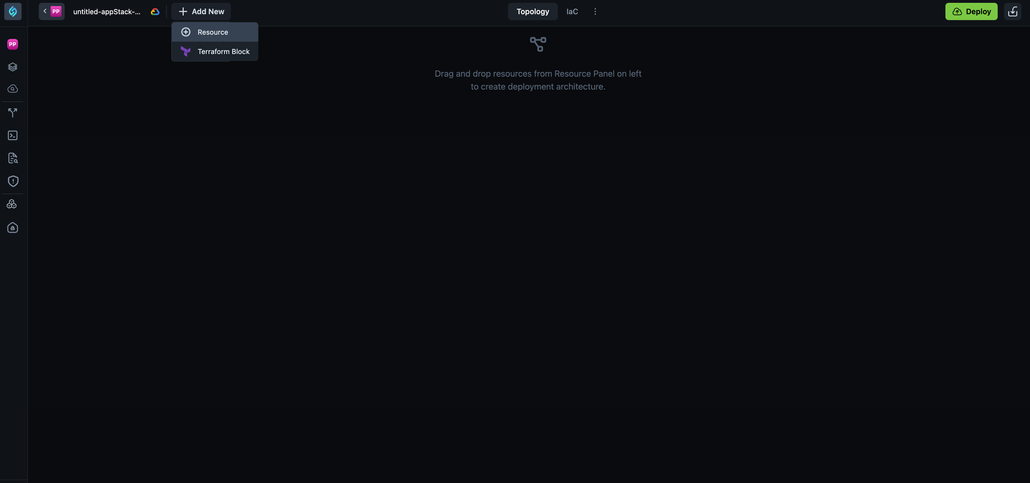
We've reorganized the Topology page when creating or adding appStacks. All options that were previously on the canvas have been moved to the top navigation bar, giving you a cleaner canvas and a more intuitive workflow.
Key Changes
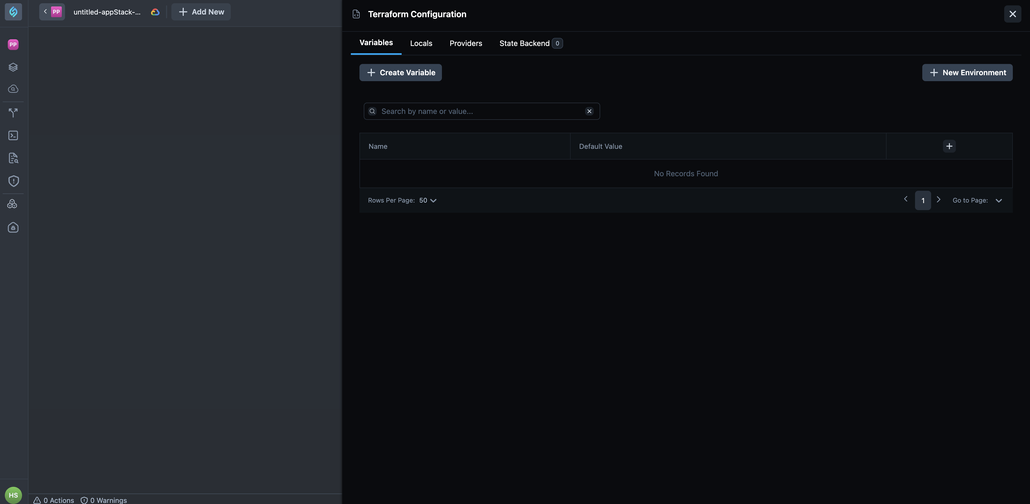
- + Add New button - The Add Resources and Add TF Module buttons have been consolidated into a single + Add New button. When you click it, you get two options:
- Resource - Opens the resource panel so you can add infrastructure resources to your topology.
- Terraform Block - Opens the Terraform Configuration panel with tabs for
Variables,Locals,Providers, andState Backend.
- Resources, Policies, and Cost Estimate - These tabs are now hidden behind a three-dot
(⋮)toggle next to the IaC tab. Click the toggle to reveal these options.
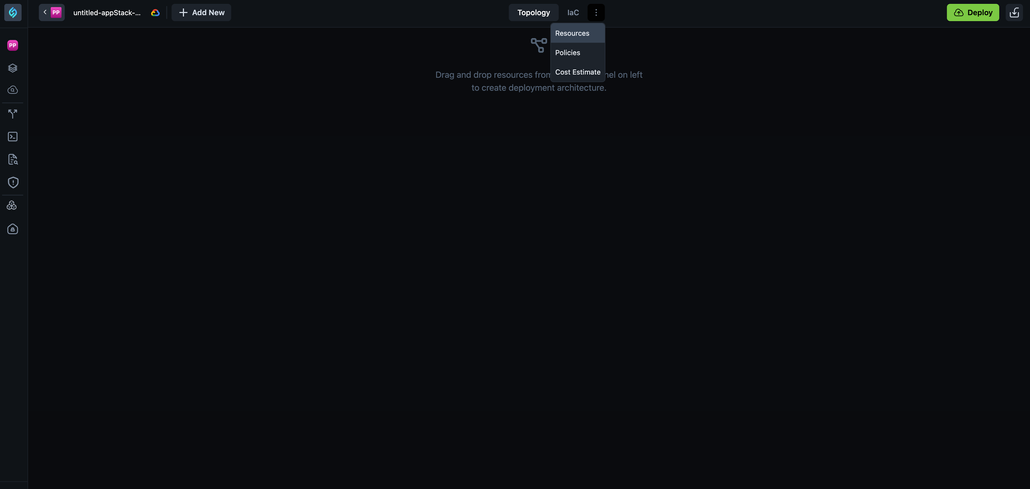
- Deploy and other actions - The Download IaC button is no longer visible by default. The Push to Git button appears only after you have added resources and there are no violations. Once a module is added, you'll see Push to Git along with Import, Download, Topology, JSON, CLI Runs, ShareInfra, and other options.
Why It Matters
These changes simplify the Topology canvas experience by reducing clutter and grouping related actions in the top bar. You can focus on building your deployment architecture while keeping configuration options easily accessible.
Inferred Connections and Enhanced Control for Infrastructure Management
Infer connections automatically and keep tighter control over how infrastructure is managed day to day.
StackGen CLI: Optional Default Provider File Creation
We've made provider file creation more flexible by making default provider.tf file creation optional when your topology uses only custom resources. This gives you greater control over provider versioning and aligns with advanced Terraform workflows.
Here's the complete command:
``bash stackgen preference set --preference-key topology.iac.export.terraform.exportRootProviderFilesIfOnlyCustomResourcesUsed --owner-type Organization --value false --project <projectid> ``
Key Features
- Project-Level Control: Provider file creation is now controlled by a project-level preference.
- No Forced Defaults: StackGen no longer forces creation of a default
provider.tffile when a topology uses only custom resources, giving you the freedom to manage provider versions as needed. - Flexible Provider Management: This change allows you to use newer Terraform and provider versions without being blocked by enforced default provider files.
Why It Matters
This enhancement gives you more control over your provider versioning strategy. If you want to use newer Terraform or provider versions, you are no longer blocked by enforced defaults, and you can avoid the manual work of downloading and editing your IaC file just to change the provider versions. This results in cleaner exported IaC files and better alignment with advanced Terraform workflows where provider versions are managed explicitly.
When Should You Disable Default Provider Files?
Consider disabling default provider file creation when:
- You're using only custom resources and want to manage provider versions explicitly.
- You need to use newer Terraform or provider versions that differ from StackGen's defaults.
- You want cleaner, more minimal IaC exports.
- You're following advanced Terraform workflows with explicit provider version management.
To learn more about managing preferences, refer to the Preference Key documentation.