Streamlined Topology, Enhanced Terraform Expressions, and Simplified Snapshots
StackGen's February 2026 Release focuses on improving the day-to-day experience of building and managing infrastructure. We've reorganized the Topology page with a cleaner canvas and consolidated actions. Terraform expressions now provide clearer visual feedback and support complex expressions such as concat, merge, and jsonencode. We've simplified snapshots by removing versioning and correctly capturing variables, locals, and providers when you restore. We've also fixed push to Git for Azure DevOps, spaces in Git subdirectory paths for custom modules, and snapshot propagation for Terraform block configurations.
Explore what's new and see how StackGen continues to simplify infrastructure operations.
Discover What's New, What's Enhanced, What's Changed, and What's Fixed; and how these updates make building and managing your infrastructure more intuitive.
| Feature | Link | |
|---|---|---|
| What's New | Topology | New Topology Page UI |
| What's Enhanced | Terraform Expressions | Terraform Expressions: UI and Complex Expressions |
| What's Changed | Snapshots | Snapshots and Versioning |
| What's Fixed | Platform | Push to Git Failing for Azure DevOps |
| Custom Modules | Spaces in Git Subdirectory Paths Not Escaped | |
| Terraform Block | Variables, Locals, and Providers Not Captured in Snapshots |
What's New
New Topology Page UI
Click to view
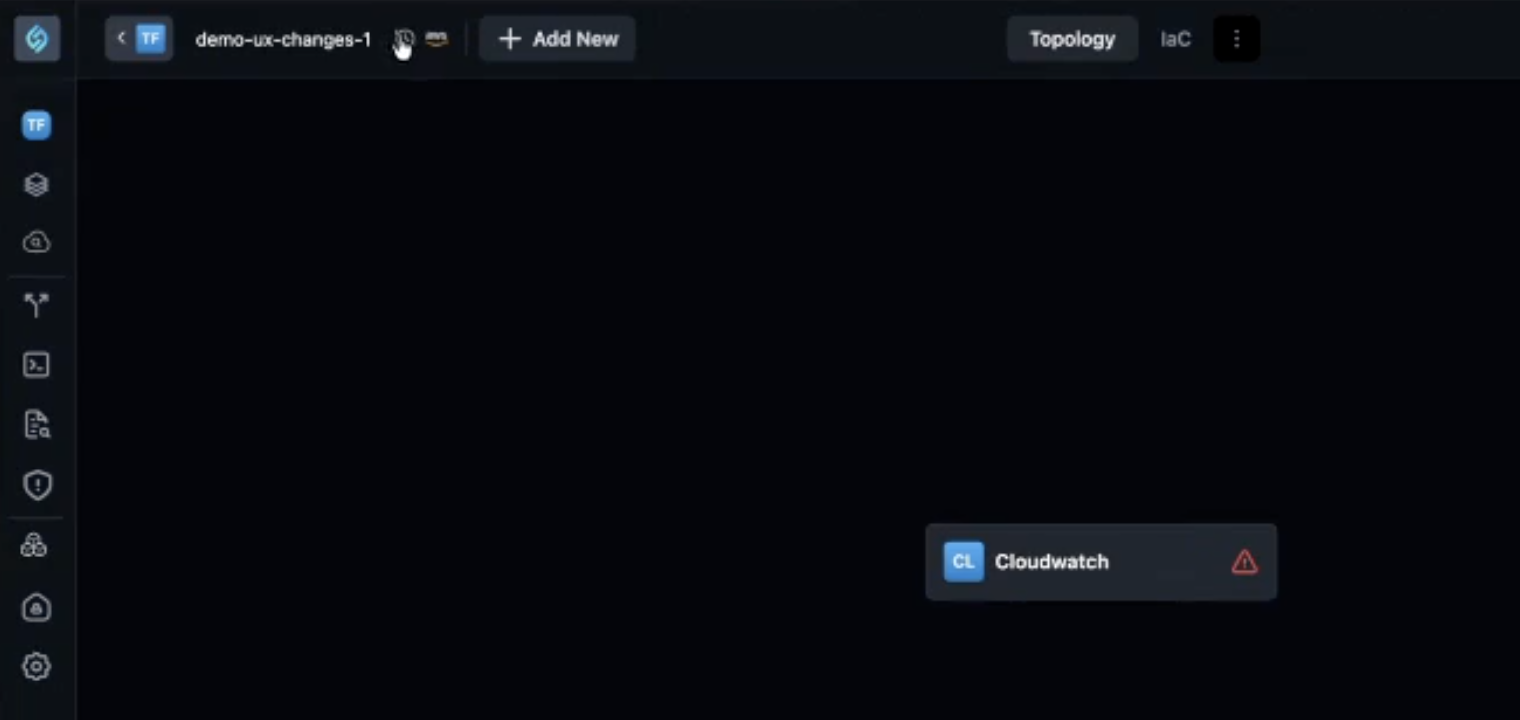
We've reorganized the Topology page when creating or adding appStacks. All options that were previously on the canvas have been moved to the top navigation bar, giving you a cleaner canvas and a more intuitive workflow.
Key Changes
-
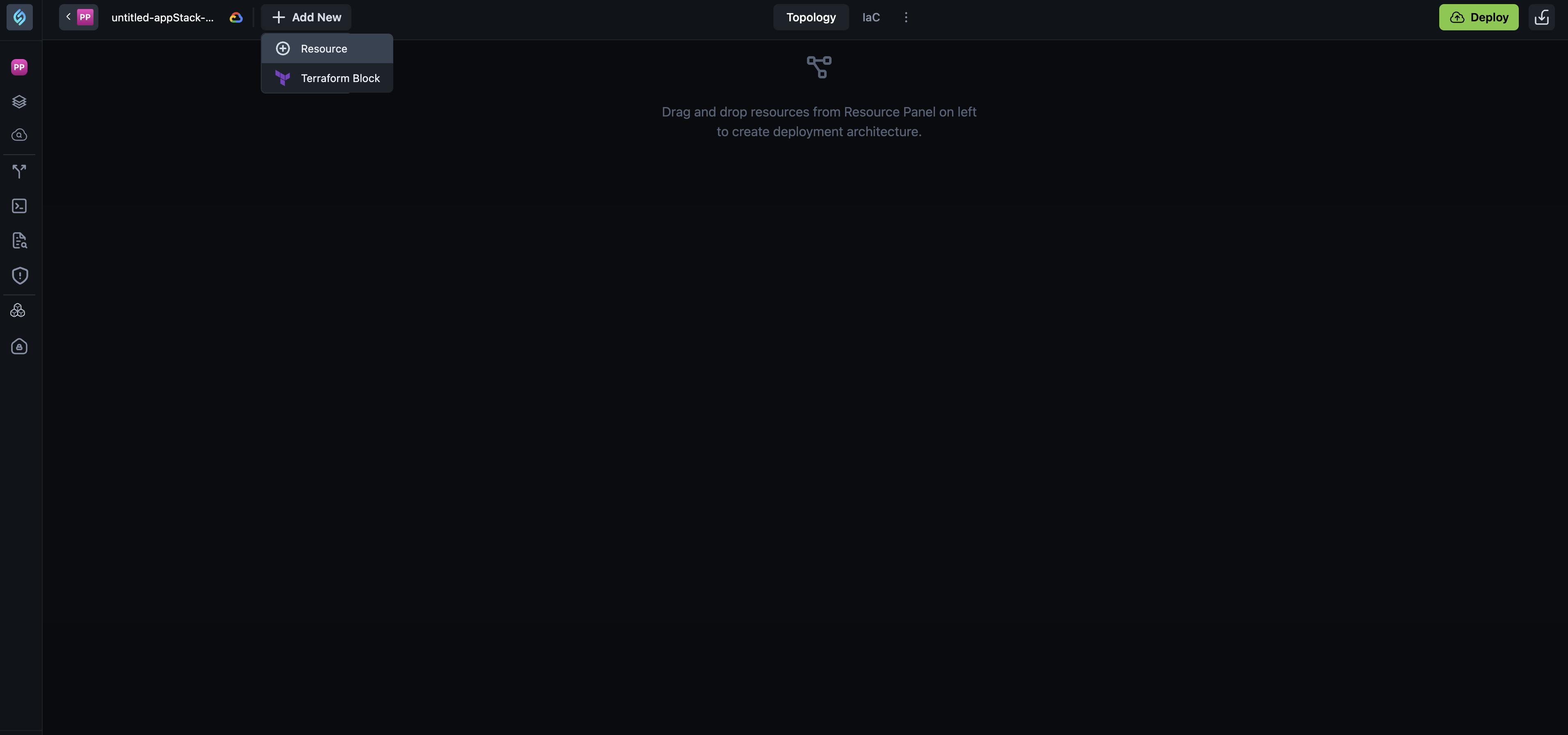
+ Add New button - The Add Resources and Add TF Module buttons have been consolidated into a single + Add New button. When you click it, you get two options:
- Resource - Opens the resource panel so you can add infrastructure resources to your topology.
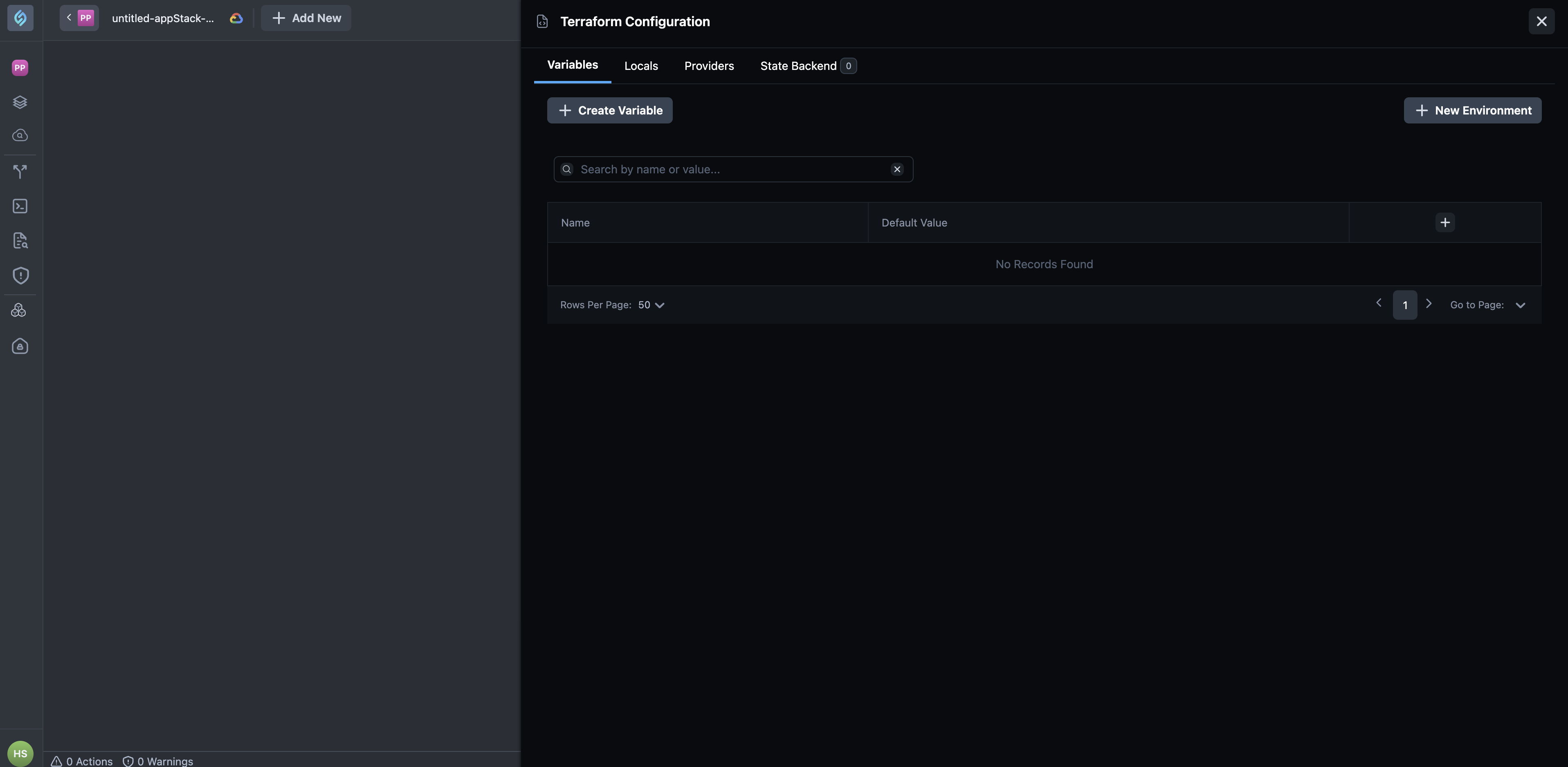
- Terraform Block - Opens the Terraform Configuration panel with tabs for
Variables,Locals,Providers, andState Backend.
-
Resources, Policies, and Cost Estimate - These tabs are now hidden behind a three-dot
(⋮)toggle next to the IaC tab. Click the toggle to reveal these options.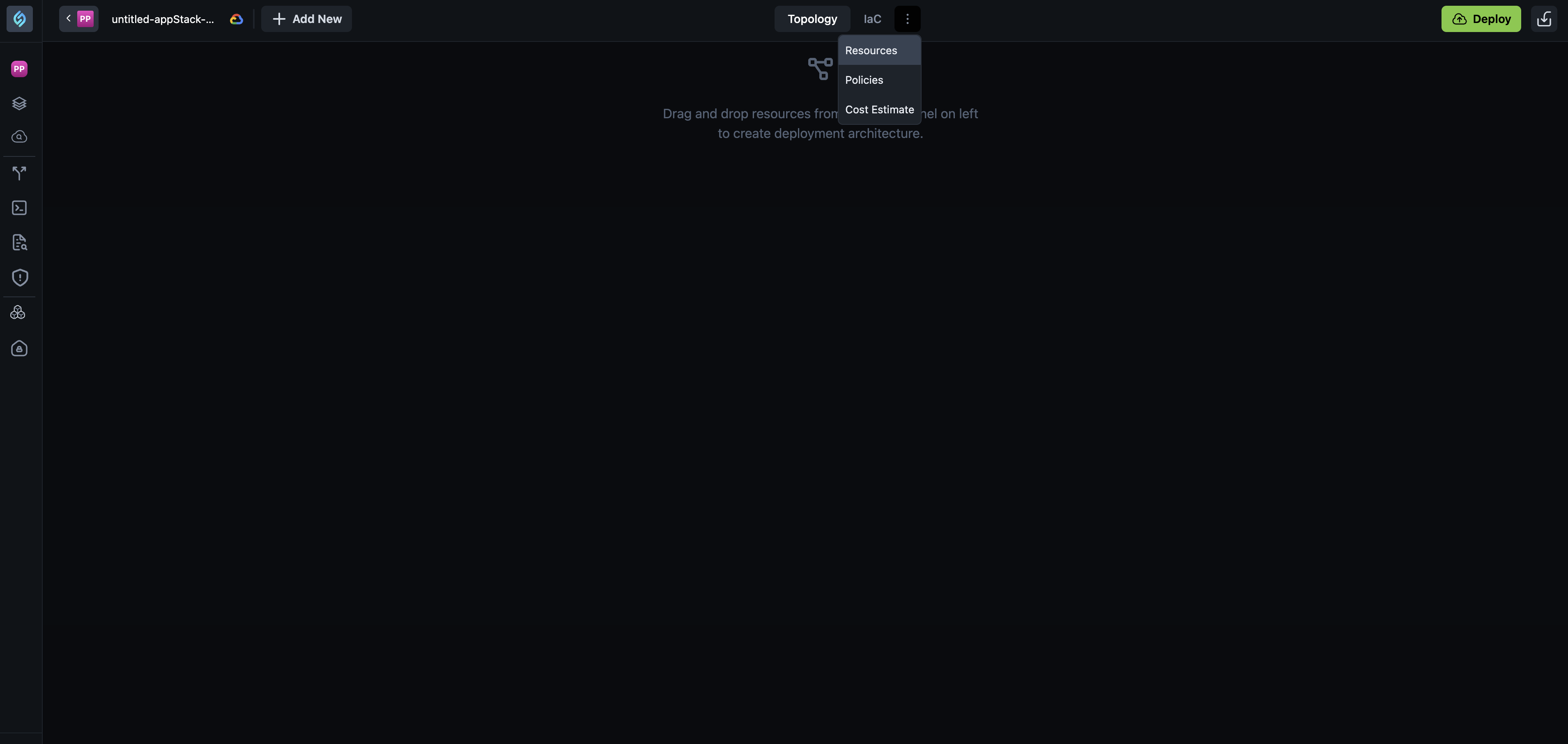
-
Deploy and other actions - The Download IaC button is no longer visible by default. The Push to Git button appears only after you have added resources and there are no violations. Once a module is added, you'll see Push to Git along with Import, Download, Topology, JSON, CLI Runs, ShareInfra, and other options.
Why It Matters
These changes simplify the Topology canvas experience by reducing clutter and grouping related actions in the top bar. You can focus on building your deployment architecture while keeping configuration options easily accessible.
What's Enhanced
Terraform Expressions: UI and Complex Expressions
Click to view
We've enhanced the Terraform expressions experience with clearer UI feedback and support for complex expressions.
Improved expression mode toggle
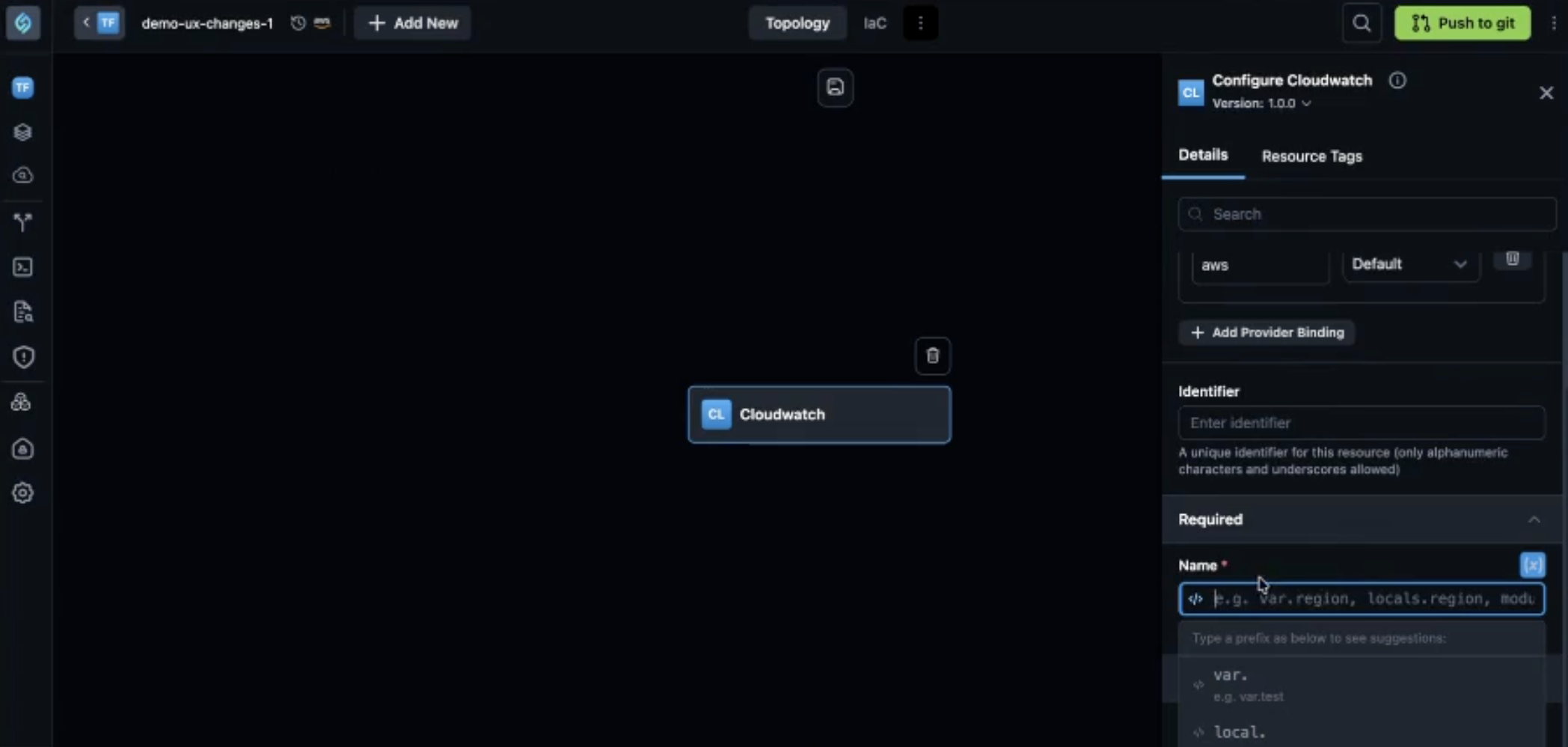
When you click the expression toggle icon (code symbol) next to a resource attribute field, you enter Terraform expression mode. Previously, there was no clear visual indication that the mode had changed.
Now when you toggle expression mode on:
-
The input field switches to a code mode editor with distinct text styling
-
A dropdown with suggestions appears as you type (for example,
var.,local.) -
The text color changes to indicate you are in code mode
Support for complex Terraform expressions
StackGen now supports complex Terraform expressions that were not supported before. You can use Terraform functions such as concat, merge, and jsonencode in resource attribute fields.
For example, when configuring an IAM role's policy as a Terraform expression, you can use jsonencode to wrap the JSON policy. You can now enter any valid Terraform expression, if Terraform supports it, StackGen supports it.
Why It Matters
The clearer UI makes it obvious when you are in expression mode, reducing confusion and input errors. Support for complex expressions lets you use advanced Terraform patterns directly in the resource attribute panel, without workarounds.
What's Changed
Snapshots and Versioning
Click to view
We've made significant changes to snapshots and versioning in appStacks.
Versioning removed
Going forward, StackGen no longer supports manually adding new versions. The Create new version button has been moved, and the option to add new versions has been removed from the dropdown and context menu. Existing appStacks that already have versions will continue to work, and you can still toggle between existing versions using the dropdown.
Snapshot panel
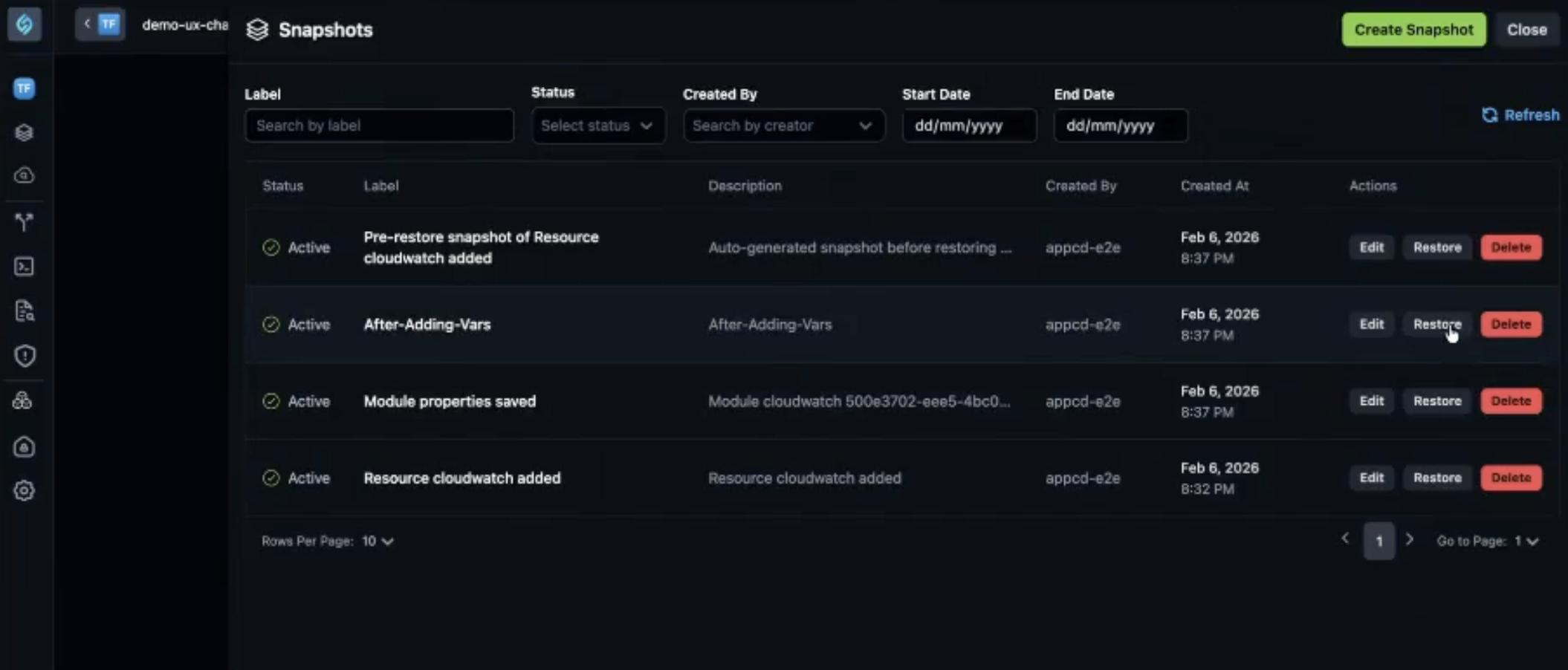
The history icon (snapshot icon) next to Cloud Provider opens the Snapshots panel. Automatic snapshots are taken when:
- A resource is added to the topology
- A resource is deleted from the topology
- You fill a value in the resource attribute panel and click Save
Variables, locals, and providers are now correctly captured and restored when you restore a snapshot (see What's Fixed).
Why It Matters
Snapshots give you a clear history of changes to your appStack, so you can restore to a previous state if needed. By removing versioning and focusing on snapshots, StackGen simplifies how you track and revert changes. The improved capture of variables, locals, and providers means your Terraform block configurations are fully preserved when you restore, reducing the risk of losing configuration when rolling back.
State backend configuration is not yet supported in snapshots. Support is planned for a future release.
What's Fixed
Platform: Push to Git Failing for Azure DevOps
Click to view
We have fixed an issue where push to git was failing for Azure DevOps. Previously, you would not be alerted when fields marked as required were left blank, and you would see validation errors that would not specify the field for which the validation failed.
Push to git for Azure DevOps now works correctly, with proper validation messaging and successful loading of generated infrastructure to the repository.
Spaces in Git Subdirectory Paths Not Escaped
Click to view
We have fixed an issue where custom modules that reference a subdirectory within a Git repo would break Terraform when the subdirectory path contained spaces. StackGen was not properly escaping spaces in the source URL.
Previously, a path like //hardened modules/ in the Git source would be exported as-is, causing Terraform to fail. The path must be URL-encoded (for example, //hardened%20modules/) for Terraform to parse it correctly.
StackGen now properly escapes spaces in Git subdirectory paths when generating the module source URL, so custom modules with spaces in their subdirectory names work correctly.
Variables, Locals, and Providers Not Captured in Snapshots
Click to view
We have fixed an issue where variables, locals, and providers were not propagating through snapshots. Previously, when you added a variable, local, or provider and created a snapshot, those values were not captured in snapshots. Restoring a snapshot would not show the Terraform block configurations correctly.
Now when you restore a snapshot, variables, locals, and providers are correctly restored. For example, if you add a variable and create a snapshot, then restore an older snapshot where that variable did not exist, the Terraform Block will show blank. When you restore the snapshot where the variable was present, it will appear correctly.
Supported Resources
Click to view
With this release, we've added additional support resources across our clouds. Refer to the Supported Resources document to view the complete list.