2026 Aiden Release Notes
2026 Aiden Release Notes
Everything new in Aiden during 2026, in full. Filter by month, or open a release to also see what was enhanced and fixed.
August 2026
App Controls, Honest RCAs, and Azure Connector Setup
Turn workspace apps on or off, archive conversations, keep SRE drafts honest, and require an Azure Subscription ID.
Enable or Disable Workspace Apps
Workspace admins control which apps are on. This is not a licensing gate in this release. If SRE or DevOps is turned off, the workspace opens Chat instead of that app.
Workspace admins can enable or disable individual apps. The app rail shows only the apps that are on, so a workspace can run SRE, DevOps, Chat, or a mix without unused apps in the rail.
Previously, every attached app stayed visible even when a demo or tenant only needed one. Now, turn an app off in workspace settings. Disabled sandbox apps also send operators to Chat.
Read more in Manage Workspaces.
Archive Conversations
You can archive Aiden conversations so they leave the default history. Restore them from an Archived filter when you need them again.
Previously, long test threads and names stayed in the history every operator could open. Now, archive a conversation from SRE history or workspace chat history. Archiving is reversible. It does not delete the thread.
Integration Wizards, Default Skills, and SRE Alert Triage
Follow clearer integration setup steps, inspect default agent skills, and triage SRE alerts in bulk.
Read the complete August 2026 release noteIntegration Parity, Workspace Chat, Alert Filters, and LLM Testing
Connect more providers, make chat the workspace landing page, inspect alert payloads, and test LLMs during onboarding.
Aiden Integration Parity
We've expanded Aiden integrations for Aiden 1.0 parity and customer requests.
Key Features
- New Relic and Dynatrace are available in Aiden onboarding and integrations.
- Coralogix and FireHydrant are available as Aiden integrations.
- ServiceNow is available as a first-class source.
- Jenkins and Prisma Cloud are available as customer-requested integrations.
These additions let migration and demo work use the current Aiden platform without one-off enablement for these tools.
Read more in New Relic, Dynatrace, Coralogix, FireHydrant, ServiceNow, Jenkins, Prisma Cloud, and Supported Integrations.
Chat as Default Workspace Landing
We've added chat as a platform app and a default landing page for workspaces.
Previously, some customers landed on workspace settings or were pushed toward Aiden for SRE or Aiden for DevOps when those apps did not fit their use case. Now, workspace switching can open chat, and you can create workspaces that use chat as the default app.
This supports general assistant use cases without routing users through an app they will not use.
Read more in Access Aiden and Manage Workspaces.
Alert Payload for Filters
We've added alert payload detail so you can inspect the raw alert JSON while writing filters.
Open an alert to view its payload, then use the actual field names and structure when you create or refine filter expressions.
Read more in Alerts.
LLM Model Test on Onboarding
We've added a Test model control during LLM onboarding.
The test confirms whether a model responds before you activate it. This is useful when an OpenAI-compatible gateway lists a model whose chat completion calls no longer work.
Current Constraints
- Reopening a saved model may not show the same test detail panel. Re-onboard the provider under a new name when you need to retest.
- Model-to-task mapping remains single-select in the UI. Use the API or Terraform for broader assignment.
Read more in OpenAI-Compatible LLM Gateways.
July 2026
Aiden for DevOps, Slack App, Workspace Chat, and GitHub Knowledge
Assign Linear or Jira work to Aiden for DevOps, tag Aiden in Slack, chat from the workspace, and use GitHub as a Knowledge Hub source.
Aiden for DevOps
Aiden for DevOps is an MVP first release. Ticket-driven triggering works with Linear and Jira in this cut. Treat workflow matching, inbox triage, and related UX as early and validate in a non-production workspace before you rely on it for customer demos or production work. Contact support@stackgen.com or your Customer Service Manager for enablement and guidance.
We've added Aiden for DevOps so teams can assign infrastructure and platform work to Aiden from the tools they already use, then review, approve, and run those requests against trained workflows and skills.
Previously, DevOps-style agent work was harder to demo and consume in one place, and customer expectations for automated ticket-driven work were scattered. Now, Aiden can ingest tickets into a DevOps inbox, triage them against your workspace workflows, and wait for you to approve and execute the matching workflow.
Key Features
- Ticket-Driven Requests - Connect a tracker (this MVP: Linear or Jira), give Aiden an API key, choose the team, and define which tickets Aiden should pick up (for example tickets assigned to Aiden, with label filters).
- Inbox and Triage - New tickets appear in the DevOps inbox. Aiden tries to match each request to a workflow in the workspace (matching uses the workflow description; keep descriptions clear and distinct).
- Approve and Execute - Review the suggested workflow, approve it, and execute so Aiden fulfills the request with the skills and integrations you configured.
- Train with Workflows and Skills - Define how Aiden should accomplish work (for example provision or tear down a cloud resource, create compliant Terraform modules and open a PR, or run cloud-to-code style flows) using the same workflow and skill model you already use in Aiden.
Example flow (Linear)
1. Connect Linear to the DevOps app with an API key and team selection. 2. Create a ticket such as provisioning a storage account in a named resource group. 3. Aiden ingests the ticket into the inbox and attempts workflow match. 4. Approve and execute the workflow. Aiden completes the work and records fulfillment detail for follow-up.
Current Constraints
- MVP quality. Expect polish work on matching, enablement UX, and related surfaces.
- Triggering for DevOps ticket intake in this release is Linear and Jira only.
- Similar workflow descriptions can confuse triage. Prefer unique, specific descriptions.
Why It Matters
You can assign Aiden work inside existing Linear or Jira processes, see what the agent is doing in one UI, and reuse the same workflows and skills you train for demos and day-to-day automation.
Read more in Skills, Tasks, Jira, and StackGen integration.
Slack App Early Access
The Slack app is early access. The enablement UX is still being polished and is not always obvious from the main Integrations page. Contact support@stackgen.com or your Customer Service Manager if you need help connecting Slack.
We've added an interactive Slack app so you can work with Aiden in Slack channels, not only send outbound notifications.
Previously, v2026.7.7 shipped outbound Slack notifications only, and called out that a fuller Slack application was still in progress. Now, you can add the Slack app to a workspace and tag Aiden in channels so it can investigate alerts and answer follow-up questions interactively.
Key Features
- Platform-Level Slack App - Slack is a workspace-level capability. It is not limited to the SRE app or the DevOps app alone.
- Cross-Signal Context - A workspace can combine infra-related and SRE-related integrations, so Slack conversations can draw on that combined context.
- One Workspace, Multiple Channels - You can connect the same Aiden Slack app to more than one channel in the same workspace.
- Tag Aiden - In a connected channel, tag Aiden on an alert or question to start an investigation or keep asking follow-ups in thread.
How to enable (current path)
Enablement is under workspace settings for admins (connected accounts), including Add to Slack. If the Integrations URL does not show the control you need, open workspace settings (admins may need the settings path rather than the Integrations path). Exact navigation is still being polished.
Current Constraints
- Early access. Setup UX needs improvement.
- Give Aiden a clear indication when you want a specific workflow from a channel conversation.
Why It Matters
Teams can bring Aiden into the Slack channels where alerts and ops discussion already happen, without waiting for a separate product surface.
Read more in Manage Workspaces.
Workspace Chat Outside Apps
We've added a chat experience in Aiden that is not tied only to the SRE app or the DevOps app.
Previously, chat-style interaction was easy to treat as app-specific (for example only inside an SRE or DevOps flow). Now, you can chat with Aiden directly in the workspace about general questions, map the conversation to an existing Persona agent or workflow, or let Aiden choose how to handle the request.
Key Features
- Workspace Chat - Chat with Aiden outside a single specialized app context.
- Persona or Workflow Mapping - Point the chat at an existing Persona agent or workflow when you want a specific behavior.
- Help and General Questions - Use chat for product help and other questions that are not limited to one app.
Why It Matters
You get a single place to talk to Aiden for general work, while still routing to the agents and workflows you already trained when you need them.
Read more in Access Aiden and Functional Agents.
GitHub Knowledge Hub Source
We've added GitHub as a Knowledge Hub source, in the same pattern as Confluence.
Previously, Knowledge Hub content commonly came from text, file upload, URL fetch, discovery, and sources such as Confluence. Now, you can connect GitHub, attach it to an agent, and let Aiden pull repository content as knowledge nodes so agents better understand your processes and workflows.
Key Features
- GitHub Knowledge Source - Connect GitHub from Knowledge Hub (GitHub icon / connect flow).
- Attach to an Agent - Bind the GitHub knowledge source to the agent that should use it.
- Repository Context as Nodes - Aiden pulls data from the connected repository so answers and workflows can use that process and workflow context.
Why It Matters
Teams that keep runbooks, standards, and process docs in GitHub can feed that context into Aiden the same way they already can with Confluence-backed knowledge.
Read more in Knowledge Hub and GitHub.
LLM Gateways, Alert Sources, Persona Agents, and Skills
Connect OpenAI-compatible LLM gateways, unlock more alert sources, and improve Persona Agent, Activities, and agent skills authoring.
OpenAI-Compatible LLM Gateways
This feature is early access. The configuration UX works, but still needs polish. Contact support@stackgen.com or your Customer Service Manager for enablement and guidance.
We've added support for OpenAI-compatible LLM gateways in Aiden, so you can route model traffic through a gateway that exposes multiple models behind one OpenAI-compatible API.
Previously, Aiden model setup did not include a path for OpenAI-compatible LLM routers or gateways. Now, you can add a gateway (for example OpenRouter), provide the gateway URL and API key, and select from the models that gateway returns.
Key Features
- OpenAI-Compatible Gateways - Connect any LLM gateway that exposes an OpenAI-compatible API.
- Model Discovery - After you save the connection, Aiden lists the models available from that gateway.
- Purpose-Based Model Selection - Choose different models for different purposes (for example tool calling vs general requests), including cheaper or specialized models where that fits the workload.
Current Constraints
- Early access. The setup and management UX still needs improvement.
- Available models and capabilities depend on the gateway you connect. Confirm tool calling and other requirements for your use case.
Why It Matters
Teams that already run an LLM gateway for cost control, model access, or approved provider lists can use that gateway with Aiden instead of wiring each model provider separately.
Aiden Alert Source Integrations
We've expanded Aiden alert and observability integrations on the platform Integrations UX, including Aiden 2.0 availability for sources that were already familiar from earlier Aiden experiences.
Previously, some alert sources were available in earlier Aiden surfaces but were not fully unlocked on the current Integrations page. Now, Datadog and New Relic are available in Community Edition, Squadcast is available as an integration, and Dynatrace is available as an integration (Community Edition UI for Dynatrace is still pending).
Key Features
- Datadog - Available from Integrations on Aiden 2.0 for parity with earlier Datadog support.
- New Relic - Unlocked in the Community Edition Integrations UX.
- Squadcast - Available as an alert and incident integration.
- Dynatrace - Available as an integration. Community Edition UI enablement for Dynatrace is still pending.
Current Constraints
- Dynatrace is available as an integration, but it is not available in the Community Edition UI yet.
Why It Matters
SRE and ops teams can connect the alert sources they already use from the current Aiden Integrations page, with clearer Aiden 2.0 coverage for Datadog and related sources.
In-Chat Help, Slack, Knowledge Hub, and Switcher
Get in-chat product help, Slack outbound notifications, Knowledge Hub editing, and round-trip navigation between Aiden and StackGen.
In-Chat Product Help
We've added in-chat product help in Aiden so you can learn how the platform works without leaving the conversation.
Previously, understanding product concepts meant leaving chat and searching the docs on your own. Now, type help in any chat for a general orientation, or use /help with a specific question (for example, what a runbook is, or what a knowledge artifact is). Answers are pulled from StackGen documentation and link back to the relevant docs pages.
Key Features
- Generic Help - Type
helpand press Enter for a broad overview of how to use the product. - Targeted Help - Use
/helpwith a question when you need a tailored explanation of a concept or workflow. - Docs-Backed Answers - Responses are grounded in product documentation and point you back to the documentation site.
Why It Matters
You get product guidance inside the chat you already use, instead of breaking context to hunt through docs for basic concepts.
Slack Notifications Integration
This is the first cut of Slack integration. It supports outbound notifications from Aiden into Slack only. A full Slack application for interactive chat with Aiden is still in development and is not generally available in production yet. Contact support@stackgen.com or your Customer Service Manager if you need a demo of the in-progress Slack app.
We've added a first-cut Slack integration so Aiden can send outbound notifications into a configured Slack workspace.
Key Features
- Slack Integration Setup - From Integrations, add a Slack integration and provide the connection details for your workspace.
- Outbound Notifications - Ask Aiden to send a message to a Slack channel, or use notification steps in workflows so teams get updates without watching the UI.
Current Constraints
- Outbound notifications only. Two-way interactive Aiden in Slack is not part of this cut.
- The broader Slack application remains under development. Demo access may be available; it is not a production GA path yet.
Why It Matters
Teams can push Aiden-driven updates into the Slack channels they already monitor, then expand to richer Slack-native interaction when the full app lands.
Multiple Authentication Providers
We've added support for multiple authentication providers on the same account in both Aiden and StackGen core.
Previously, signing in with Google, GitHub, or another provider could create separate tenants and accounts, which made it painful when a PoC used one identity provider and production needed another. Now, you can associate more than one sign-in method with the same account (for example both Google and GitHub) so the same tenant stays available across providers.
Key Features
- Link Multiple Providers - Connect additional identity providers to an existing account instead of ending up with disconnected tenants.
- Aiden and StackGen Core - The same multi-provider login model applies in Aiden and in the StackGen infrastructure product.
- PoC to Production Continuity - Teams that start on one provider and later standardize on another can keep the same tenant without a separate account migration.
Why It Matters
SaaS customers who change identity providers between evaluation and production can keep one account and tenant, instead of rebuilding access around a second login method.
Aiden to StackGen Product Switcher
We've added the reverse product switcher so you can move from Aiden back to StackGen core.
Previously, v2026.7.3 added a switcher from StackGen to Aiden, but returning from Aiden to core StackGen was not available yet. Now, the same switch pattern works in Aiden, so you can move either direction between the products.
Key Features
- Switch to StackGen - From the Aiden UI, use the product switcher to open StackGen core.
- Round-Trip Navigation - With the StackGen to Aiden switcher from v2026.7.3, teams that use both products can move between them without hunting for separate URLs.
Why It Matters
Users who work in both products get a consistent switcher in each direction, matching how teams move between infrastructure and Aiden workflows day to day.
Product Switcher and Email OTP Login
Switch from StackGen to Aiden in one step, and sign in with email or OTP.
StackGen to Aiden Product Switcher
We've added a product switcher in the core StackGen platform UI so you can move from StackGen to Aiden.
Key Features
- Switch to Aiden - From the core StackGen UI, use the product switcher to open Aiden.
- Known Limitation - Switching back from Aiden to core StackGen is not available yet. StackGen to Aiden works; Aiden to StackGen still needs to land in a later update.
Why It Matters
Teams that use both products can open Aiden from the core platform in one step, while the reverse switcher is tracked as a follow-up.
Aiden Email and OTP Login
Aiden now supports email-based login and one-time password (OTP) login over email.
Key Features
- Email Login - Sign in to Aiden using your email address.
- Email OTP - Request a one-time password sent to your email, then complete login with that OTP.
Why It Matters
This brings Aiden login closer to Aiden 1 parity for customers who need email and OTP-based sign-in, alongside the other Aiden 1 support fixes in this release cycle.
June 2026
Light Mode, Functional Agent Tasks, and New Integrations
Switch between light and dark mode, assign tasks to Persona/Functional Agents, and connect Civo Cloud, New Relic, Fire Hydrant, and Squadcast.
Aiden Light Mode
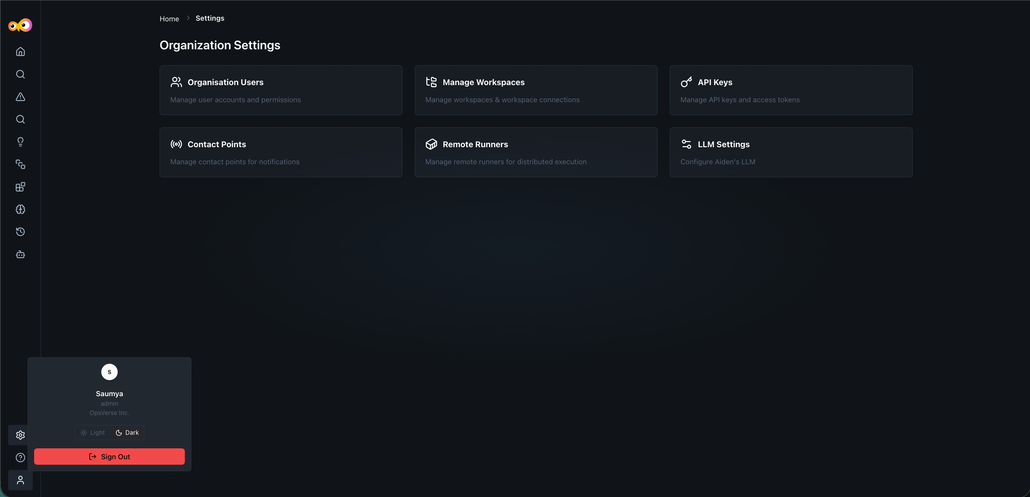
Aiden now includes a light mode toggle, letting you switch the interface between light and dark mode, with corresponding background and UI component adjustments.
Why It Matters
Teams can match Aiden to their preferred visual environment, whether that's a bright workspace or a low-light setup.
Task Support for Functional Agents
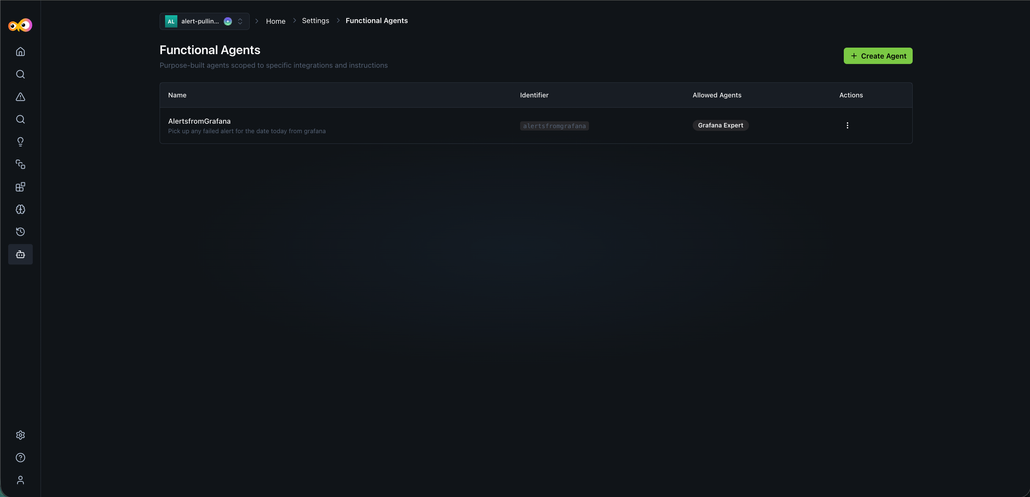
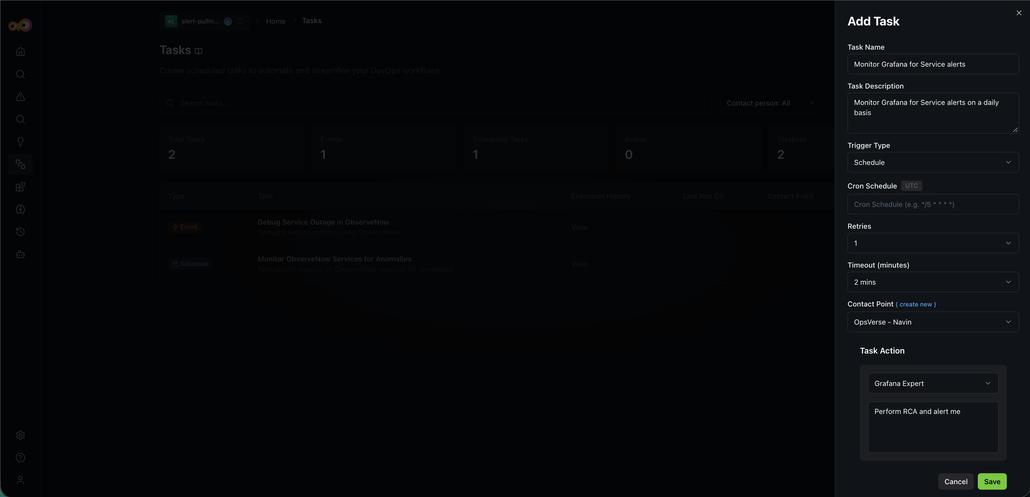
When creating tasks, you can now assign task actions to Persona or Functional Agents powered by specific custom prompts, expanding beyond standard integration experts.
Why It Matters
Tasks aren't limited to built-in integration experts anymore. You can route work to agents tailored with custom prompts for your specific use case.
New Tool Integrations
Aiden adds support for several new integrations:
- Civo Cloud: Connect using an API key and query cloud networks via the Civo expert.
We have added initial integration support for the following tools:
- New Relic: Connect your account and query APM, logs, traces, and alerts with NRQL in conversation.
- Fire Hydrant: Connect with a bot token and manage incidents, runbooks, and on-call from chat.
- Squadcast: Connect with an API token, then acknowledge or reassign incidents and look up who is on call.
Why It Matters
Expanded integration coverage lets more teams bring their existing tools into Aiden's investigation and automation workflows.
May 2026
Functional Agents and Alert Investigations
Create specialized Functional Agents with custom prompts, and get fuller alert payloads and investigation context.
Functional Agents
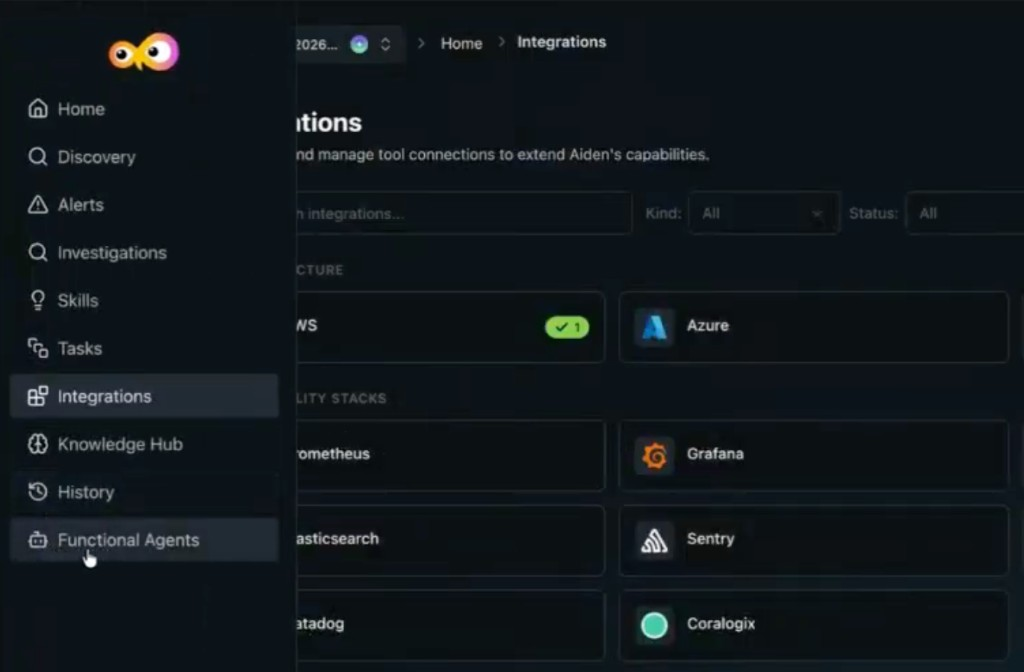
Functional Agents (also referred to as personal agents) are customizable AI entities in Aiden that you can configure with specific expertise and operational guidelines.
Key Features
- Persona customization - Define specific roles for an agent, such as a Cloud Infra Architect, to handle specialized tasks.
- Expert integration - When you define an agent, select which expert it is allowed to work with so the agent uses the correct domain knowledge.
- Custom instructions - Provide unique instructions to each agent to govern how it responds and the standards it should follow.
- Thought process visibility - When an agent generates output (for example Terraform code), its internal reasoning and thought process are visible, including which agent produced the response.
- Agent filtering - Filter your list of agents by text to quickly find the right persona for a conversation.
Why It Matters
Specialized personas and transparent reasoning give you more accurate, context-aware assistance, so teams can generate infrastructure code and troubleshoot complex environments according to their own organizational standards.
Read more in Functional Agents.
Observability and Alert Integration
Aiden now provides enhanced visibility and automated context-gathering for infrastructure alerts and investigations.
Key Features
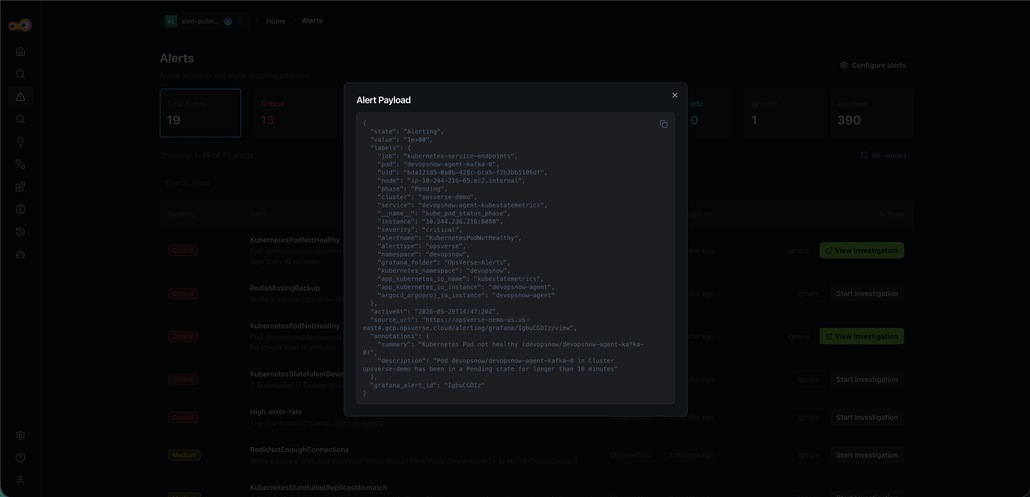
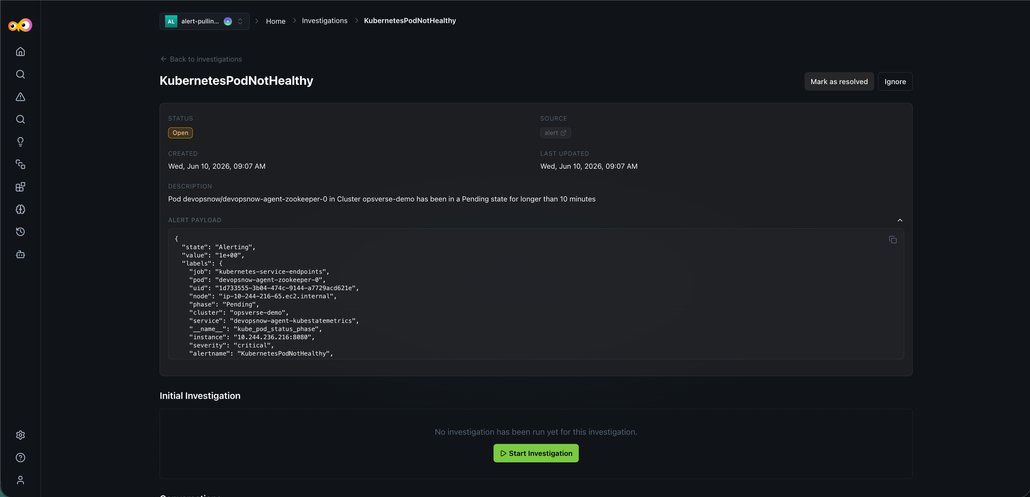
- Full alert payloads - For environments with Grafana or Observe configured, Aiden can display the complete information payload for any captured alert.
- Investigation detail visibility - The Investigation tab now renders all detailed data related to a specific infrastructure investigation in one view.
- Contextual conversations - Start a new Aiden conversation that automatically includes the full payload of an investigation for more accurate, data-driven assistance.
- Chain of thought rendering - The internal reasoning and chain of thought for an investigation are visible in both the dedicated investigation view and the main chat window.
Why It Matters
By surfacing full alert payloads and maintaining the chain of thought throughout the investigation, Aiden gives DevOps teams immediate, deep context. This reduces the time spent manually gathering data from external observability tools during critical incidents.
GitHub MCP Branching Fix
Fix GitHub MCP branching so conversational and scripted SCM branch requests from the IDE complete successfully again.
Read the complete April 2026 release noteDatadog, JSM, SRE Discovery Tasks, and Chat UX
Connect Datadog and JSM, auto-create tasks and skills from SRE Discovery, and use interactive chat elements.
Datadog Integration
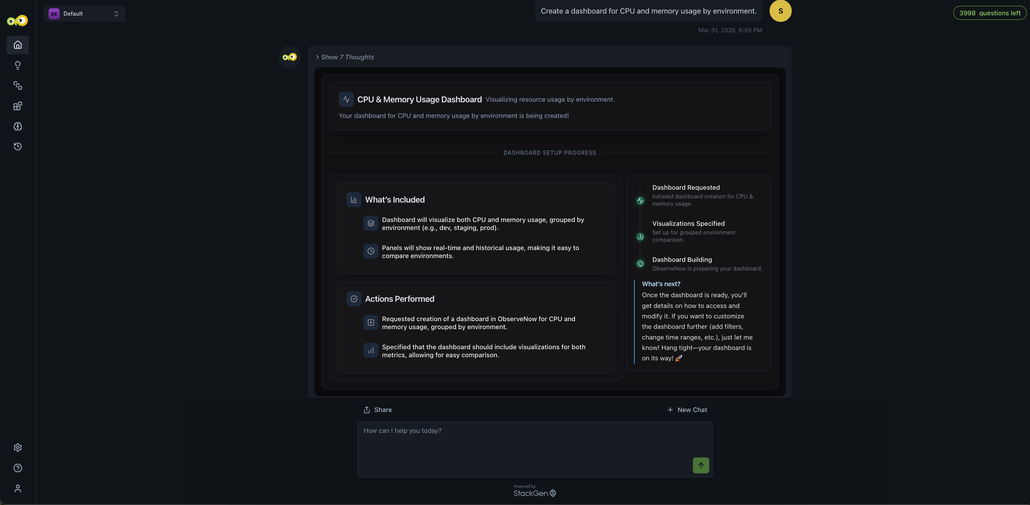
The Datadog integration supports observability-driven investigation and monitoring. You can query logs, analyze traces, explore metrics, review monitors, track incidents, and manage dashboards, all directly within Aiden. Interact with your Datadog data conversationally for troubleshooting issues, understanding system behavior, and monitoring infrastructure without switching tools.
Typical use case: investigating production issues by querying logs, correlating traces and metrics, identifying root causes, and taking action, without leaving the Aiden interface.
Datadog observability in Aiden lets you:
- Query logs with filters, indexes, and time ranges
- Investigate distributed traces and spans
- Analyze time-series metrics and dashboards
- Review monitors and alert configurations
- Track and investigate incidents
- Monitor infrastructure health and hosts
- Explore CI/CD pipeline events
- Browse service catalog and team metadata
Example prompts
- "Show me error logs from api-service in the last hour"
- "What's causing the latency spike in checkout service?"
- "List all active monitors and their status"
- "Find traces with 5xx errors today"
- "Are there any open incidents?"
Why It Matters
You get unified observability access in Aiden without switching to Datadog. Logs, metrics, traces, and incidents stay in one place, keeping investigation and troubleshooting workflows fast and in context.
Check out the Datadog integration guide to set up and start using the integration.
JSM Integration
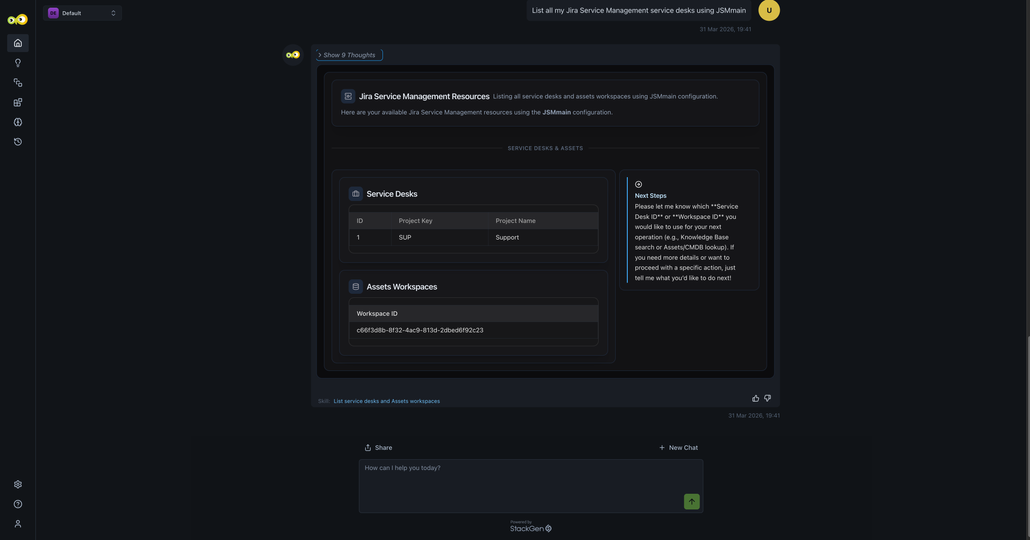
The Jira Service Management (JSM) integration brings service management, CMDB, SLAs, and on-call context into your workflows. You can search assets, check SLA status, query the Knowledge Base, and view alerts or on-call schedules without leaving the Aiden interface.
Interact with your JSM data conversationally to investigate issues, understand service context, and respond faster without switching tools.
Typical use case: incident investigation and support workflows, checking SLA status, identifying impacted assets, finding relevant Knowledge Base articles, and routing issues to the right on-call engineer.
JSM capabilities in Aiden:
- List service desks and access Knowledge Base content
- Search articles across service desks
- Check SLA status (breached, time remaining) for issues
- Explore Assets (CMDB) with AQL-based queries
- Retrieve detailed asset and configuration item information
- List Opsgenie alerts (if configured)
- View on-call schedules and current responders
Example prompts
- "Who is on call right now?"
- "List open Opsgenie alerts"
- "What's the SLA status for SUP-123?"
- "Search Knowledge Base for password reset"
- "Find laptops in Assets with name containing dev"
- "Are there any breached SLAs for Help Desk?"
Why It Matters
You get unified service management context in Aiden without switching to JSM. Assets, SLAs, knowledge, and on-call data stay in one place, keeping support and incident workflows fast and in context.
Check out the JSM integration guide to set up and start using the integration.
Tasks and Skills from Discovery
Aiden SRE Discovery now does more than show you what's running in your environment. It also sets up the tasks and skills you need to act on that information, automatically.
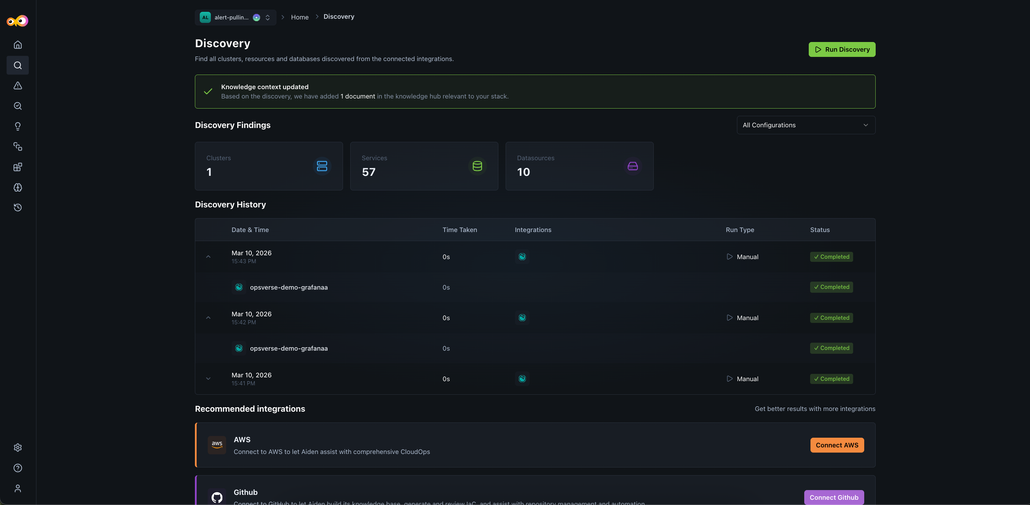
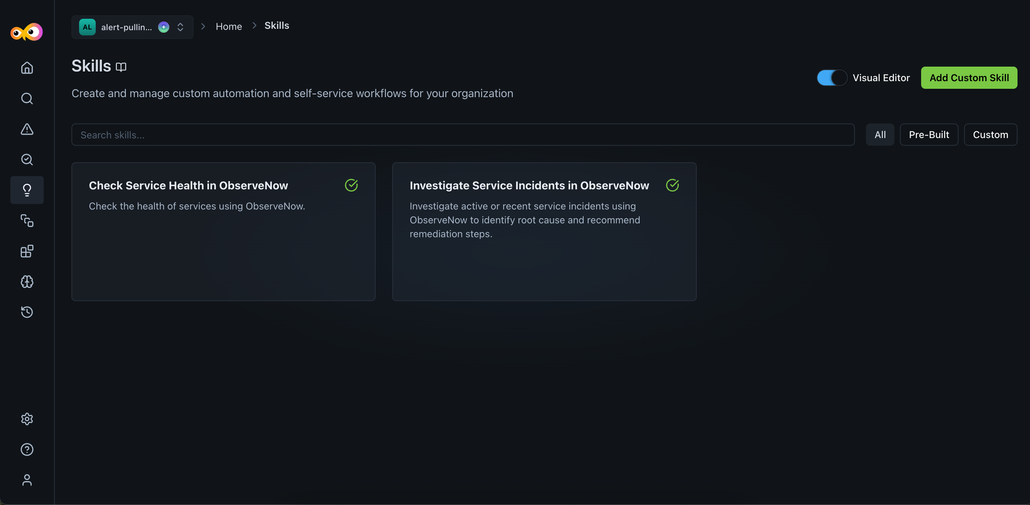
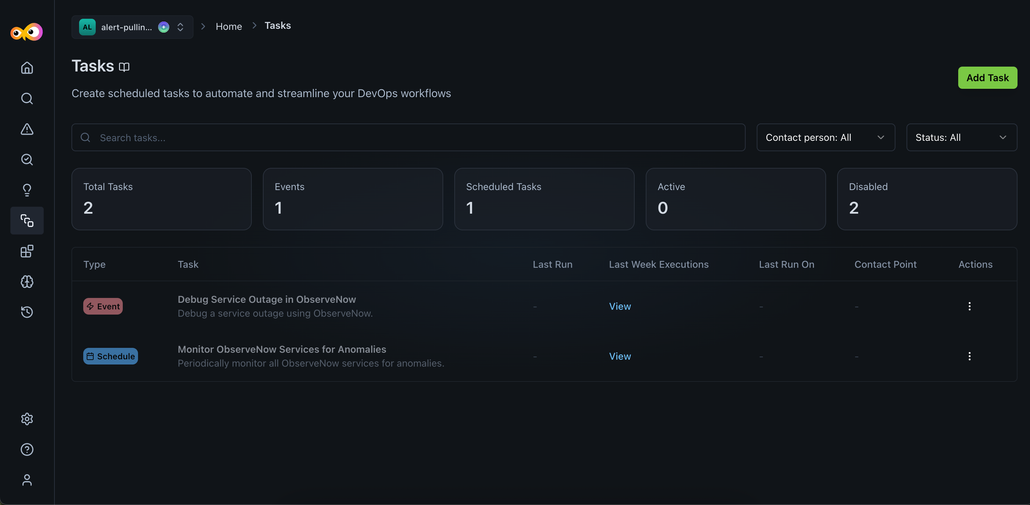
As part of the discovery process, Aiden creates a Knowledge Base, along with ready-to-use tasks and skills, so you can move from insight to action without extra setup. Aiden sets up tasks and skills for the resources it finds using built-in templates, eliminating the need for manual configuration.
- Prebuilt skills are generated automatically from discovery: Get started quickly with ready-to-use skills for:
- Monitoring service health
- Investigating incidents
- New incident-response tasks are automatically created:
- Debug Service Outage: runs when an issue is detected
- Monitor Services for Anomalies: runs every hour
- Optional notification setup: You can automatically link tasks to notification channels, so the right people are alerted when something needs attention.
- Updated Discovery Flow
- Tasks and skills are now created automatically.
- Tasks are created in a disabled state, so you can review them before enabling.
- Discovery results now include more context, like schedules, run times, and creators.
Why It Matters
You no longer need to manually set things up after discovery. Aiden prepares everything for you, so you can focus on reviewing, enabling, and taking action when you're ready.
Aiden SRE, PagerDuty, and Reliability Fixes
Enable Aiden SRE onboarding and discovery, investigate PagerDuty incidents, and fix response and integration reliability issues.
Aiden SRE for Workspaces
This release introduces Aiden SRE onboarding and infrastructure discovery. Aiden SRE is an AI assistant that helps you run Site Reliability Engineering (SRE) workflows by connecting to your observability and infrastructure tools. It can monitor systems, investigate incidents, and answer operational questions across your integrations.
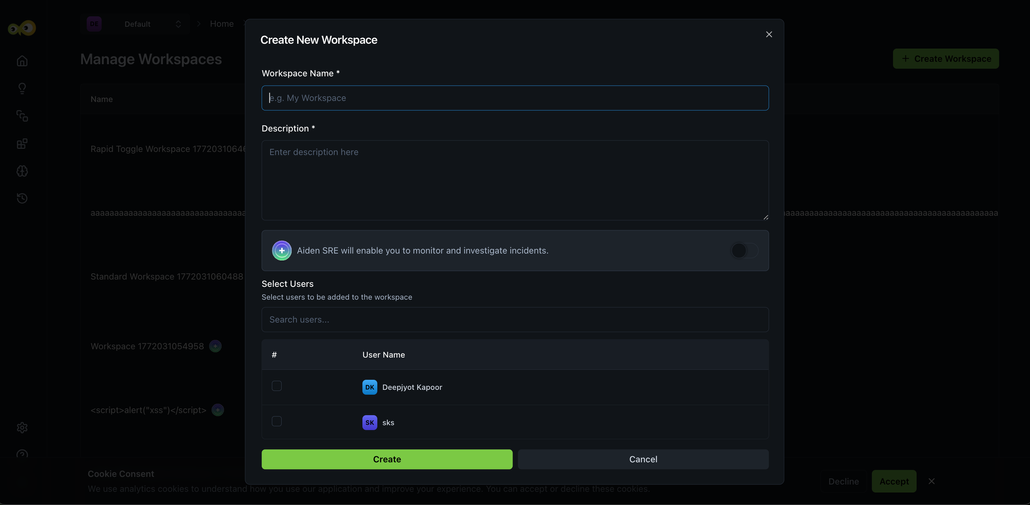
Aiden SRE onboarding
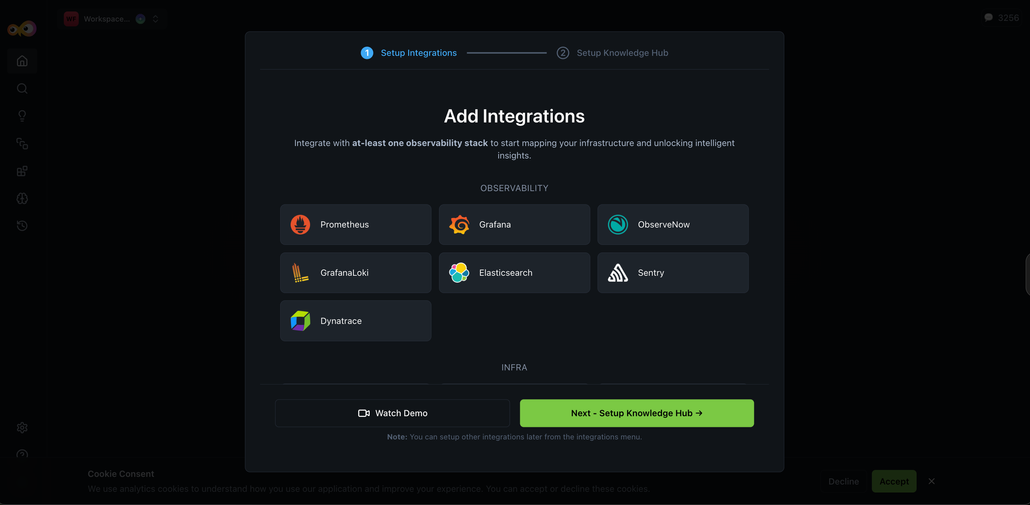
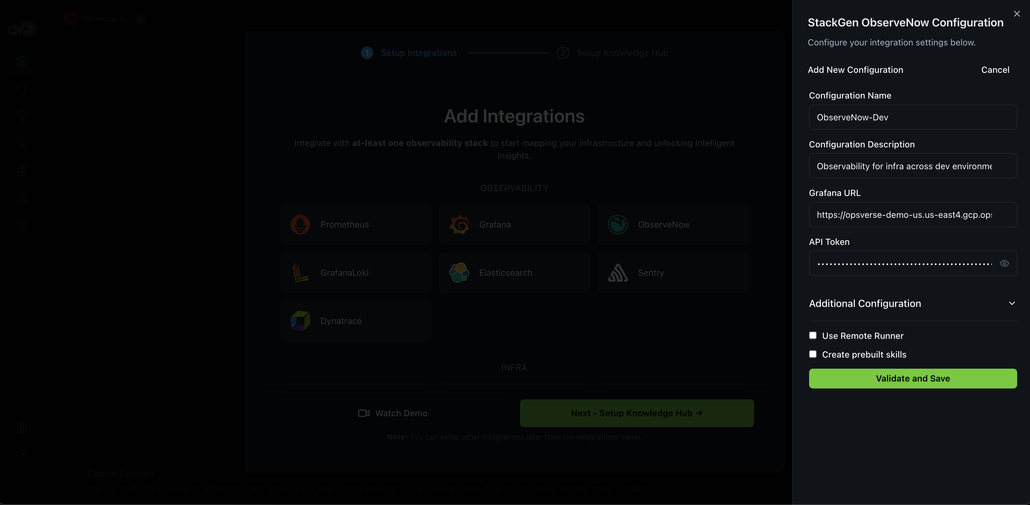
You can now enable Aiden SRE when creating a workspace. The onboarding flow guides you through integration setup and mandatory context entry so Aiden can understand your environment quickly. You then review discovered infrastructure entities. The result is faster time-to-productivity for SRE teams, with clear contextual information up front.
Integration: Infrastructure discovery and recommendations
Once your observability integrations are connected, Aiden discovers your infrastructure and suggests next steps.
Context input and Knowledge Hub
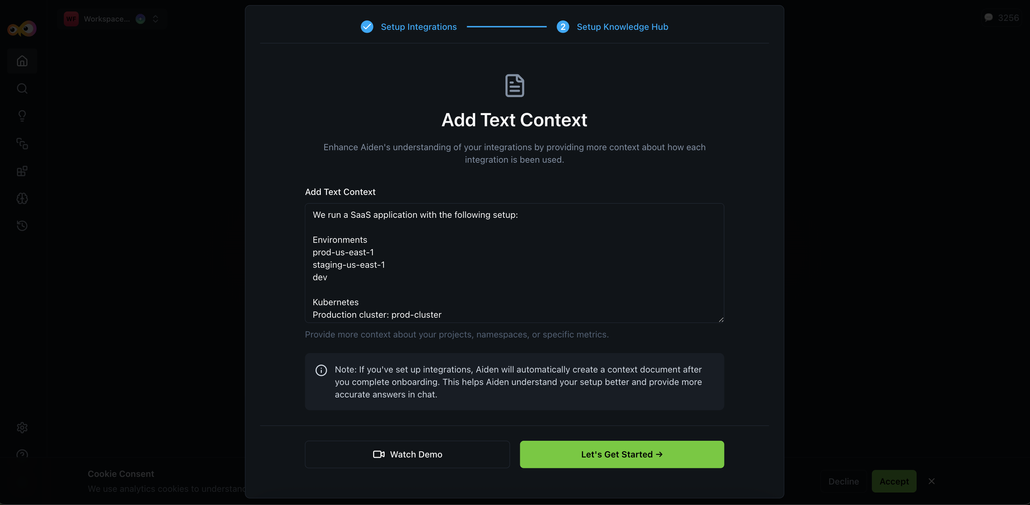
A new Context Input step in onboarding lets you provide structured context so Aiden can reason about your environment and route queries to the right tools. You can describe cluster environments, namespace ownership, alert routing, observability tool usage, and incident management setup. As the next step, the Knowledge Hub is populated with discovered infrastructure data; adding this context reduces ambiguity during incident responses.
After integration setup, Aiden automatically:
- Detects clusters, namespaces, services, and data sources.
- Identifies associated cloud providers (for example, AWS, Azure).
- Recommends additional integrations based on discovered entities.
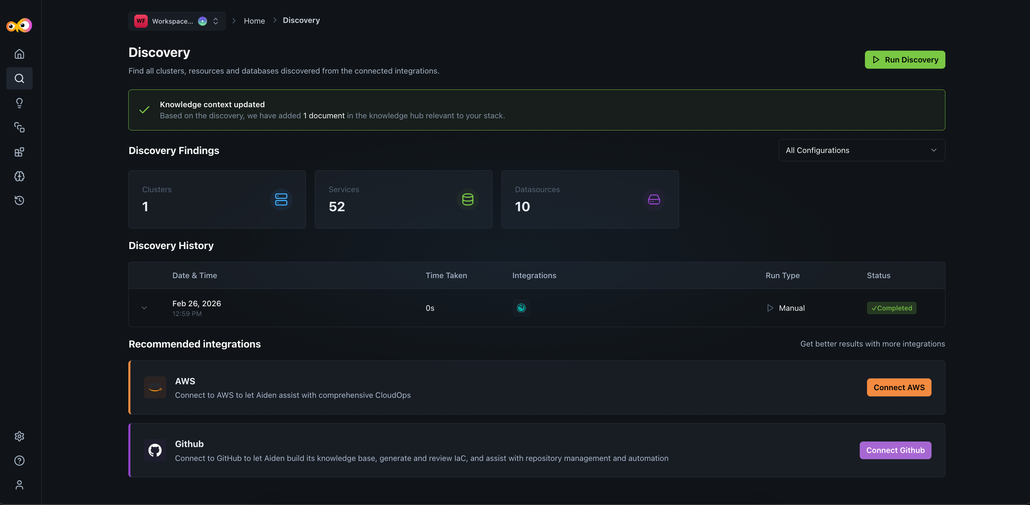
This ensures manual configuration is reduced and faster operational readiness.
Why It Matters
Structured context and discovery give Aiden a semantic understanding of your environment without manual effort. Aiden can monitor clusters and services, investigate incidents across integrations, route queries to the right observability tools, and reduce ambiguity during incident response. Grafana and Prometheus integrations are supported for alerting and incident management.
To learn more, check out Aiden SRE.
PagerDuty Integration Support
Aiden now supports PagerDuty Integration for incident investigation. You can fetch incident details by ID, retrieve summaries, query by status (Triggered, Acknowledged, Resolved), and summarize open incidents from within Aiden.
Typical use case for this integration is automation of your incident response by having Aiden receive a webhook from PagerDuty, correlate data from observability and cloud tools, generate an RCA, and update the PagerDuty ticket.
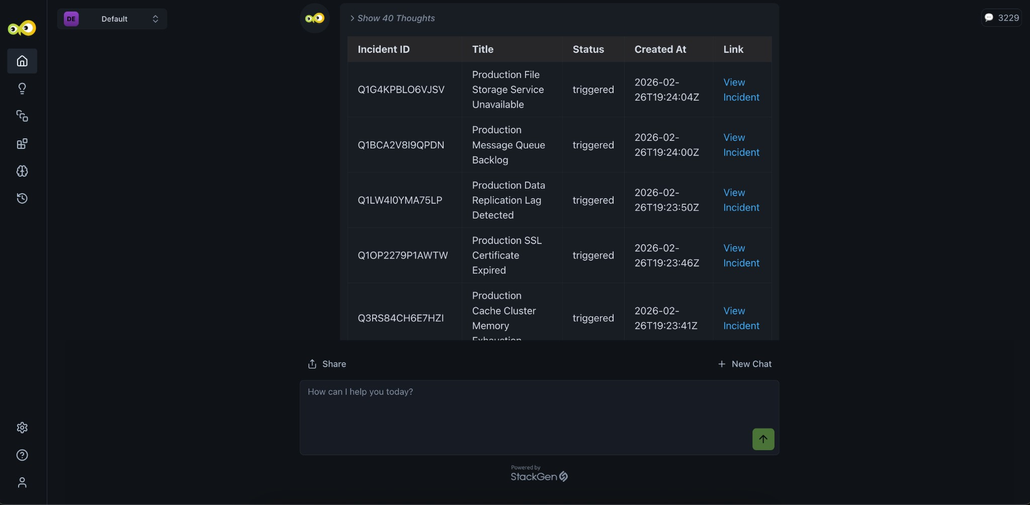
Example prompts
- "Get details for PagerDuty incident INC-1234"
- "Summarize all unresolved incidents"
Why It Matters
You get cross-platform incident visibility in Aiden without switching to PagerDuty; incident lookup and triage stay in context with your other observability and SRE workflows.
Check out the PagerDuty integration guide to set up and use the integration.
Multiple MCP Configurations and Skills Fixes
Configure multiple MCP connections and keep skills reliable when switching between them.
Support for Multiple MCP Configurations
You can now configure multiple MCP (Managed Control Protocol) connections within StackGen. This lets you work with more than one MCP setup in parallel, without overwriting or reconfiguring existing connections.
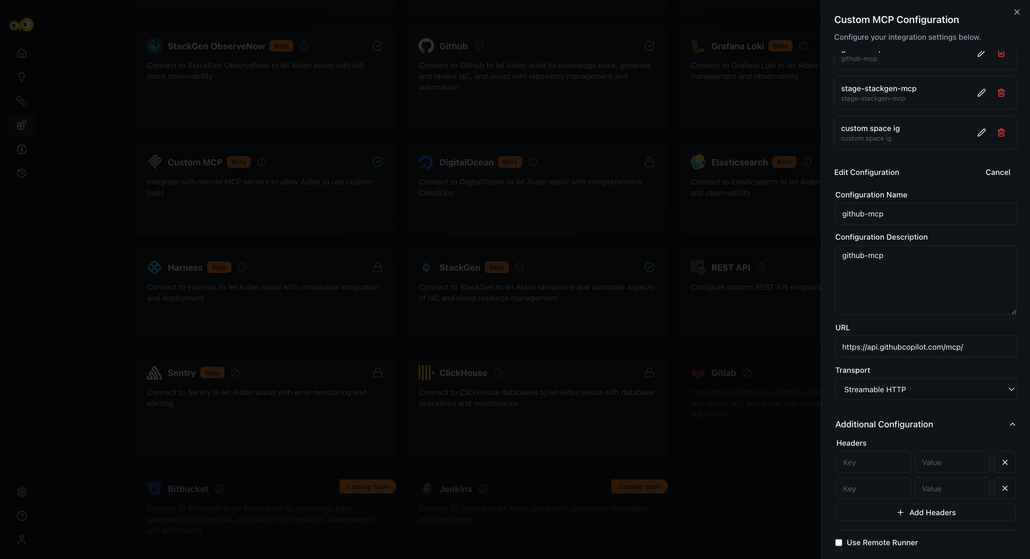
With this feature, you can:
- Configure and manage multiple MCPs in the same environment.
- Seamlessly use Aiden while it switches between MCP configurations as needed.
This change will have no impact on your existing MCP setups.
Why it matters
This update makes it easy to support complex environments, multi-team setups, and evolving infrastructure needs, without repeated reconfiguration or downtime.
Check out the documentation on Aiden MCP Server to learn more.