Cost Estimate
Cost Estimate
The Cost Estimate view shows what an appStack is likely to cost to run before you deploy it. StackGen runs Infracost on the appStack's generated Terraform and lists the estimated cost of each resource.
Cost Estimate is an installation setting. It is shown only when the cost estimation service is running for your StackGen installation. On private SaaS and on-prem installations, your administrator controls it. See Feature Availability.
Open the Cost Estimate view
- Open an appStack.
- At the top of the editor, next to Topology and IaC, select the three-dot menu.
- Select Cost Estimate.
In the updated UI (Workspace names) the menu lists Module Instances and Cost Estimate. In the earlier UI it lists Resources, Policies and Cost Estimate. After you select it, Cost Estimate appears as a tab next to Topology and IaC.
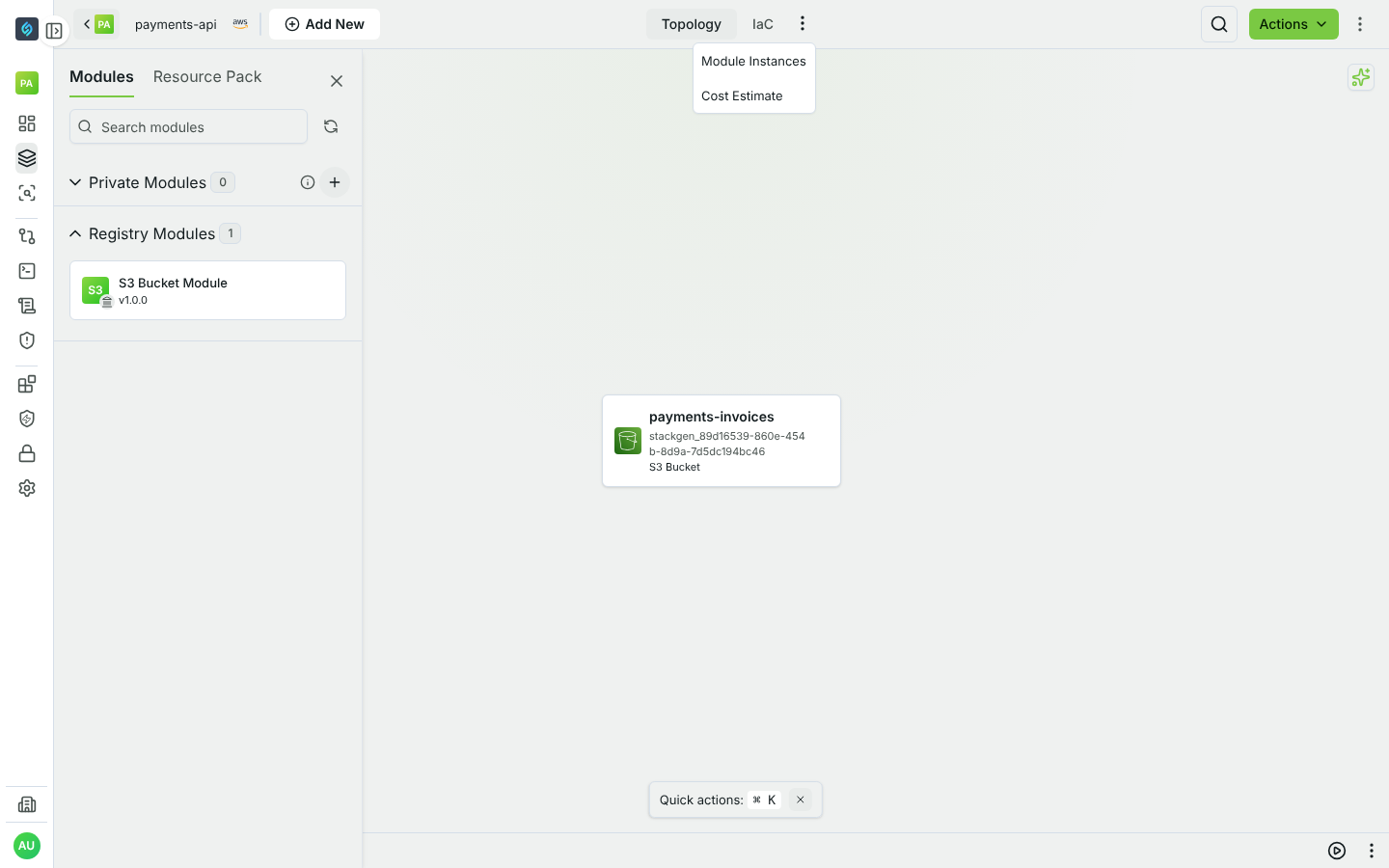
If Cost Estimate is not in the menu, the cost estimation service is not running or not reachable. StackGen checks the service's health and hides the option when the check fails.
What the view shows
- Estimated Cost: the total for the appStack, with the number of priced resources below it.
- Monthly / Yearly switch: shows costs per month or per year. Yearly is the monthly cost multiplied by 12.
- A table with one row per priced resource:
- Application Component: the Terraform resource address, for example
module.<module>.aws_instance.this. - Price: the estimated monthly cost of the resource.
- Qty: always 1.
- Subscription Type: Monthly or Yearly, matching the switch.
- Total Price: the price for the selected period.
- Application Component: the Terraform resource address, for example
- Search: filters the table by resource name.
All amounts are in US dollars.
The estimate is per Terraform resource, not per module. A module that creates several billable resources shows one row for each of them.
How the estimate is calculated
- When you open the view, StackGen downloads the appStack's generated IaC, the same files as the IaC tab.
- The cost estimation service runs
infracost breakdownon those files. - The UI checks for the result for about 30 seconds and shows it when it is ready. If it takes longer, see Troubleshooting.
StackGen keeps the last result for the appStack. If the IaC has not changed, the same result is returned. If it has changed, StackGen runs a new estimate. While a new estimate runs, the view shows the last known values with the message Refreshing cost estimates in the background. Showing last known values.
Usage-based costs
Some costs depend on usage, such as storage size, requests or data transfer. Infracost cannot read these from Terraform, so StackGen uses Infracost's default usage values.
To use your own values, add an infracost-usage.yml file to the appStack in the IaC tab. StackGen passes it to Infracost on the next estimate. For the file format, see the Infracost documentation on usage files.
Limits
- Estimates use Infracost public list prices. Discounts and negotiated pricing are not included.
- Usage-based costs are only as accurate as the usage values. Without a usage file, they use Infracost defaults.
- Resources that Infracost does not support, and free resources such as IAM roles, are not priced and add nothing to the total.
- The estimate covers only the resources in the appStack's IaC.
Infracost API key
The cost estimation service needs an Infracost API key. Without one, every estimate fails and the view shows Failed to fetch cost estimation. On StackGen-managed installations, contact support@stackgen.com if estimates keep failing.
On private SaaS and on-prem installations, the administrator supplies the key in one of two ways:
- StackGen Vault (default for the infraops Helm chart): each organization stores one secret of type Infracost with its Infracost API Key. The service reads it for every estimate, so a rotated key is used on the next run. If an organization has no Infracost secret, or more than one, its estimates fail.
- Environment variable: when Vault is not used, set
INFRACOST_API_KEYon the cost estimation service. This key applies to every organization.
The service uses Vault automatically when a StackGen Vault service is available. Set INFRACOST_VAULT_ENABLED to true or false on the service to force one source. When Vault is in use, INFRACOST_API_KEY is ignored.
Troubleshooting
| Message | What to do |
|---|---|
| Cost estimation timed out | The estimate took longer than the UI waits. Open the Cost Estimate view again. |
| Failed to fetch cost estimation | The estimate failed or the service did not respond. Open the view again to start a new estimate. If it keeps failing, ask your administrator to check the service logs and the Infracost API key. |