Managing Preferences
Use Preferences to manage tenant-level and project-level settings from the StackGen UI. This guide explains how preference scope works, who can update values, and how to make changes in the correct context.
The Preferences UI is currently released behind a feature flag. Navigation may also change in a future release.
What you will learn:
- What the Preferences page controls
- How tenant and project preference scope works
- Who can update preferences in the UI
- How to edit preferences without changing the wrong scope
Overview
The Preferences page can include settings such as:
- IaC directory naming
- Compliance-related defaults
- Other preference keys exposed in your tenant
These values are available in the UI when the feature is enabled for the tenant.
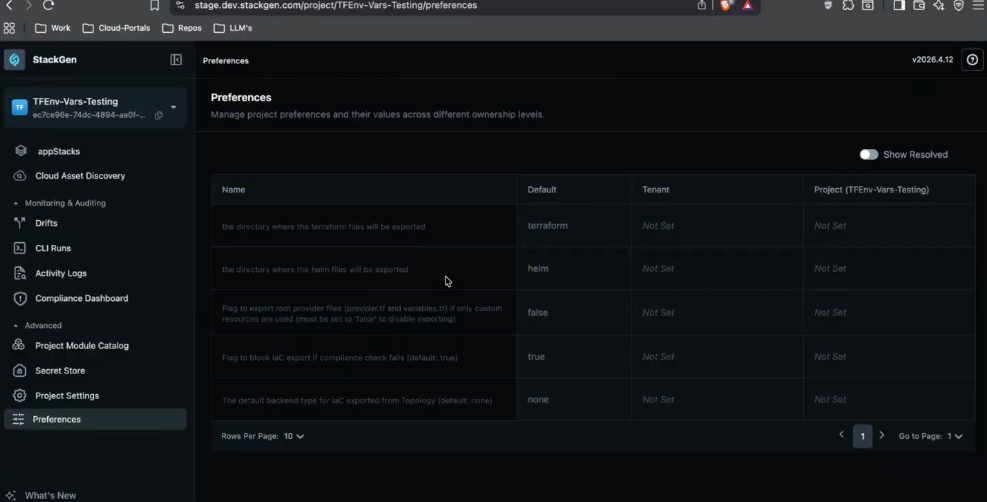
Preference Scope and Inheritance
Preferences can be set at more than one level.
| Scope | What it affects | How it behaves |
|---|---|---|
| Default | Product-provided baseline value | Used when no tenant or project override is set |
| Tenant | Default behavior for the whole tenant | Applies across projects unless a project override exists |
| Project | Project-specific override for the selected project | Overrides the tenant value for that project |
When the same preference exists at both levels, the Project value overrides the Tenant value for that project.
Who can Manage Preferences
| Capability | Admin | DevOps | Developer |
|---|---|---|---|
| View available preference keys | Yes | Yes | No |
| Update tenant-level preferences | Yes | Yes | No |
| Update project-level preferences | Yes | Yes | No |
| Review effective values in project context | Yes | Yes | No |
Edit a Preference
Click to view
Follow these steps to update a preference:
- Open Preferences from the current StackGen navigation entry point available in your tenant.
- Review the available keys and their Default, Tenant, and Project values.
- Confirm whether you want to change the Tenant value or the Project value.
- Update the value at the intended scope.
- Save the change.
If the same key exists at both scopes, confirm which value StackGen will use before you rely on the resulting IaC or export behavior.
Tenant preference warning in project context
If you open Preferences while scoped to a project and then edit a tenant value, StackGen shows a confirmation modal before saving. This helps prevent accidental tenant-wide changes when you only meant to update the current project.
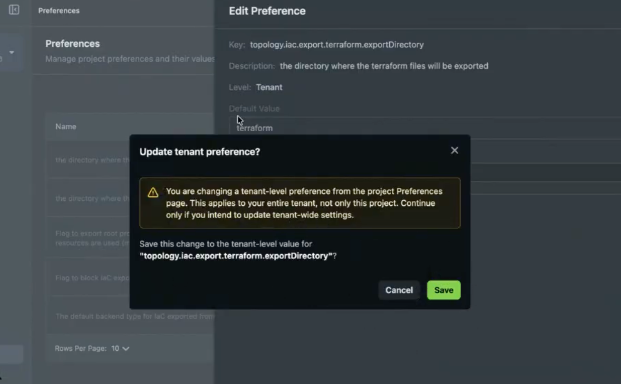
The warning is not a hard block. Admin and DevOps users can still save the tenant-level change after they confirm it.
Benefits
- The UI makes commonly used preference keys available without switching to CLI-based configuration.
- Tenant and project values are shown together so you can review the active configuration in one place.
- Scope-aware editing helps reduce accidental tenant-wide changes during project work.
Best Practices
- Confirm whether the change belongs at the tenant or project level before you save it.
- Use tenant values for standards that should apply broadly across projects.
- Use project values only when the current project needs a different setting from the tenant default.
- Review both the configured value and the effective scope before relying on generated IaC output.