Endpoint monitoring with Blackbox Exporter
Overview
Blackbox Exporter is used for endpoint monitoring and can help generate meaningful uptime and availability metrics. Blackbox Exporter allows blackbox probing of endpoints over HTTP, HTTPS, DNS, TCP, ICMP and gRPC.
While most of the exporters use static configurations and then expose metrics accordingly, Blackbox Exporter works a little differently.
To setup Blackbox Exporter, we define modules which contain a set of targets/urls to monitor. Prometheus agent queries the blackbox exporter with these targets/urls which generates endpoint metrics like uptime, latency etc.
A sample configuration is shown below
Configuration
Add the following YAML snippets to the StackGen agent's values.yaml file.
victoria-metrics-agent:
  extraScrapeConfigs:
    - job_name: 'blackbox-exporter'
      scrape_timeout: 30s
      scrape_interval: 30s
      metrics_path: /probe
      params:
        module: [http_2xx]

      static_configs:
        - targets:
          - <Add target endpoint(s) here>

      relabel_configs:
        - source_labels: [__address__]
          target_label: __param_target
        - source_labels: [__param_target]
          target_label: instance
        - target_label: __address__
          replacement: devopsnow-agent-blackbox-exporter.devopsnow:9115
blackbox-exporter:
  enabled: true
Run the below command:
helm upgrade --install devopsnow-agent -n devopsnow \
    --repo https://registry.devopsnow.io/chartrepo/public \
    -f <path to opsverse-values.yaml file>
Single Machine
Alternatively, you can install the Prometheus Blackbox Exporter on a single machine.
Prerequisite(s):
- You have the [StackGen Agent running on the machine](../../Collecting Telemetry/Install the OpsVerse Agent#dszlx)
Run this command to install the Blackbox Exporter as a systemd unit:
# for amd64
curl https://raw.githubusercontent.com/OpsVerseIO/installers/main/prometheus-exporters/install-exporter-amd64.sh | sudo bash -s -- -e blackbox

# for arm64
curl https://raw.githubusercontent.com/OpsVerseIO/installers/main/prometheus-exporters/install-exporter-arm64.sh | sudo bash -s -- -e blackbox
- Edit the StackGen agent config file by using the following command:
sudo vi /etc/opsverse/agent-config.yaml
- Add the Blackbox exporter job under
scrape_configsand edit the fields as required.
- job_name: 'blackbox-exporter'
  metrics_path: /probe
  params:
    module: [http_2xx]
  static_configs:
    - targets:
      - <Add target endpoints here>
  relabel_configs:
    - source_labels: [__address__]
      target_label: __param_target
    - source_labels: [__param_target]
      target_label: instance
    - target_label: __address__
      replacement: localhost:9115
- Edit the Blackbox exporter's config file by using the following command:
sudo vi /etc/opsverse/exporters/blackbox/config.yaml
If the below content is alerady present in the config file, you can ignore the below step.
- Add the below module to Blackbox exporter's config file.
modules:
  http_2xx:
    prober: http
    timeout: 5s
    http:
      valid_http_versions: ["HTTP/1.1", "HTTP/2.0"]
      method: GET
      preferred_ip_protocol: "ip4"
      ip_protocol_fallback: false
      no_follow_redirects: false
      fail_if_ssl: false
      fail_if_not_ssl: false
      tls_config:
        insecure_skip_verify: true
- Restart the
prom-blackbox-exporterservice and also the StackGen Agent by using the following commands:
sudo systemctl restart prom-blackbox-exporter

sudo systemctl restart opsverse-agent
- Check status to confirm everything is working fine.
sudo systemctl status prom-blackbox-exporter

sudo systemctl status opsverse-agent
Custom Modules for Blackbox Exporter
You can configure custom modules in Blackbox exporter by defining the module in the blackbox config file and then updating scrape_configs section of agent-config.yaml to use the custom module. Some examples are provided below:
Appending Custom Headers with requests
Add the following module to the modules section in /etc/opsverse/exporters/blackbox/config.yaml
http_2xx_with_header:
  prober: http
  timeout: 5s
  http:
    valid_http_versions: ["HTTP/1.1", "HTTP/2.0"]
    method: GET
    headers: # These are your custom headers
      Authentication: Bearer <your-token>
      Accept-Language: en-US
    preferred_ip_protocol: "ip4"
    ip_protocol_fallback: false
    no_follow_redirects: false
    fail_if_ssl: false
    fail_if_not_ssl: false
    tls_config:
      insecure_skip_verify: true
Then restart the blackbox-exporter as described above and update scrape_configs in /etc/opsverse/agent-config.yaml by adding the custom module to the params block:
module: [http_2xx_with_header] # Use the custom module
The exporter will now send the defined headers to every target it is monitoring
Sending POST body to target
Add the following module to the modules section in /etc/opsverse/exporters/blackbox/config.yaml
http_post_2xx:
  prober: http
  timeout: 5s
  http:
    valid_http_versions: ["HTTP/1.1", "HTTP/2.0"]
    method: POST
    headers:
      Content-Type: application/json
    body: '{"foo": "bar"}' # This can be a custom body you want to send to the target
    preferred_ip_protocol: "ip4"
    ip_protocol_fallback: false
    no_follow_redirects: false
    fail_if_ssl: false
    fail_if_not_ssl: false
    tls_config:
      insecure_skip_verify: true
Then restart the blackbox-exporter as described above and update scrape_configs in /etc/opsverse/agent-config.yaml by adding the custom module to the params block:
module: [http_post_2xx] # Use the custom module
The exporter will now make a POST request with predefined body to every target it is monitoring
For more examples of custom blackbox-exporter modules, you can see the blackbox-exporter examples page.
Visualisation
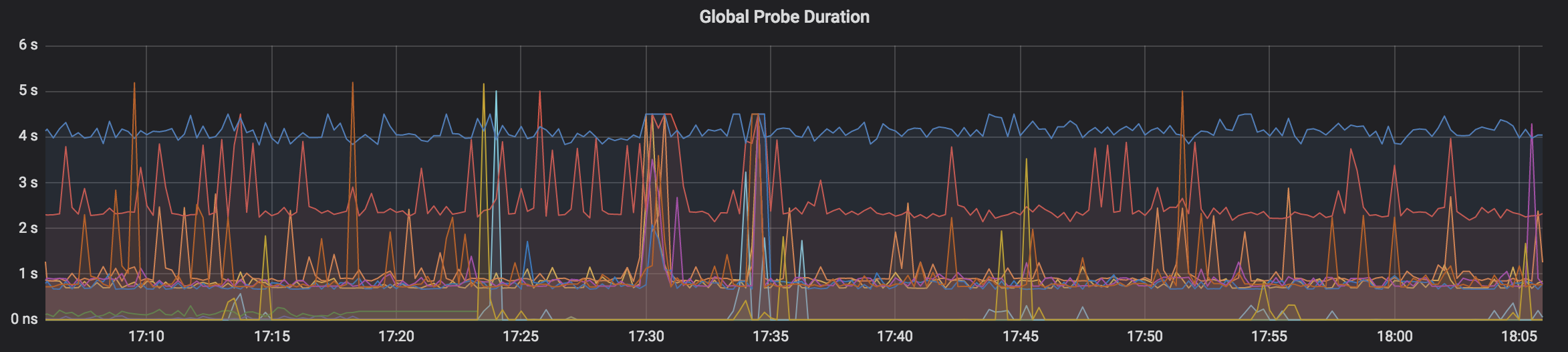
StackGen ObserveNow provides an out of the box Blackbox Exporter/Endpoint Monitoring dashboard that can be used to provide a visual overview of your monitored endpoints.