Amazon Web Services (AWS)
Collecting AWS CloudWatch Logs
Logs generated by AWS managed services like RDS, ElastiCache, MKS etc are available only in CloudWatch Logs. These logs can be pulled into the StackGen Observability stack using the log-shipper lambda function.
This enables you to bring all your logs to one central system.
This lambda function is delivered as a terraform script. Please download this zip file and unzip it on a computer from where you can run terraform.
Structure
When unzipped, it should look like this:
./lambda/
├── iam.tf
├── main.tf
├── triggers.tf
└── variables.tf
Running the Lambda
To run the lambda, please provide the necessary variables present in the variables.tf.
Run the lambda script using the following two commands -
terraform plan
terraform apply
Here's a sample run:
module "logshipper_lambda" {
  source = "/path/to/extracted/dir/lambda"

  create_execution_role = true

  aws_region    = "us-east-1"
  loki_endpoint = "https://example.com"
  loki_username = "testuser"
  loki_password = "testpass"

  # list of log groups to ship to Loki
  cw_log_groups = [
    "/aws/rds/instance/database-1/slowquery",
    "/aws/rds/instance/database-2/slowquery"
  ]

  aws_account_id = "1234567890123"
}
Please run once for each region you need this for. The first time you run it in your account, make sure to have create_execution_role = true set. Remove this in subsequent runs of different regions in the same account (because IAM resources are global, not region-specific - there's no need to re-create them in subsequent runs).
Summary of What It Creates
- A lambda function (
log-shipper) by pulling our function from S3. The supported AWS regions areus-east-1,us-west-2,eu-central-1andap-south-1 - The corresponding roles and policies to allow the function to both:
- Allow the function specific permissions needed on the log groups passed in
- create its own log group (for debug/output)
- A subscription (trigger) of each of the log groups to the newly created Lambda function# AWS CloudWatch Metrics
Collecting AWS CloudWatch Metrics
Metrics generated by AWS managed services like RDS, ElastiCache, MKS etc are available only in AWS CloudWatch. StackGen agent can pull those metrics and bring them into the same metrics backend enabling you to visualize all your metrics in one place.
Tag your AWS resources
Set the following tags in AWS for the resources you want to monitor. This allows you to easily identify the AWS metrics from your resources and correlate them with the rest of the telemetry data.
RDS:Key:opsverse-database-nameValue:
CloudFront:Key:opsverse-monitorValue:
Setting Up Authentication
Following types of authentication can be set up for the cloudwatch agent:
- Configure using an aws role
- Configure using aws_access_key_id and aws_secret_access_key
- Configure using pre-created secret in which AWS credentials are stored.
- Service Account based authentication
Using AWS access and secret keys
You can configure aws_access_key_id and aws_secret_access_key in the values file under aws as a method of authentication. The chart values when configured with these values shall create a secret which will be used for authentication.
:::
Using existing secret
Copy the following kubernetes secret template into a file named cloudwatch-secret.yaml and update the access and secret keys.
aws_access_key_id is assumed to be in a field called access_key, aws_secret_access_key is assumed to be in a field called secret_key, and the session token, if it exists, is assumed to be in a field called security_token
apiVersion: v1
kind: Secret
metadata:
  name: aws-cloudwatch-agent
  namespace: devopsnow
type: Opaque
data:
  access_key: <Base 64 encoded aws_access_key_id>
  secret_key: <Base 64 encoded aws_secret_access_key>
Use the following command to create the secret
kubectl apply -f cloudwatch-secret.yaml -n devopsnow
This shall create a secret named aws-cloudwatch-agent in devopsnow namespace. You can now use this secret configuration in the values file under aws.
:::
Service Account based Auth
Prerequisites
1. Check if your AWS EKS cluster already has an associated OpenID Connect provider URL. To do this navigate to the Overview section of you aws EKS cluster in the AWS console and check for OpenID Connect provider URL. If one is not associated with the cluster, use the following AWS doc to do so -
Authenticating Users via OIDC Provider
2. Navigate to Access Management > Identity Providers in AWS IAM. Check for an entry corresponding to you OIDC Provider URL. If not present, add an Identity Provider for the correspoding OIDC Provider URL using the below AWS doc -
Creating OIDC Provider
Step 1 - Creating a Custom Policy
Navigate to IAM > Access Management > Policies and create a new IAM Policy using the following json.
{
    "Version": "2012-10-17",
    "Statement": [
        {
            "Sid": "Statement1",
            "Effect": "Allow",
            "Action": [
                "tag:GetResources",
                "cloudwatch:GetMetricData",
                "cloudwatch:GetMetricStatistics",
                "cloudwatch:ListMetrics",
                "apigateway:GET",
                "aps:ListWorkspaces",
                "autoscaling:DescribeAutoScalingGroups",
                "dms:DescribeReplicationInstances",
                "dms:DescribeReplicationTasks",
                "ec2:DescribeTransitGatewayAttachments",
                "ec2:DescribeSpotFleetRequests",
                "shield:ListProtections",
                "storagegateway:ListGateways",
                "storagegateway:ListTagsForResource",
                "iam:ListAccountAliases"
            ],
            "Resource": "*"
        }
    ]
}
Step 2 - Creating a new IAM Role
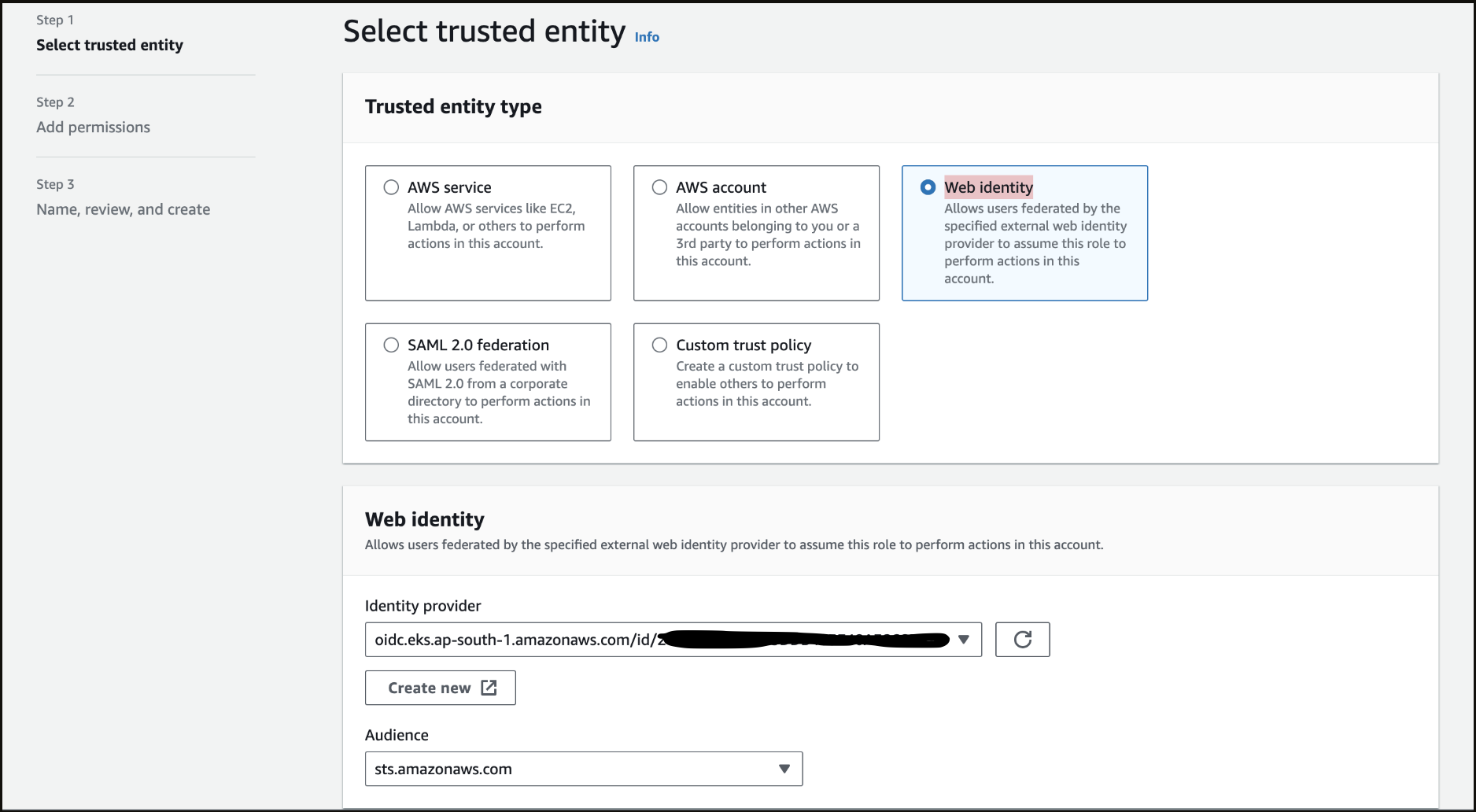
Navigate to Access Management > Roles in AWS IAM. Create a new role of type Web Identity using the Identity Provider corresponding to your OIDC Provider URL. Set the Audience as sts.amazonaws.com . Select the policy that we created in Step 1 to attach permissions to the role and create the role by giving an appropriate name.
Step 3 - Verify Trust Relationships
Navigate to the Trust relationships section inside your role. Verify and update the trust relationships using the below json
    {
      "Version": "2012-10-17",
      "Statement": [
          {
              "Effect": "Allow",
              "Principal": {
                  "Federated": "arn:aws:iam::<AWS_ACCOUNT_ID>:oidc-provider/<OPENID_CONNECT_URL>"
              },
              "Action": "sts:AssumeRoleWithWebIdentity",
              "Condition": {
                  "StringLike": {
                      "<OPENID_CONNECT_URL>:aud": "sts.amazonaws.com",
                      "<OPENID_CONNECT_URL>:sub": "system:serviceaccount:*:cloudwatch-agent"
                  }
              }
          }
      ]
    }
Do not include the https: prefix when using the OIDC URL from the EKS console
::::
Configuring values.yaml and Installing the chart
Copy the template in a cloudwatch-values.yaml named file and configure the values appropriately.
If using aws role, aws access keys, precreated secret or the service account for authentication, update the values file accordingly.
Only one of the authentication methods needs to be configured. Please remove the other authentication configurations from the values.
podAnnotations:
  prometheus.io/path: /metrics
  prometheus.io/port: 5000
  prometheus.io/scrape: true

# Use one of the following methods to authenticate with AWS
aws:
# Configure using an aws role
  role: <role>

# Or
  # Configure using aws_access_key_id and aws_secret_access_key (not recommended for prod)
  aws_access_key_id: <Edit: add your access key>
  aws_secret_access_key: <Edit: add your access secret>

# Or
  # Configure using a existing secret
  secret:
    name: aws-cloudwatch-agent
    includesSessionToken: false

# Or
# Configure using a service account
serviceAccount:
  create: true
  annotations:
    eks.amazonaws.com/role-arn: arn:aws:iam::<12-digit-aws-account-id>:role/<cloudwatch-metrics-role-name>
  name: cloudwatch-agent

config: |-
  apiVersion: v1alpha1
  sts-region: us-east-1
  discovery:
    exportedTagsOnMetrics:
      rds:
        - opsverse-database-name
      cloudfront:
        - opsverse-monitor
    jobs:
      - type: rds
        searchTags:
          - key: opsverse-database-name
            value: <Edit: Add rds tag value here>
        length: 60
        period: 60
        regions:
          - us-east-1
        metrics:
          - name: CPUUtilization
            statistics:
              - Average
          - name: BinLogDiskUsage
            statistics:
              - Average
          - name: BurstBalance
            statistics:
              - Average
          - name: CPUCreditUsage
            statistics:
              - Average
          - name: DatabaseConnections
            statistics:
              - Average
          - name: DiskQueueDepth
            statistics:
              - Average
          - name: EBSByteBalance
            statistics:
              - Average
          - name: NetworkReceiveThroughput
            statistics:
              - Average
          - name: FailedSQLServerAgentJobsCount
            statistics:
              - Average
          - name: MaximumUsedTransactionIDs
            statistics:
              - Average
          - name: FreeableMemory
            statistics:
              - Average
          - name: FreeStorageSpace
            statistics:
              - Average
          - name: NetworkTransmitThroughput
            statistics:
              - Average
          - name: OldestReplicationSlotLag
            statistics:
              - Average
          - name: ReadIOPS
            statistics:
              - Average
          - name: ReadLatency
            statistics:
              - Average
          - name: ReadThroughput
            statistics:
              - Average
          - name: ReplicaLag
            statistics:
              - Average
          - name: ReplicationSlotDiskUsage
            statistics:
              - Average
          - name: SwapUsage
            statistics:
              - Average
          - name: TransactionLogsDiskUsage
            statistics:
              - Average
          - name: TransactionLogsGeneration
            statistics:
              - Average
          - name: WriteIOPS
            statistics:
              - Average
          - name: WriteLatency
            statistics:
              - Average
          - name: WriteThroughput
            statistics:
              - Average
      - type: cloudfront
        searchTags:
          - key: opsverse-monitor
            value: <Edit: Add cloudfront tag value here>
        length: 300
        period: 300
        regions:
          - us-east-1
        metrics:
          - name: 4xxErrorRate
            statistics:
              - Average
          - name: 401ErrorRate
            statistics:
              - Average
          - name: 403ErrorRate
            statistics:
              - Average
          - name: 404ErrorRate
            statistics:
              - Average
          - name: 5xxErrorRate
            statistics:
              - Average
          - name: 502ErrorRate
            statistics:
              - Average
          - name: 503ErrorRate
            statistics:
              - Average
          - name: 504ErrorRate
            statistics:
              - Average
          - name: BytesDownloaded
            statistics:
              - Sum
          - name: BytesUploaded
            statistics:
              - Sum
          - name: CacheHitRate
            statistics:
              - Average
          - name: OriginLatency
            statistics:
              - Percentile
          - name: Requests
            statistics:
              - Sum
          - name: TotalErrorRate
            statistics:
              - Average
      - type: AmazonMWAA
        length: 60
        period: 60
        regions:
          - us-east-1
        metrics:
          - name: SLAMissed
            statistics:
              - Average
          - name: FailedSLACallback
            statistics:
              - Average
          - name: Updates
            statistics:
              - Average
          - name: Orphaned
            statistics:
              - Average
          - name: FailedCeleryTaskExecution
            statistics:
              - Average
          - name: FilePathQueueUpdateCount
            statistics:
              - Average
          - name: CriticalSectionBusy
            statistics:
              - Average
          - name: DagBagSize
            statistics:
              - Average
          - name: DagCallbackExceptions
            statistics:
              - Average
          - name: FailedSLAEmailAttempts
            statistics:
              - Average
          - name: TaskInstanceFinished
            statistics:
              - Average
          - name: JobEnd
            statistics:
              - Average
          - name: JobHeartbeatFailure
            statistics:
              - Average
          - name: JobStart
            statistics:
              - Average
          - name: ManagerStalls
            statistics:
              - Average
          - name: OperatorFailures
            statistics:
              - Average
          - name: OperatorSuccesses
            statistics:
              - Average
          - name: OtherCallbackCount
            statistics:
              - Average
          - name: Processes
            statistics:
              - Average
          - name: SchedulerHeartbeat
            statistics:
              - Average
          - name: StartedTaskInstances
            statistics:
              - Average
          - name: SlaCallbackCount
            statistics:
              - Average
          - name: TasksKilledExternally
            statistics:
              - Average
          - name: TaskTimeoutError
            statistics:
              - Average
          - name: TaskInstanceCreatedUsingOperator
            statistics:
              - Average
          - name: TaskInstancePreviouslySucceeded
            statistics:
              - Average
          - name: TaskInstanceFailures
            statistics:
              - Average
          - name: TaskInstanceSuccesses
            statistics:
              - Average
          - name: TaskRemovedFromDAG
            statistics:
              - Average
          - name: TaskRestoredToDAG
            statistics:
              - Average
          - name: TriggersSucceeded
            statistics:
              - Average
          - name: TriggersFailed
            statistics:
              - Average
          - name: TriggersBlockedMainThread
            statistics:
              - Average
          - name: TriggerHeartbeat
            statistics:
              - Average
          - name: TaskInstanceCreatedUsingOperator
            statistics:
              - Average
          - name: ZombiesKilled
            statistics:
              - Average
          - name: DAGFileRefreshError
            statistics:
              - Average
          - name: ImportErrors
            statistics:
              - Average
          - name: ExceptionFailures
            statistics:
              - Average
          - name: ExecutedTasks
            statistics:
              - Average
          - name: InfraFailures
            statistics:
              - Average
          - name: LoadedTasks
            statistics:
              - Average
          - name: TotalParseTime
            statistics:
              - Average
          - name: TriggeredDagRuns
            statistics:
              - Average
          - name: TriggersRunning
            statistics:
              - Average
          - name: PoolDeferredSlots
            statistics:
              - Average
          - name: DAGFileProcessingLastRunSecondsAgo
            statistics:
              - Average
          - name: OpenSlots
            statistics:
              - Average
          - name: OrphanedTasksAdopted
            statistics:
              - Average
          - name: OrphanedTasksCleared
            statistics:
              - Average
          - name: PokedExceptions
            statistics:
              - Average
          - name: PokedSuccess
            statistics:
              - Average
          - name: PokedTasks
            statistics:
              - Average
          - name: PoolFailures
            statistics:
              - Average
          - name: PoolStarvingTasks
            statistics:
              - Average
          - name: PoolOpenSlots
            statistics:
              - Average
          - name: PoolQueuedSlots
            statistics:
              - Average
          - name: PoolRunningSlots
            statistics:
              - Average
          - name: ProcessorTimeouts
            statistics:
              - Average
          - name: QueuedTasks
            statistics:
              - Average
          - name: RunningTasks
            statistics:
              - Average
          - name: TasksExecutable
            statistics:
              - Average
          - name: TasksPending
            statistics:
              - Average
          - name: TasksRunning
            statistics:
              - Average
          - name: TasksStarving
            statistics:
              - Average
          - name: TasksWithoutDagRun
            statistics:
              - Average
          - name: CollectDBDags
            statistics:
              - Average
          - name: CriticalSectionDuration
            statistics:
              - Average
          - name: CriticalSectionQueryDuration
            statistics:
              - Average
          - name: DAGDependencyCheck
            statistics:
              - Average
          - name: DAGDurationFailed
            statistics:
              - Average
          - name: DAGDurationSuccess
            statistics:
              - Average
          - name: DAGFileProcessingLastDuration
            statistics:
              - Average
          - name: DAGScheduleDelay
            statistics:
              - Average
          - name: FirstTaskSchedulingDelay
            statistics:
              - Average
          - name: SchedulerLoopDuration
            statistics:
              - Average
          - name: TaskInstanceDuration
            statistics:
              - Average
          - name: TaskInstanceQueuedDuration
            statistics:
              - Average
          - name: TaskInstanceScheduledDuration
            statistics:
              - Average
Run the following command in a Kubernetes cluster:
helm upgrade --install cloudwatch-agent -n devopsnow --create-namespace cloudwatch-agent \
    --repo https://registry.devopsnow.io/chartrepo/public \
    -f cloudwatch-values.yaml